







Question: HANDS-ON ACTIVITY 5B Exploring DNS Request and DNS Response In this chapter, we talked about address resolution. This activity will help you see how your
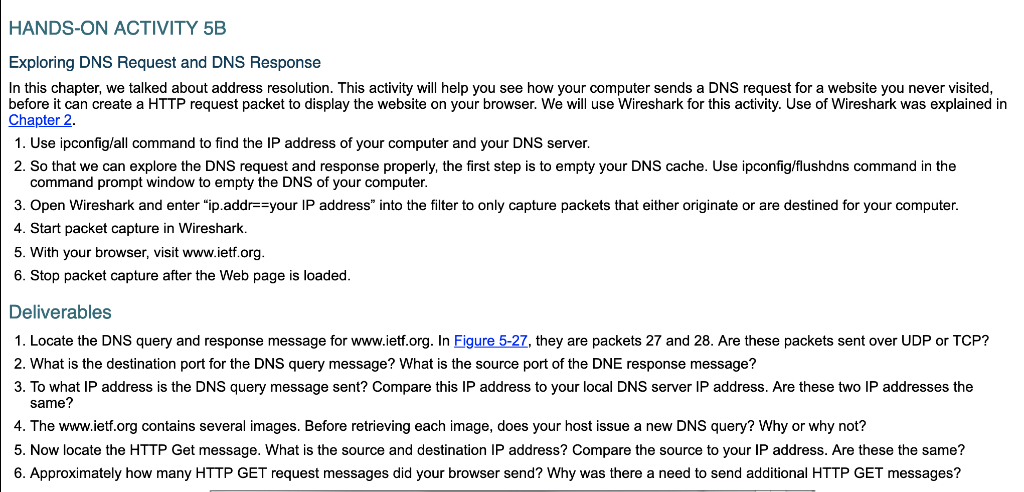
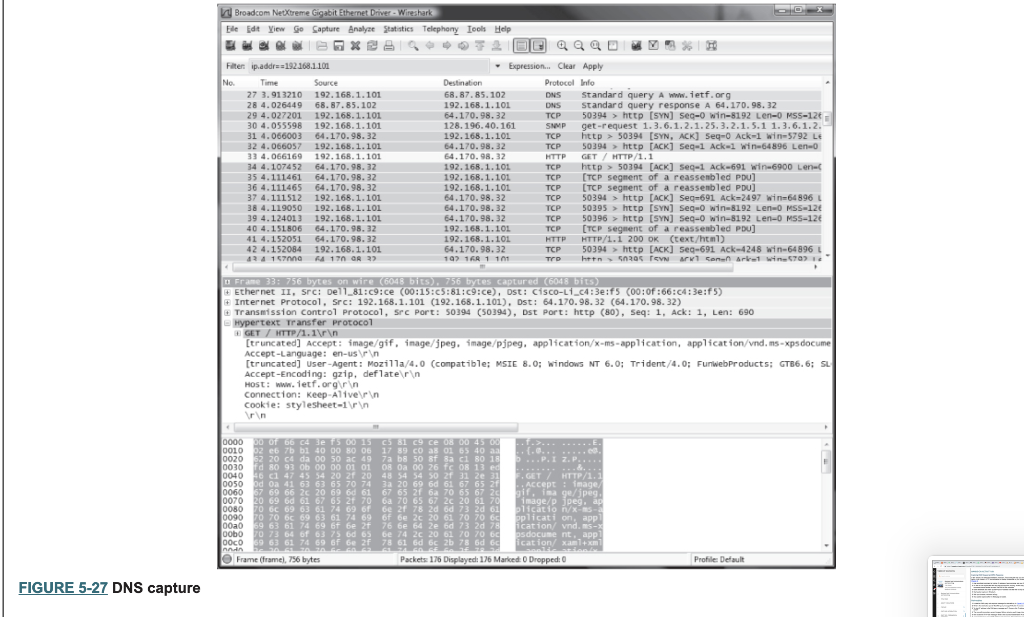
HANDS-ON ACTIVITY 5B Exploring DNS Request and DNS Response In this chapter, we talked about address resolution. This activity will help you see how your computer sends a DNS request for a website you never visited before it can create a HTTP request packet to display the website on your browser. We will use Wireshark for this activity. Use of Wireshark was explained in Chapter 2 1. Use ipconfig/all command to find the IP address of your computer and your DNS server 2. So that we can explore the DNS request and response properly, the first step is to empty your DNS cache. Use ipconfig/flushdns command in the command prompt window to empty the DNS of your computer 3. Open Wireshark and enter "ip.addr--your IP address" into the filter to only capture packets that either originate or are destined for your computer 4. Start packet capture in Wireshark. 5. With your browser, visit www.ietf.org 6. Stop packet capture after the Web page is loaded Deliverables 1. Locate the DNS query and response message for www.ietf.org. In Figure 5-27, they are packets 27 and 28. Are these packets sent over UDP or TCP? 2. What is the destination port for the DNS query message? What is the source port of the DNE response message? 3. To what IP address is the DNS query message sent? Compare this IP address to your local DNS server IP address. Are these two IP addresses the same? 4. The www.ietf.org contains several images. Before retrieving each image, does your host issue a new DNS query? Why or why not? 5. Now locate the HTTP Get message. What is the source and destination IP address? Compare the source to your IP address. Are these the same? 6. Approximately how many HTTP GET request messages did your browser send? Why was there a need to send additional HTTP GET messages? Eile dt ew Capture Analyze Satstics Telephony leels Help Filten ip.addrs 192.168.110 No. 27 3.913210 192.168.1.101 28 4.026449 68. 87.85.102 29 4.027201 192.168.1.101 30 4.055598 192.168.1.101 ONS Standard query response A 64.170. 98. 32 TCP 50394 > http [SYN] seq-o win-8192 Len-o MSS-12t SNMP get-request 1.3.6.1.2.1.25.3.2.1.5.1 1.3.6.1.2 TCP http50394 [sYN, ACK] Seq-0 Ack-1 win-5792 LE TCP 50394 http [ACK] Segel Ack-1 win-64896 Len-o 32 4.066057 192.168.1.10164.170.98.32 33 4.066169 192.168.1.101 4 4.107452 64.170.98.32 35 4.111461 64.170.98.32 36 4.111465 64.170.98. 32 37 4.111512 192.168.1.101 8 4.119050 192.168.1.101 39 4.124013 192.168.1.101 40 4.15180664.170.98. 32 41 4.152051 64.170. 98.3 42 4.152084 192.168.1.101 192.168.1.101TCPhttp> 50394 [ACK] seq-1 Ack-691 win-6900 Len-( TCP [TCP segment of a reassenbled PDU] TCP [TCP segment of a reassenbled PDU] TCP 50394 > http [ACK] Seq-691 Ack=2497 win-64 896 1 TCP 50395 http [sYN] Seq 0 win 8192 Len 0 MSS-126 TCP 50396 http [sYN] Seq-o win-8192 Len-0 MSS-12 TCP [TCP segnent of a reassenbled Pou] HTTP HTTP/1.1 200 ok (text/html) TCP 50394 http [ACK] Seq-691 Ack-4248 win-64896 L Ethernet Internet Protocol, Src: 192.168.1.101 (192.168.1.101), Dst: 64.170.98.32 (64.170.98. 32) Transmission control Protocol, Src Port: 50394 (50394), Dst Port: http (80), Seq: 1, Ack: 1, Len: 690 + 11, src: Dell-81 : c9ce (00:15:c3:81:9:ce), ost : cisco-Li_c4 : 3e : f5 (00:0f :66 :C4:3e:15) [truncated] Accept: image/gif. inage/jpeg, image/pipeg, application/x-ms-application, applicat ion/vnd. ms-xpsdocume [truncated] User-Agent: Mozilla/4.0 (compatible; MSTE 8.0; windows NT 6.0; Trident /4.0; FunwebProducts; 6.6; su Accept-Encoding: gzip, deflatern HoSt: Www.ietf.orgir n Connection: Keep-Alive rn cookie: stylesheet-1rn 2 e6 7b bl 40 00 80 06 17 89 C0 a8 01 65 40 a 2 20 c4 da 00 50 ac 49 7a b8 50 8f 8a c1 80 1 d 80 93 ob 00 00 01 01 08 0a 00 26 fc 08 13 e 6 c1 47 45 54 20 2f 20 48 54 54 50 2f 31 2e 31 d oa 41 63 63 65 70 74 3a 20 69 66 61 67 652 69 66 2c 20 69 6d 61 67 65 2f 6a 70 65 67 2c 069 6d 61 67 65 2f 70 6 70 65 67 2c 20617 0 70 6c 69 63 61 74 69 9 63 61 74 69 6f 6e 2f 76 6e 64 2e 6d 73 2d 78cation/ vnd. ms 0 73 64 61 63 75 6d 65 6e 74 2c 20 61 70 70 6c 63 61 74 69 6f 6e 2f 78 61 66 6c 2b 78 6d 6c FIGURE 5-27 DNS capture
Step by Step Solution
There are 3 Steps involved in it

Get step-by-step solutions from verified subject matter experts
 Study Help