







Question: Hello, I am a beginner using the Microsoft Visual Studio program for my work. This problem comes from the Microsoft Visual Basic 2015 RELOADED book,
Hello, I am a beginner using the Microsoft Visual Studio program for my work. This problem comes from the "Microsoft Visual Basic 2015 RELOADED" book, chapter 8 page 449, exercise #25. Please, remember that I am a beginner at this.
Here is the Problem:
Open the Translator Solution (Translator Solution.sln) file contained in the VbReloaded2015\Chap08\Translator Solution-Sub folder. Code the application so that it uses three independent Sub procedures to translate the English words into French, Spanish, or Italian. (Hint: If the Code Editor indicates that a String variable is being passed before it has been assigned a value, assign the String.Empty value to the variable in its Dim statement.) Clear the label when a different radio button is selected. Save the solution and then start and test the application. Close the solution. (13) Here is the Interface:
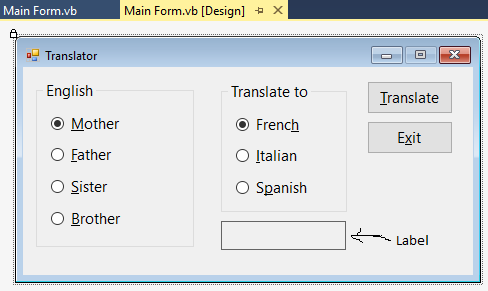
Here is the existing code:
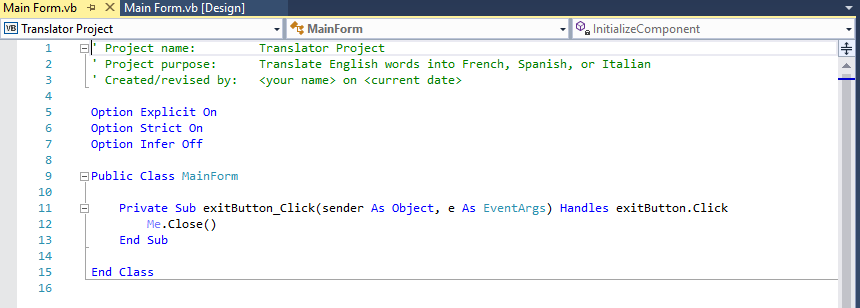
The Options need to stay as is.
Also, I've posted questions (exercises) before but only got back about half of the problem with portions left out and not answered according to the exercise's posted text. Please do not leave out any portions of the problem. Thanks a bunch for your help in this!
Main Form.vb [Design] x Main Form.vb Translator Translate to English o Mother o French O Father O talia O Sister O Spanish O Brother Translate Exit Labe
Step by Step Solution
There are 3 Steps involved in it

Get step-by-step solutions from verified subject matter experts
 Study Help