







Question: Here is my current code, I need help visualizing my data using Python. ################################################### from matplotlib import pyplot as plt import pandas as pd import
Here is my current code, I need help visualizing my data using Python.
###################################################
from matplotlib import pyplot as plt
import pandas as pd
import numpy as np
#find the location of the data file uploaded
from google.colab import drive
drive.mount('/content/drive')
#create the location as a variable
datapath = '/content/helsinki-vantaa (1).txt'
#read the data in
data = pd.read_csv(datapath, delim_whitespace=True,
usecols=["DATE", "USAF", "TEMP_F", "TEMP_C", "REF_TEMP_C", "DIFF_C"],
parse_dates=['DATE'], index_col='DATE')
selection = data[data.index.to_series().between('1988-01-01', '2018-12-31')]
plt_1 = plt.figure(figsize=(6, 3))
###################################################
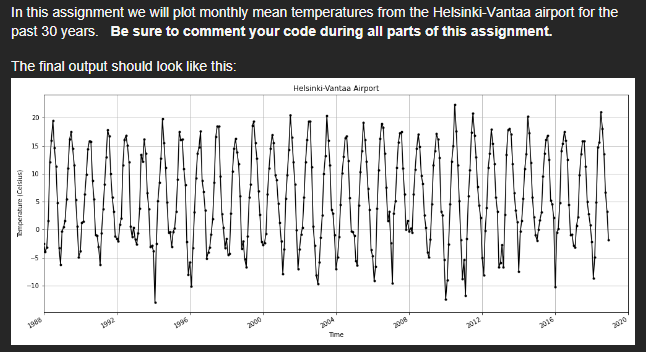
Here is my goal for the code.
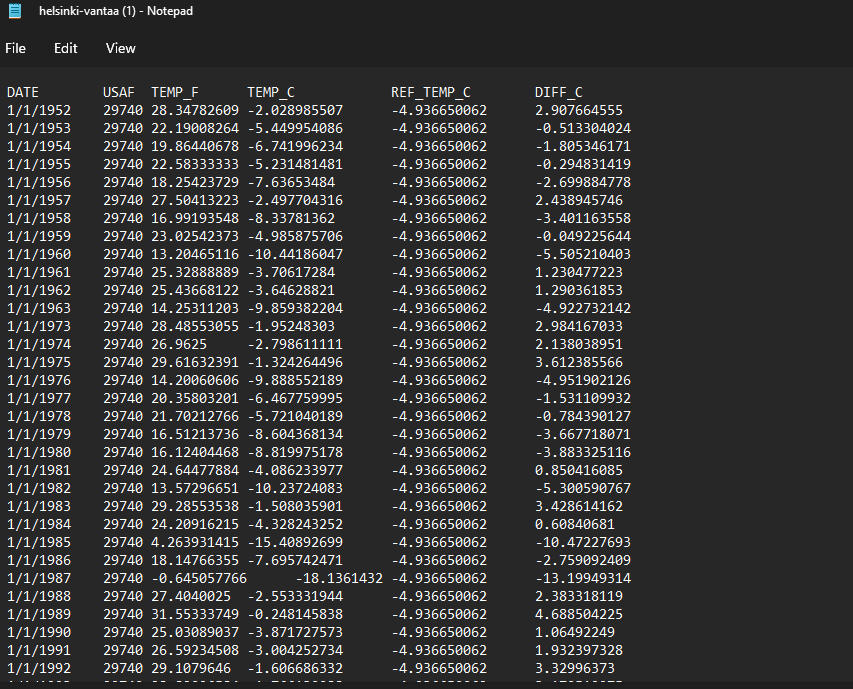
Here is what the source data looks like:
In this assignment we will plot monthly mean temperatures from the Helsinki-Vantaa airport for the past 30 years. Be sure to comment your code during all parts of this assignment. The final output should look like this: helsinki-vantaa (1) - Notepad File Edit View
Step by Step Solution
There are 3 Steps involved in it

Get step-by-step solutions from verified subject matter experts
 Study Help