







Question: Hi, I am using matlab for image processing and am trying to enchance this image using subimages of the black squares. I do not want
Hi, I am using matlab for image processing and am trying to enchance this image using subimages of the black squares. I do not want the entire image to be equalized, but rather only the black squares. I am not allowed to use imfilter or fspecial commands so i need to do all of this manually. Please help as soon as possible and I really appreciate any assistance.
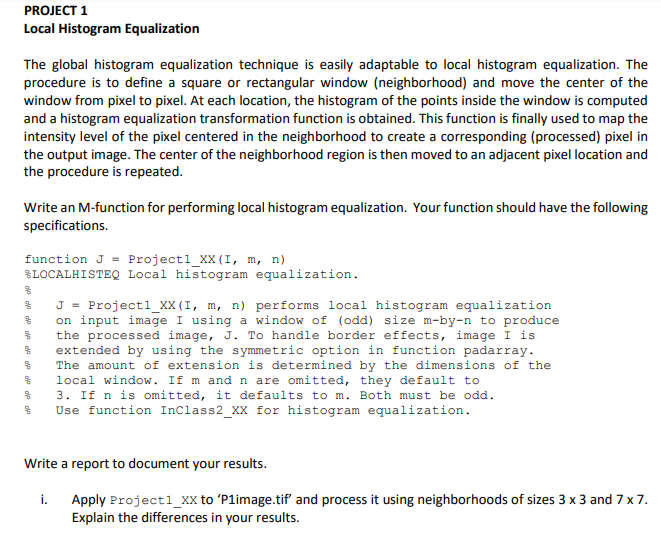

Where the assignment says to use inclass please use this function;
if isa(I,'uint8') | isa(I,'uint16') | isa(I,'double') % (1) Calculate cdf, the cumulative sum of normalized histogram values hist = imhist(I, 256) ./ numel(I); cdf = cumsum(hist); %calculates the cdf %(2) Compute the histogram-equalized image H. x = linspace(0,1,numel(cdf))'; if isa(I,'double') H = interp1(x, cdf, I); imshow(H) elseif isa(I,'uint8') H = interp1(x, cdf, double(I)/255); H = uint8(H*255); imshow(H) elseif isa(I,'uint16') H = interp1(x, cdf, double(I)/65535); H = uint16(H*65535); imshow(H) end else disp('I must be of class uint8, uint16, or double.') % error msg end
end
PROJECT 1 Local Histogram Equalization The global histogram equalization technique is easily adaptable to local histogram equalization. The procedure is to define a square or rectangular window (neighborhood) and move the center of the and a histogram equalization transformation function is obtained. This function is finally used to map the intensity level of the pixel centered in the neighborhood to create a corresponding (processed) pixel in the output image. The center of the neighborhood region is then moved to an adjacent pixel location and the procedure is repeated. Write an M-function for performing local histogram equalization. Your function should have the following specifications. function J-Projectl_xX(I, m, n) %LOCALHISTEQ Local histogram equalization. % % % % % % % % J- Project1 XX(1, m, n) performs local histogram equalization on input image 1 using a window of (odd) size n-by-n to produce the processed image, J. To handle border effects, image 1 is extended by using the symmetric option in function padarray The amount of extension is determined by the dimensions of the local window. If m and n are omitted, they default to 3. If n is omitted, it defaults to m. Both must be odd. Use function InClass2 XX for histogram equalization. Write a report to document your results. i. Apply Project1_xx to 'P1image.tif and process it using neighborhoods of sizes 3 x 3 and 7 x7 Explain the differences in your results. PROJECT 1 Local Histogram Equalization The global histogram equalization technique is easily adaptable to local histogram equalization. The procedure is to define a square or rectangular window (neighborhood) and move the center of the and a histogram equalization transformation function is obtained. This function is finally used to map the intensity level of the pixel centered in the neighborhood to create a corresponding (processed) pixel in the output image. The center of the neighborhood region is then moved to an adjacent pixel location and the procedure is repeated. Write an M-function for performing local histogram equalization. Your function should have the following specifications. function J-Projectl_xX(I, m, n) %LOCALHISTEQ Local histogram equalization. % % % % % % % % J- Project1 XX(1, m, n) performs local histogram equalization on input image 1 using a window of (odd) size n-by-n to produce the processed image, J. To handle border effects, image 1 is extended by using the symmetric option in function padarray The amount of extension is determined by the dimensions of the local window. If m and n are omitted, they default to 3. If n is omitted, it defaults to m. Both must be odd. Use function InClass2 XX for histogram equalization. Write a report to document your results. i. Apply Project1_xx to 'P1image.tif and process it using neighborhoods of sizes 3 x 3 and 7 x7 Explain the differences in your results
Step by Step Solution
There are 3 Steps involved in it

Get step-by-step solutions from verified subject matter experts
 Study Help