







Question: I need help to solve this please with explanation. Second Loop - Select sheet tab Second Loop Name the cells B3 startValus. C3 current Value
I need help to solve this please with explanation. 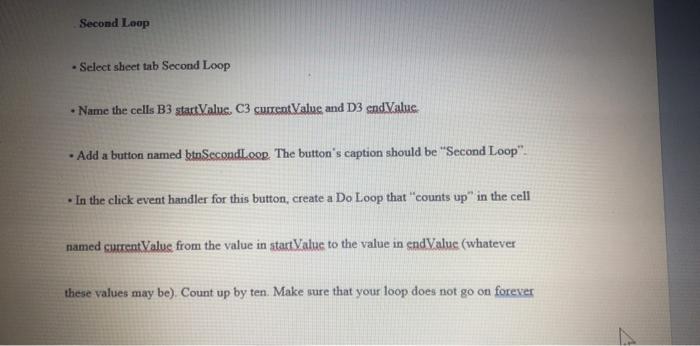
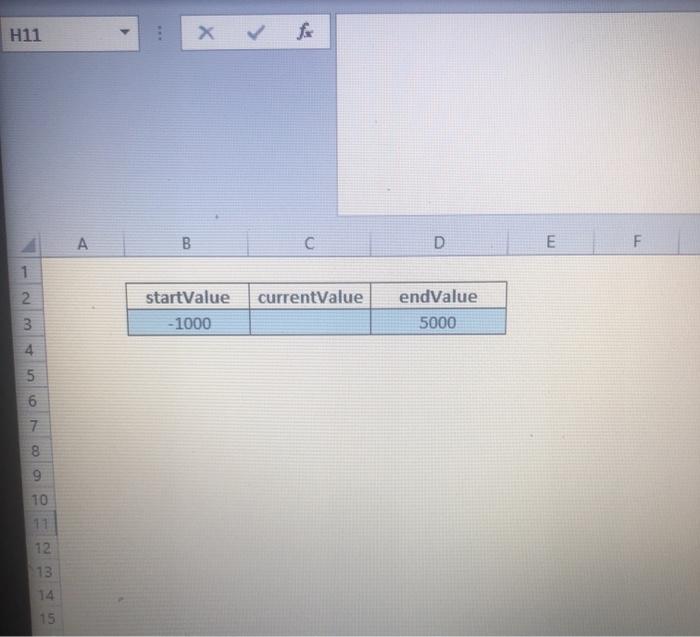
Second Loop - Select sheet tab Second Loop Name the cells B3 startValus. C3 current Value and D3 and Value Add a button named btnSecondLoop The button's caption should be "Second Loop" In the click event handler for this button, create a Do Loop that "counts up in the cell named current Value from the value in startValue to the value in end Value (whatever these values may be). Count up by ten. Make sure that your loop does not go on forever H11 B C D E F 1 2 2 currentValue startValue -1000 endValue 5000 3 4 5 6 7 8 9 10 11 12 13 14 15
Step by Step Solution
There are 3 Steps involved in it
1 Expert Approved Answer
Step: 1 Unlock

Question Has Been Solved by an Expert!
Get step-by-step solutions from verified subject matter experts
Step: 2 Unlock
Step: 3 Unlock
 Study Help