







Question: I need help with the code in java fx please, no swing or awt. I provided the code that needs to be added to along
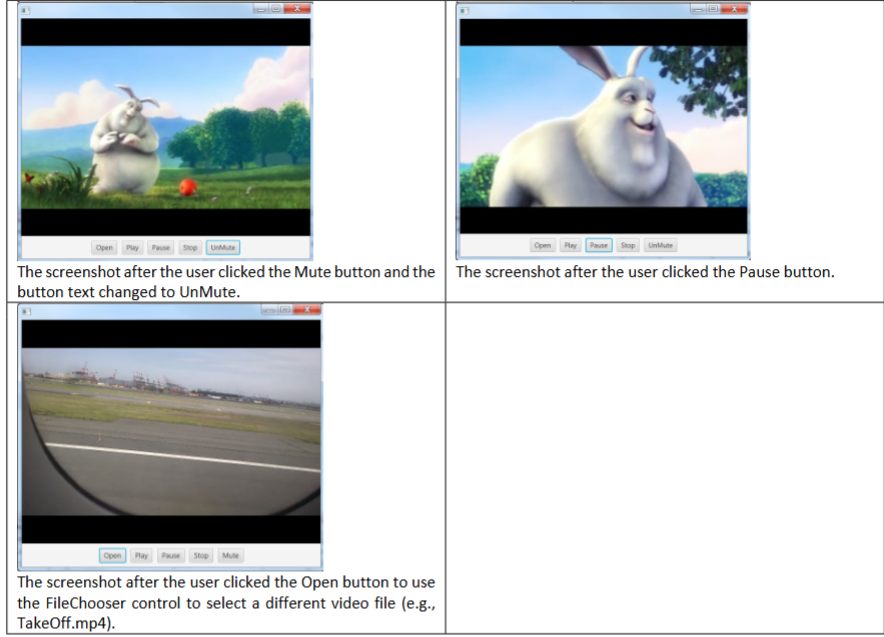
I need help with the code in java fx please, no swing or awt. I provided the code that needs to be added to along with a picture of the expected output.
Ex Enhanced the Video Player application
Add two new buttons Open and Mute to enhance the existing application refer to the code on page
a The Open button will allow the user to use a FileChooser dialog window to select a different video file.
i If the user indeed selects a video file, make sure to reset the following:
Stop playing the video file if it is playing.
Make sure to set the text of the Mute button to Mute.
Load the new video file image into your app and set the mediaview controls size back to
x
b The Mute button will allow the user to mute or unmute the sound.
i After the Mute button is clicked, make sure to change the text on the button to UnMute and mute
the sound.
ii After the UnMute button is clicked, make sure to change the text on the button to Mute and
unmute the sound.
c When the Stop button is clicked, you just need to stop playing the video. There is no need to change the state
of the mute or unmute situation or text.
You are required to create an app similar to the app in the screenshot.
I will use the HD screen resolution x
public class VideoPlayer extends Application
public static void mainStringargs
launchargs;
@Override
public void startStage primaryStage
final double WIDTH HEIGHT ;
File videoFile new FileTakeOffmp;
Media media new MediavideoFiletoURItoString;
MediaPlayer player new MediaPlayermedia;
player.setOnEndOfMedia
player.stop;
;
MediaView view new MediaViewplayer;
view.setFitWidthWIDTH;
view.setFitHeightHEIGHT;
Button playButton new ButtonPlay;
Button pauseButton new ButtonPause;
Button stopButton new ButtonStop;
playButton.setOnActionevent
player.play;
;
pauseButton.setOnActionevent
player.pause;
;
stopButton.setOnActionevent
player.stop;
;
HBox hbox new HBox playButton, pauseButton, stopButton;
hbox.setAlignmentPosCENTER;
hbox.setPaddingnew Insets;
BorderPane borderPane new BorderPane;
borderPane.setCenterview;
borderPane.setBottomhbox;
Scene scene new SceneborderPane;
primaryStage.setScenescene;
primaryStage.show;
Step by Step Solution
There are 3 Steps involved in it
1 Expert Approved Answer
Step: 1 Unlock

Question Has Been Solved by an Expert!
Get step-by-step solutions from verified subject matter experts
Step: 2 Unlock
Step: 3 Unlock
 Study Help