







Question: In python, create a sorted_grades application that can store up to 10 grades in order from highest to lowest in a list. The application should
In python, create a sorted_grades application that can store up to 10 grades in order from highest to lowest in a list. The application should display a menu of options, which include Enter a grade, Delete a grade, Display lowest grade, Display highest grade, Show grades, and Quit. The list should initially contain all zeros (0).
The algorithm for entering a grade is similar to: 1. Find the appropriate position for the grade so that all grades are still in order from highest to lowest. 2. Insert the grade 3. Make certain that length of list remains the same
The algorithm for deleting a grade is similar to: 1. Find the element containing the grade to delete. 2. If list empty tell user they can delete and if grade doesnt exist, inform user no grade has been found. 3. Use del function. Make certain the length doesnt change and last element =0 Note: You can use the return to exit your function once you have found your element.
Output should look similar to:
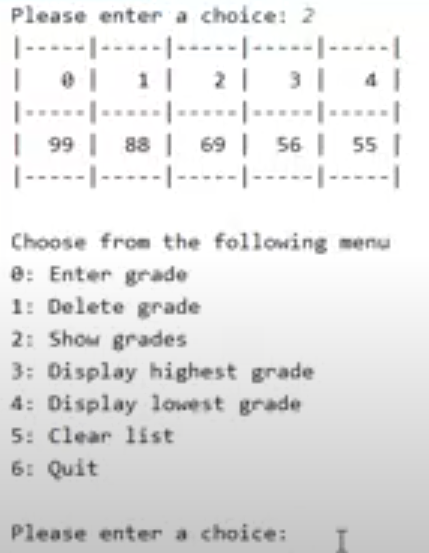
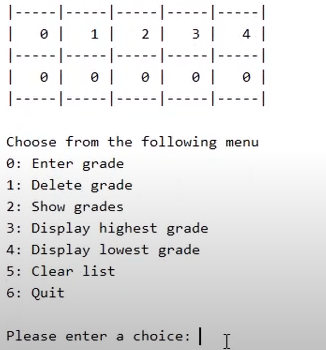
Please enter a choice: 2 ----------- 101112131 ----------- | 99 | 88 | 69 | 56 | 55 ------------------ Choose from the following menu e: Enter grade 1: Delete grade 2: Show grades 3: Display highest grade 4: Display lowest grade 5: Clear list 6: Quit Please enter a choice: I-------------------------| 1 0111 2. 3. 4. |-----|-----|-----|-----|-----| | 0 1 0 1 1 0 1 0 1 |-------------------------| Choose from the following menu 0: Enter grade 1: Delete grade 2: Show grades 3: Display highest grade 4: Display lowest grade 5: Clear list 6: Quit Please enter a choice: |
Step by Step Solution
There are 3 Steps involved in it

Get step-by-step solutions from verified subject matter experts
 Study Help