







Question: In Visual Studio; Create a C++ Windows Console project called Square In Square, add a C++ source file called main.cpp. Copy the source in the
In Visual Studio;
- Create a C++ Windows Console project called Square
- In Square, add a C++ source file called main.cpp.
- Copy the source in the attached file Pr6-27.cpp into main. This is the same code as Program 6-27 of our book.
- Run the program.
- Modify the program so that it keeps asking for an integer and a floating point number and displaying their squares. It quits when the user enters -1 as the integer.
- Upload your main.cpp file (typically in Documents\Visual Studio 2013\Projects\Square\Square) to this activity for credit.
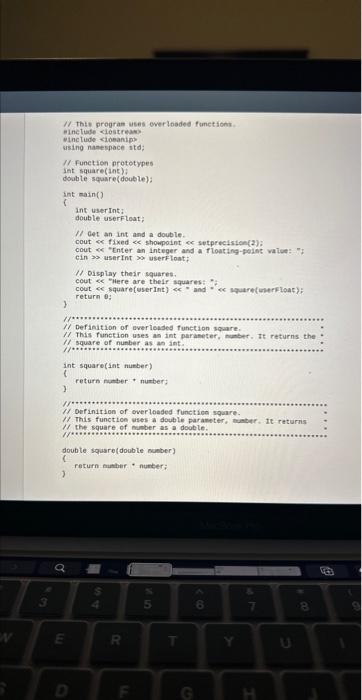
(f. Tht progran uses owerinaded functions. elnctuale ciestreaw: vinctude ciobanipo using nanespace itd: Pl. Function nototypes int square(ane)? double square(double): int main() Int user int: double userfloat; If eet an int and a double. cout or. fixed es shoupoint cer setprecisten(2)? cout we "Cnter an integer and a floating-gaint watee:" " cin so aser Int mon userflont; ff oisplay thedr squares. cout ce - Here are thelf aquarest. = cout oc square [userint ) ce = and = oc squarefwerfloach : return 0: 1 (1) Defiadtion of aver leaded function square. 11 . This function uses an int paraneter, munber. It returns the If square of nupber as an int. Int square(Int nunber) f return nunber + number; 1 P. This function ases a double paraneter, nuebur o te returnas 1f the square of nuber as a dooble. 8 doubte square(double number) I. return muther: - nunter; )
Step by Step Solution
There are 3 Steps involved in it

Get step-by-step solutions from verified subject matter experts
 Study Help