







Question: Instructions: Create a database with the name CSE311L_Final. Download the CSE311L_Final_db.sql Download CSE311L_Final_db.sqlfile and import it into the database you have just created. For Section
Instructions:
- Create a database with the name CSE311L_Final.
- Download the CSE311L_Final_db.sql Download CSE311L_Final_db.sqlfile and import it into the database you have just created.
- For Section A, execute the SQL statement using PHP scripts, submit the code in PHP and full window screenshots of the results and the table changes after the execution of PHP Script.
- Alternatively, you can complete Section A without PHP, just like Section B, but using PHP you will get bonus marks.
- For Section B, execute the SQL statements through XAMPP PHPMyAdmin and submit the SQL statements along with full window screenshots of the results.
- Go through the database schema once and observe the database tables before you start writing your codes and SQL statements.
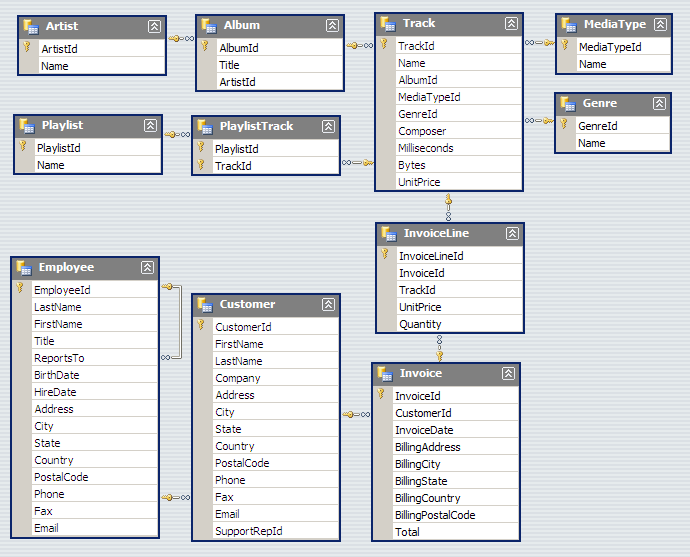
Section A
Answer the following question by executing SQL statements through PHP scripts. Alternatively, you can complete Section A without PHP, just like Section B, but using PHP you will get bonus marks.
Question 1:
Add yourself as an artist in the artist table and set the first 7 digits of your NSU id as artist id.
Question 2:
Add an album for yourself to the album table.
Question 3:
Move the track named 'Walk on water' in your album.
Question 4:
Show all the album titles and their artists' names.
Section B
Answer the following question by executing SQL statements through Xampps PHP MyAdmin SQL window.
Question 5:
Show the number of customers assigned to each of the employees.
Question 6:
From the invoices, show which country's customers spent the most on the tracks.
Question 7:
Show the top 3 artists based on their track sales.
Question 8:
Show the track names, album titles, artist name and genre of all the artist whose names contains the last letter from your artist name.
Artist
Step by Step Solution
There are 3 Steps involved in it

Get step-by-step solutions from verified subject matter experts
 Study Help