







Question: Main.java - in the application package MainController.java - in the application.controller package CalculatorController.java - in the application.controller package QuizController.java - in the application.controller package Calculator.java
Main.java - in the application package
MainController.java - in the application.controller package
CalculatorController.java - in the application.controller package
QuizController.java - in the application.controller package
Calculator.java - in the application.model package
Quiz.java - in the application.model package
Main.fxml
Quiz.fxml
Calculator.fxml
quiz.csv
(fxml & data files will be at the top of the Eclipse project - creating a new FXML document will put them in this default location)
App Design
Your program will show a view similar to the one shown below when the app is run: 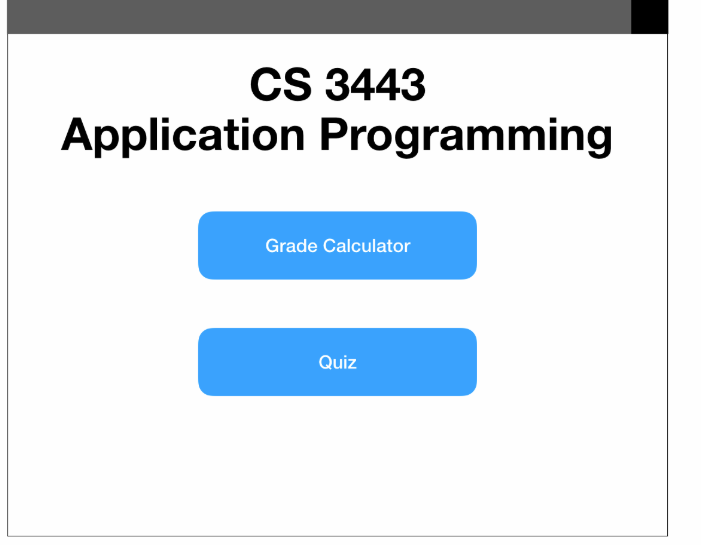 This view will be the Main.fxml.
If the user clicks on the "Grade Calculator" button on the main view, the app will display a GUI similar to the following: 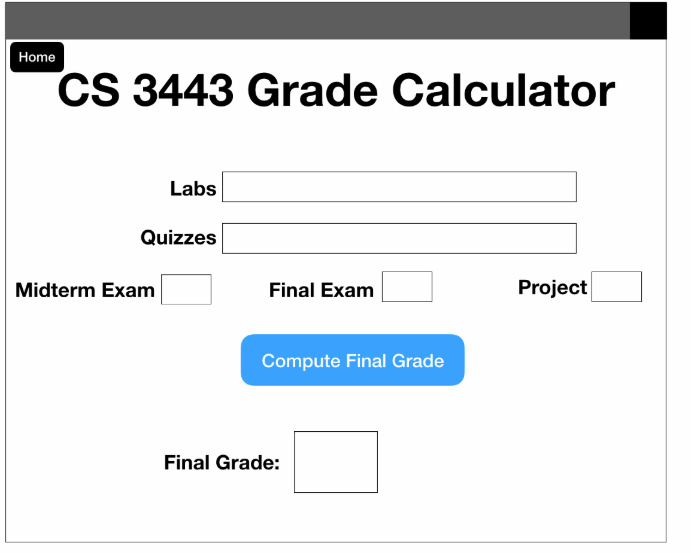 This view will be the Calculator.fxml. The "Home" button should return the user to the Main.fxml.
If the user clicks on the "Quiz" button on the main view, the app will display a GUI similar to the following: 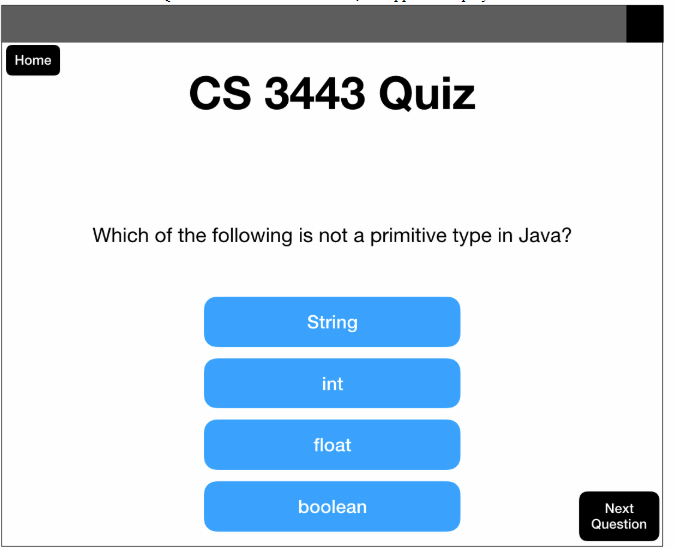 This view will be the Quiz.fxml. You should reuse some of the logic (methods, fxml, etc) that you created in Lab 3 for this portion of the lab! The "Home" button should return the user to the Main.fxml. The remainder of the design of this app is up to you. You may choose to add images, alter fonts, colors, or the size of the app.
Making it Work
This app will follow MVC:
Model: Quiz.java, Calculator.java
View: Main.fxml, Quiz.fxml, Calculator.fxml
Controller: MainController.java, QuizController.java, CalculatorController.java
The names of each aspect of the app indicate their dependencies. For example, MainController.java is the controller for Main.fxml.
Calculator
Calculator.java will be a model class responsible for keeping track of user-entered data related to the CS 3443 course. Therefore, this class must have variables to store the user's grades, including the midterm exam, final exam, team project, 8 lab grades, and 9 quiz grades. The user will enter their grades into the calculator, as in the following example. Multiple quizzes and labs can be handled by having the user type a comma between each grade. You may change this if you have an idea for a better GUI. 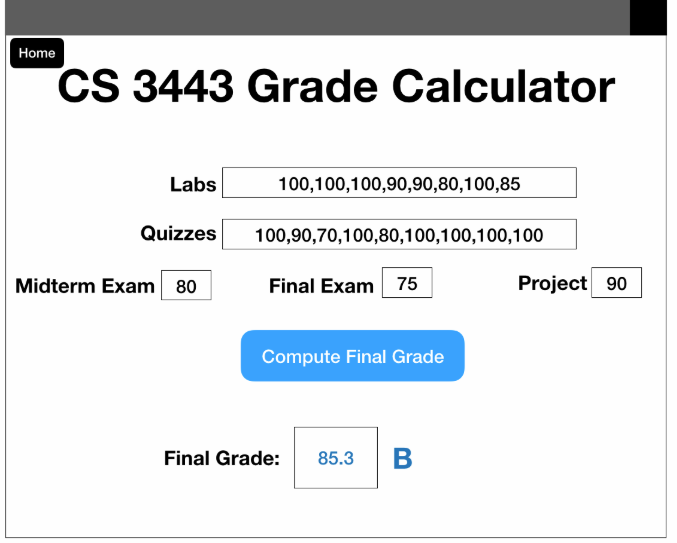 In this example, all grades were entered properly, so a final grade can be calculated. Both the numeric value and the letter grade should be shown on the screen, and the user's entered data should remain in the fields. Your calculator must be useful for this course, so refer to the syllabus to determine the weight of each graded component. Additionally, letter grades are calculated as standard. For example, A+ is 96-100, A is 93-95, A- is 90-92. This part of the lab will require some exception handling, as some values are invalid for some calculations. If the user enters one or more invalid values into the calculator, do not compute a grade. Instead, change the color of the label(s) to red and display an error message near "compute" button to indicate there is a problem. An example is provided:
 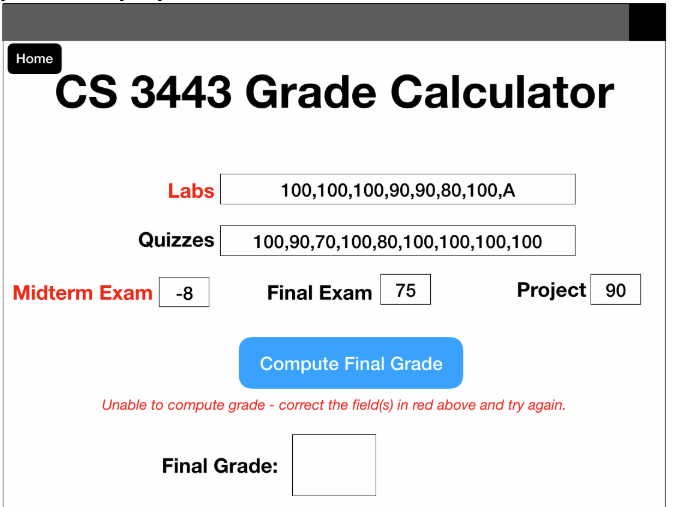 From this view, the user should be able to correct their mistake, and click the button again to compute their grade. They should not have to re-enter any of their grades. This example shows 2 types of invalid entries: a letter in the Labs entry, and a negative value in the Midterm Exam entry. What other invalid data could the user enter? You must handle any invalid data appropriately - we will test this as part of the "correctness" of this lab.
CS 3443 Application Programming Grade Calculator Quiz CS 3443 Application Programming Grade Calculator Quiz
Step by Step Solution
There are 3 Steps involved in it

Get step-by-step solutions from verified subject matter experts
 Study Help