







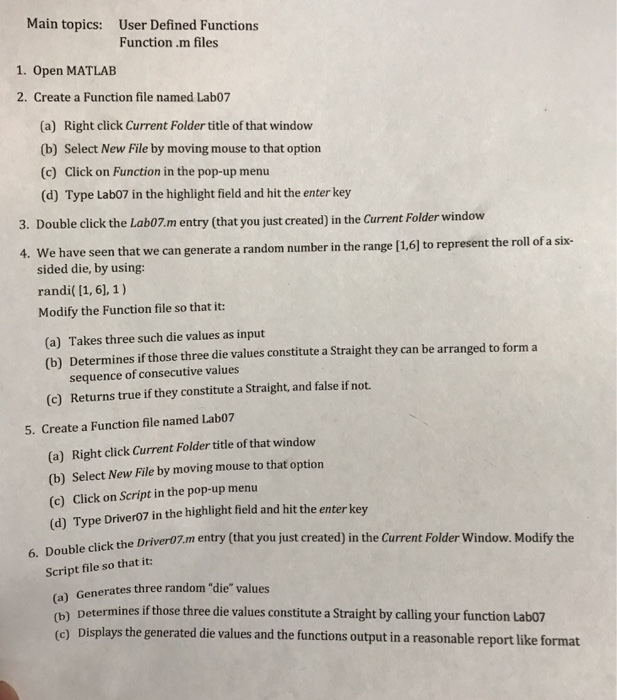
Question: Need help on this matlab.. Im interested in correct codes Main topics: User Defined Functions Function .m files 1. Open MATLAB 2. Create a Function
 Need help on this matlab..
 Main topics: User Defined Functions Function .m files 1. Open MATLAB 2. Create a Function file named Lab07 (a) Right click Current Folder title of that windovw (b) Select New File by moving mouse to that option (c) Click on Function in the pop-up menu (d) Type Lab07 in the highlight field and hit the enter key 3. Double click the Lab07.m entry (that you just created) in the Current Folder window e have seen that we can generate a random number in the range [1,61 to represent the roll of a six- sided die, by using: randi( [1, 6), 1) Modify the Function file so that it: 4. W (a) Takes three such die values as input (b) Determines if those three die values constitute a Straight they can be arranged to form a sequence of consecutive values (c) Returns true if they constitute a Straight, and false if not. 5. Create a Function file named Lab07 (a) Right click Current Folder title of that window (b) Select New File by moving mouse to that option (c) Click on Script in the pop-up menu (d) Type Driver07 in the highlight field and hit the enter key the Driver07.m entry (that you just created) in the Current Folder Window. Modify the 6. Script file so that it: (a) Generates three random "die" values (b Determines if those three die values constitute a Straight by calling your function Lab07 (e) Displays the generated die values and the functions output in a reasonable report like format
Step by Step Solution
There are 3 Steps involved in it

Get step-by-step solutions from verified subject matter experts
 Study Help