







Question: Plz show all code Main topics: User Defined Functions Function.m files Loops 1. Open MATLAB 2. Create a Function file named Lab06 (a) Right click
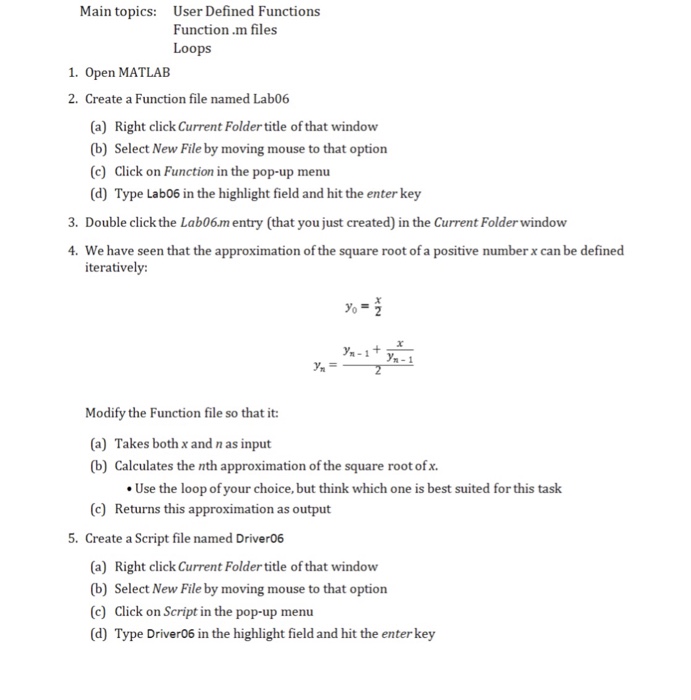
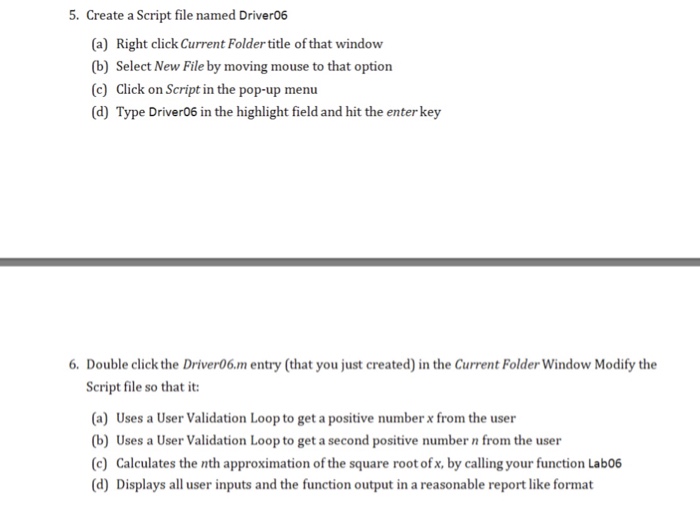
Main topics: User Defined Functions Function.m files Loops 1. Open MATLAB 2. Create a Function file named Lab06 (a) Right click Current Folder title of that window (b) Select New File by moving mouse to that option (c) Click on Function in the pop-up menu (d) Type Lab06 in the highlight field and hit the enter key 3. Double click the Lab06.m entry (that you just created) in the Current Folder window 4. We have seen that the approximation of the square root of a positive number x can be defined iteratively: n-1 y Modify the Function file so that it (a) Takes both x and n as input (b) Calculates the nth approximation of the square root of x. Use the loop of your choice, but think which one is best suited for this task (c) Returns this approximation as output 5. Create a Script file named Driver06 (a) Right click Current Folder title of that window (b) Select New File by moving mouse to that option (c) Click on Script in the pop-up menu (d) Type Driver06 in the highlight field and hit the enter key
Step by Step Solution
There are 3 Steps involved in it

Get step-by-step solutions from verified subject matter experts
 Study Help