







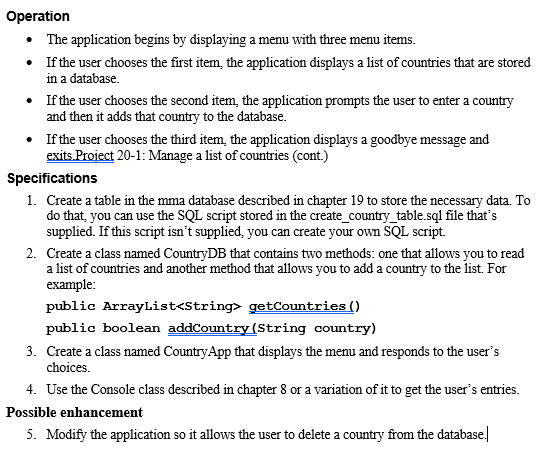
Question: Need help with Java. Here we are using both MySQL to create tables on step 1 and Java for the operations and steps 2-5. //Provided
Need help with Java. Here we are using both MySQL to create tables on step 1 and Java for the operations and steps 2-5.
//Provided code for creating mma database product-- create and select the database DROP DATABASE IF EXISTS mma; CREATE DATABASE mma; USE mma;
-- create the Product table CREATE TABLE Product ( ProductID INT PRIMARY KEY AUTO_INCREMENT, Code VARCHAR(10) NOT NULL UNIQUE, Description VARCHAR(255) NOT NULL, ListPrice DECIMAL(10,2) NOT NULL );
-- insert some rows into the Product table INSERT INTO Product VALUES (1, 'java', 'Murach''s Java Programming', '57.50'), (2, 'jsp', 'Murach''s Java Servlets and JSP', '57.50'), (3, 'mysql', 'Murach''s MySQL', '54.50'), (4, 'android', 'Murach''s Android Programming', '57.50'), (5, 'html5', 'Murach''s HTML5 and CSS3', '54.50'), (6, 'oracle', 'Murach''s Oracle and PL/SQL', '54.50'), (7, 'javascript', 'Murach''s JavaScript and jQuery', '54.50');
-- create a user and grant privileges to that user GRANT SELECT, INSERT, DELETE, UPDATE ON mma.* TO mma_user@localhost IDENTIFIED BY 'sesame';
//create_country_table.sql provided USE mma;
DROP DATABASE IF EXISTS Country;
CREATE TABLE Country ( ID INT PRIMARY KEY AUTO_INCREMENT, Name VARCHAR(100) ); INSERT INTO Country VALUES (1, 'India'), (2, 'Japan'), (3, 'Mexico'), (4, 'Spain'), (5, 'United States')
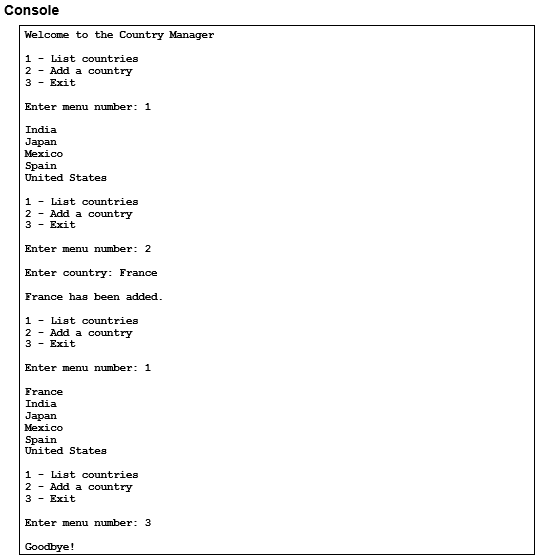
Console Welcome to the Country Manager 1 - List countries 2 Add a country 3 Exit Enter menu number 1 Mexico United States 1 - List countries 2 Add a country 3- Exit Enter menu number 2 Enter country: France France has been added 1 - List countries 2 - Add a country 3 Exit Enter menu number 1 France Mexico United States 1 - List countries 2 Add a country 3 Exit Enter menu number: 3 Goodbye
Step by Step Solution
There are 3 Steps involved in it

Get step-by-step solutions from verified subject matter experts
 Study Help