







Question: need help with this steps please!!! 11 12 13 You want to display an alphabetical list of each state abbreviation, In cell L2, insert a
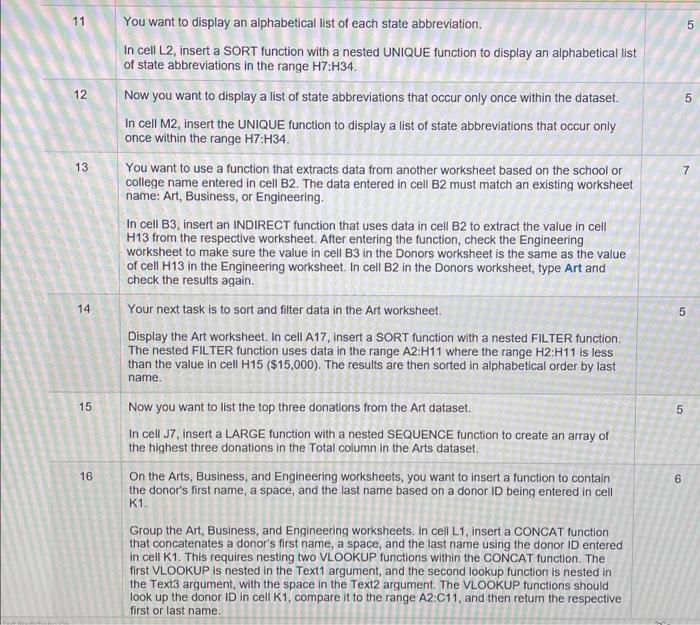
11 12 13 You want to display an alphabetical list of each state abbreviation, In cell L2, insert a SORT function with a nested UNIQUE function to display an alphabetical list ot state abbreviations in the range H7:H34. Now you want to display a list of state abbreviations that occur only once within the dataset. In cell M2, insen the UNIQUE function to display a list ot state abbreviations that occur only once within the range H7:H34. You want to use a function that extracts data from another worksheet based on the school or college name entered in cell B2. The data entered in cell B2 must match an existing worksheet name Art, Business, or Engineering, In cell 83. insert an INDIRECT function that uses data in cell B2 to extract the value in cell H13 trom the respective worksheet, Atter entering the function, check the Engineering worksheet to make sure the value in celi B3 in the Donors worksheet is the same as the value of cell H 13 in the Engineering worksheet. In cell 32 in the Donors worksheet, type Art and check the results again. Your next task is to sort and filter data in the Art worksheet. Display the Art worksheet. In cell A17, insert a SORT function with a nested FILTER tunction. The nested FILTER function uses data in the range A2:H11 where the range H2:H11 is less than the value in cell H15 ($15,000). The results are then sorted in alphabetical order by last Now you want to list the top three donations from the Art dataset. In cell J7. insert a LARGE function With a nested SEQUENCE function to create an array 01 the highest three donations in the Total column in the Arts dataset. On the Arts, Business, and Engineering worksheets, you want to insert a 'unction to contain the donor's first name, a space, and the last name based on a cnnor It) being entered in cell Group the Art, Business, and Engineerinq worksheets. In cell L 1, insert a CONCAT lunction that concatenates a donor's first name, a space, and the last name using the donor ID entered in cell KI . This requires nesting two VLOOKUP functions Within the CONCAT function. The first VLOOKUP is nested in the Textl argument, and the second lookup function is nested in the Text3 arqument, With the space in the Texta argument. The VLOOKUP functions should 100k up the donor ID in cell KI , compare it to the range A2:CI I . and then the respective first or last name. 5
Step by Step Solution
There are 3 Steps involved in it

Get step-by-step solutions from verified subject matter experts
 Study Help