







Question: please write a bash script Write 1 script which does all of the following: if run without commandline args, exits if run with 1 commandline
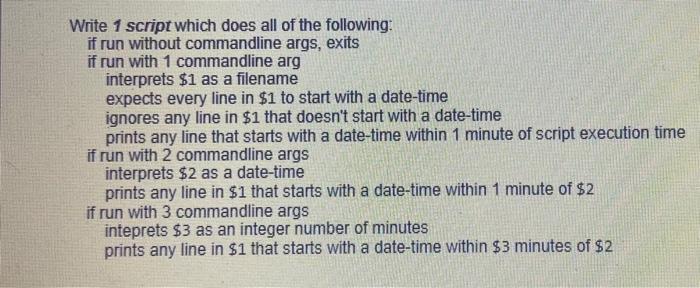
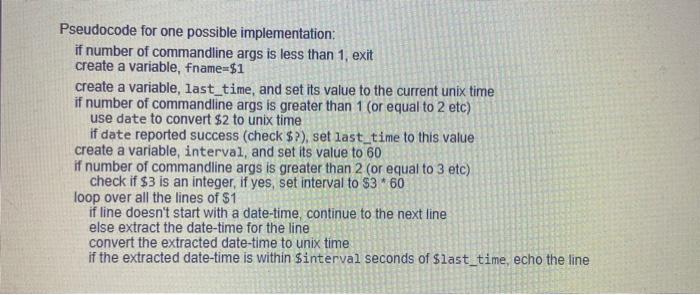
Write 1 script which does all of the following: if run without commandline args, exits if run with 1 commandline arg interprets $1 as a filename expects every line in $1 to start with a date-time ignores any line in $1 that doesn't start with a date-time prints any line that starts with a date-time within 1 minute of script execution time if run with 2 commandline args interprets $2 as a date-time prints any line in $1 that starts with a date-time within 1 minute of $2 if run with 3 commandline args inteprets $3 as an integer number of minutes prints any line in $1 that starts with a date-time within $3 minutes of $2 Pseudocode for one possible implementation: if number of commandline args is less than 1, exit create a variable, fname=$1 create a variable, last_time, and set its value to the current unix time if number of commandline args is greater than 1 (or equal to 2 etc) use date to convert $2 to unix time if date reported success (check $?), set last time to this value create a variable, interval, and set its value to 60 if number of commandline args is greater than 2 (or equal to 3 etc) check if $3 is an integer, if yes, set interval to $3 * 60 loop over all the lines of $1 if line doesn't start with a date-time, continue to the next line else extract the date-time for the line convert the extracted date-time to unix time if the extracted date-time is within $interval seconds of $last_time, echo the line
Step by Step Solution
There are 3 Steps involved in it

Get step-by-step solutions from verified subject matter experts
 Study Help