





Question: Practice Exercise 2 Directions: 28. Make sure that you downloaded the BalanceSheet file from Blackboard 29. Upload it to Office 360 and open it with
Practice Exercise 2 Directions: 28. Make sure
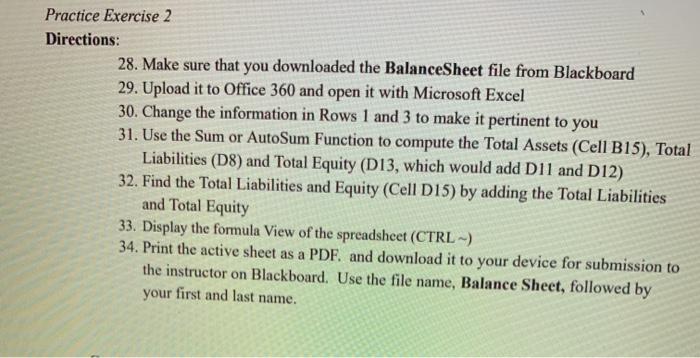
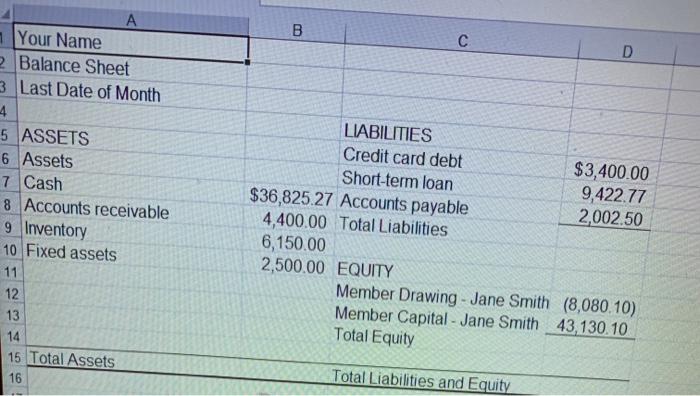
Practice Exercise 2 Directions: 28. Make sure that you downloaded the BalanceSheet file from Blackboard 29. Upload it to Office 360 and open it with Microsoft Excel 30. Change the information in Rows 1 and 3 to make it pertinent to you 31. Use the Sum or AutoSum Function to compute the Total Assets (Cell B15), Total Liabilities (D8) and Total Equity (D13, which would add D11 and D12) 32. Find the Total Liabilities and Equity (Cell D15) by adding the Total Liabilities and Total Equity 33. Display the formula View of the spreadsheet (CTRL -) 34. Print the active sheet as a PDF. and download it to your device for submission to the instructor on Blackboard. Use the file name, Balance Sheet, followed by your first and last name. B D A 1 Your Name Balance Sheet 3 Last Date of Month 4 5 ASSETS 6 Assets 7 Cash 8 Accounts receivable 9 Inventory 10 Fixed assets 11 12 13 14 15 Total Assets 16 LIABILITIES Credit card debt $3,400.00 Short-term loan 9,422.77 $36,825 27 Accounts payable 2,002.50 4,400.00 Total Liabilities 6,150.00 2,500.00 EQUITY Member Drawing - Jane Smith (8,080.10) Member Capital - Jane Smith 43,130.10 Total Equity Total Liabilities and Equity

Step by Step Solution

There are 3 Steps involved in it

1 Expert Approved Answer
Step: 1 Unlock blur-text-image

Question Has Been Solved by an Expert!

Get step-by-step solutions from verified subject matter experts

Step: 2 Unlock
Step: 3 Unlock

Students Have Also Explored These Related General Management Questions!