



Question: Problem 6-71 Three mutually exclusive design alternatives are being considered. The estimated cash flows for each alternative are given next. The MARR is 20% per
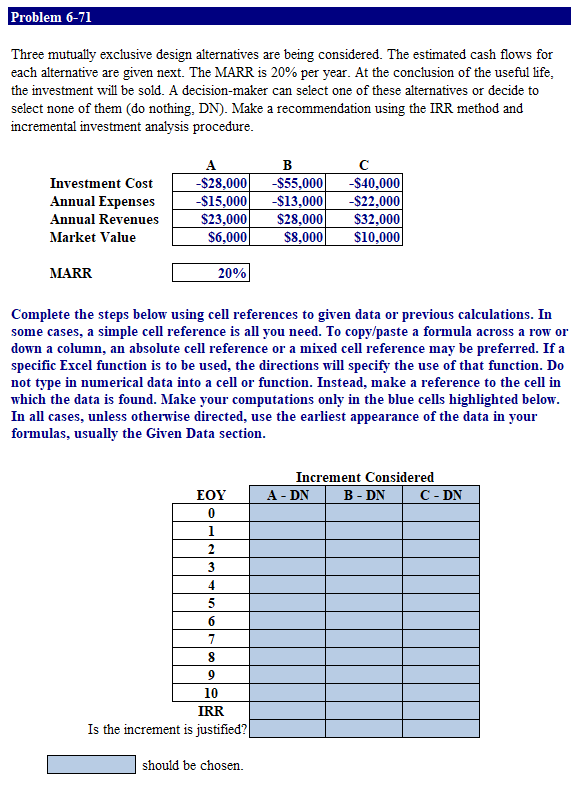
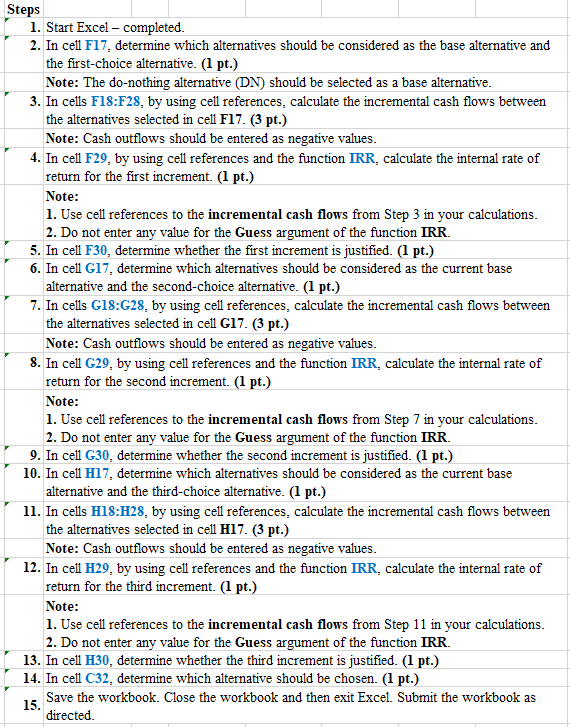
Problem 6-71 Three mutually exclusive design alternatives are being considered. The estimated cash flows for each alternative are given next. The MARR is 20% per year. At the conclusion of the useful life, the investment will be sold. A decision-maker can select one of these alternatives or decide to select none of them (do nothing, DN). Make a recommendation using the IRR method and incremental investment analysis procedure. Investment Cost Annual Expenses Annual Revenues Market Value A -$28,000 $15,000 $23,000 $6,000 B -$55,000 $13,000 $28,000 $8,000 $40,000 -$22,000 $32,000 $10,000 MARR 20% Complete the steps below using cell references to given data or previous calculations. In some cases, a simple cell reference is all you need. To copy/paste a formula across a row or down a column, an absolute cell reference or a mixed cell reference may be preferred. If a specific Excel function is to be used, the directions will specify the use of that function. Do not type in numerical data into a cell or function. Instead, make a reference to the cell in which the data is found. Make your computations only in the blue cells highlighted below. In all cases, unless otherwise directed, use the earliest appearance of the data in your formulas, usually the Given Data section. Increment Considered A - DN B - DN C - DN EOY 0 1 2 3 4 5 6 7 8 9 10 IRR Is the increment is justified? should be chosen Steps 1. Start Excel - completed. 2. In cell F17, determine which alternatives should be considered as the base alternative and the first choice alternative. (1 pt.) Note: The do-nothing alternative (DN) should be selected as a base alternative. 3. In cells F18:F28, by using cell references, calculate the incremental cash flows between the alternatives selected in cell F17. (3 pt.) Note: Cash outflows should be entered as negative values. 4. In cell F29, by using cell references and the function IRR, calculate the internal rate of return for the first increment. (1 pt.) Note: 1. Use cell references to the incremental cash flows from Step 3 in your calculations. 2. Do not enter any value for the Guess argument of the function IRR. 5. In cell F30, determine whether the first increment is justified. (1 pt.) 6. In cell G17, determine which alternatives should be considered as the current base alternative and the second-choice alternative. (1 pt.) 7. In cells G18:G28, by using cell references, calculate the incremental cash flows between the alternatives selected in cell G17. (3 pt.) Note: Cash outflows should be entered as negative values. 8. In cell G29, by using cell references and the function IRR, calculate the internal rate of return for the second increment. (1 pt.) Note: 1. Use cell references to the incremental cash flows from Step 7 in your calculations. 2. Do not enter any value for the Guess argument of the function IRR. 9. In cell G30, determine whether the second increment is justified. (1 pt.) 10. In cell H17, determine which alternatives should be considered as the current base alternative and the third-choice alternative. (1 pt.) 11. In cells H18:H28, by using cell references, calculate the incremental cash flows between the alternatives selected in cell H17. (3 pt.) Note: Cash outflows should be entered as negative values. 12. In cell H29, by using cell references and the function IRR, calculate the internal rate of return for the third increment. (I pt.) Note: 1. Use cell references to the incremental cash flows from Step 11 in your calculations. 2. Do not enter any value for the Guess argument of the function IRR. 13. In cell H30, determine whether the third increment is justified. (1 pt.) 14. In cell C32, determine which alternative should be chosen. (1 pt.) 15. Save the workbook. Close the workbook and then exit Excel. Submit the workbook as directed Problem 6-71 Three mutually exclusive design alternatives are being considered. The estimated cash flows for each alternative are given next. The MARR is 20% per year. At the conclusion of the useful life, the investment will be sold. A decision-maker can select one of these alternatives or decide to select none of them (do nothing, DN). Make a recommendation using the IRR method and incremental investment analysis procedure. Investment Cost Annual Expenses Annual Revenues Market Value A -$28,000 $15,000 $23,000 $6,000 B -$55,000 $13,000 $28,000 $8,000 $40,000 -$22,000 $32,000 $10,000 MARR 20% Complete the steps below using cell references to given data or previous calculations. In some cases, a simple cell reference is all you need. To copy/paste a formula across a row or down a column, an absolute cell reference or a mixed cell reference may be preferred. If a specific Excel function is to be used, the directions will specify the use of that function. Do not type in numerical data into a cell or function. Instead, make a reference to the cell in which the data is found. Make your computations only in the blue cells highlighted below. In all cases, unless otherwise directed, use the earliest appearance of the data in your formulas, usually the Given Data section. Increment Considered A - DN B - DN C - DN EOY 0 1 2 3 4 5 6 7 8 9 10 IRR Is the increment is justified? should be chosen Steps 1. Start Excel - completed. 2. In cell F17, determine which alternatives should be considered as the base alternative and the first choice alternative. (1 pt.) Note: The do-nothing alternative (DN) should be selected as a base alternative. 3. In cells F18:F28, by using cell references, calculate the incremental cash flows between the alternatives selected in cell F17. (3 pt.) Note: Cash outflows should be entered as negative values. 4. In cell F29, by using cell references and the function IRR, calculate the internal rate of return for the first increment. (1 pt.) Note: 1. Use cell references to the incremental cash flows from Step 3 in your calculations. 2. Do not enter any value for the Guess argument of the function IRR. 5. In cell F30, determine whether the first increment is justified. (1 pt.) 6. In cell G17, determine which alternatives should be considered as the current base alternative and the second-choice alternative. (1 pt.) 7. In cells G18:G28, by using cell references, calculate the incremental cash flows between the alternatives selected in cell G17. (3 pt.) Note: Cash outflows should be entered as negative values. 8. In cell G29, by using cell references and the function IRR, calculate the internal rate of return for the second increment. (1 pt.) Note: 1. Use cell references to the incremental cash flows from Step 7 in your calculations. 2. Do not enter any value for the Guess argument of the function IRR. 9. In cell G30, determine whether the second increment is justified. (1 pt.) 10. In cell H17, determine which alternatives should be considered as the current base alternative and the third-choice alternative. (1 pt.) 11. In cells H18:H28, by using cell references, calculate the incremental cash flows between the alternatives selected in cell H17. (3 pt.) Note: Cash outflows should be entered as negative values. 12. In cell H29, by using cell references and the function IRR, calculate the internal rate of return for the third increment. (I pt.) Note: 1. Use cell references to the incremental cash flows from Step 11 in your calculations. 2. Do not enter any value for the Guess argument of the function IRR. 13. In cell H30, determine whether the third increment is justified. (1 pt.) 14. In cell C32, determine which alternative should be chosen. (1 pt.) 15. Save the workbook. Close the workbook and then exit Excel. Submit the workbook as directed
Step by Step Solution
There are 3 Steps involved in it

Get step-by-step solutions from verified subject matter experts