







Question: Procedure SETUP Step 1: Start the computer and let it complete its start-up process. Step 2: Open the Planetary Orbits simulation. Exploration 12.2: Set Both
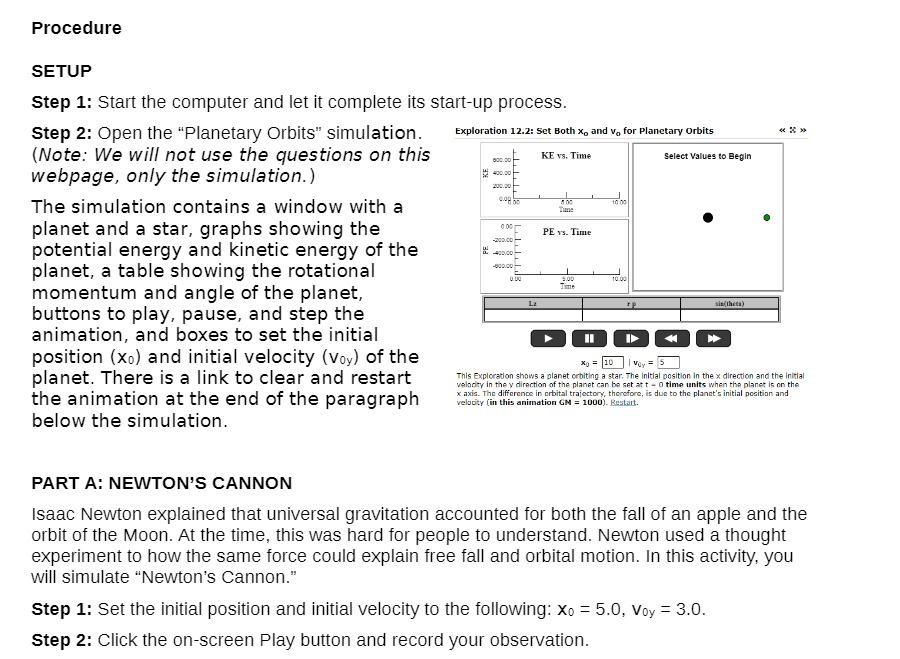
Procedure SETUP Step 1: Start the computer and let it complete its start-up process. Step 2: Open the "Planetary Orbits" simulation. Exploration 12.2: Set Both x, and v. for Planetary Orbits (Note: We will not use the questions on this 830.20 KE vs. Time Select Values to Begin webpage, only the simulation.) 430.00 200.00 The simulation contains a window with a planet and a star, graphs showing the PE vs. Time -200.00 - potential energy and kinetic energy of the planet, a table showing the rotational 10.00 momentum and angle of the planet, buttons to play, pause, and step the animation, and boxes to set the initial position (xo) and initial velocity (Voy) of the *0 = 10 | Vay = 5 planet. There is a link to clear and restart This Exploration shows a planet orbiting a star, The Initial position in the * direction and the initial velocity in the y direction of the planet can be set at t - 0 time units when the planet is on the the animation at the end of the paragraph * axis. The difference in orbital trajectory, therefore, is due to the planet's initial position and velocity (in this animation GM = 1000). Bestart. below the simulation. PART A: NEWTON'S CANNON Isaac Newton explained that universal gravitation accounted for both the fall of an apple and the orbit of the Moon. At the time, this was hard for people to understand. Newton used a thought experiment to how the same force could explain free fall and orbital motion. In this activity, you will simulate "Newton's Cannon." Step 1: Set the initial position and initial velocity to the following: Xo = 5.0, Voy = 3.0. Step 2: Click the on-screen Play button and record your observation
Step by Step Solution
There are 3 Steps involved in it

Get step-by-step solutions from verified subject matter experts
 Study Help