







Question: **Show work and Formula in Excel** Create a Microsoft Excel spreadsheet that will replicate example 13-9 in your textbook. Table 13.1 and 13.2 is the
**Show work and Formula in Excel**
Create a Microsoft Excel spreadsheet that will replicate example 13-9 in your textbook. Table 13.1 and 13.2 is the solution for example 13.9
This should be fairly easy (see figures in the book that provide useful formulas for this activity). One change that needs to be added is the use of WACC instead of a given interest rate.
Your model should be able to accommodate different tax rates. Your submission should generate/replicate a working model of Tables 13-1 and 13-2. The optimal life should be identified.
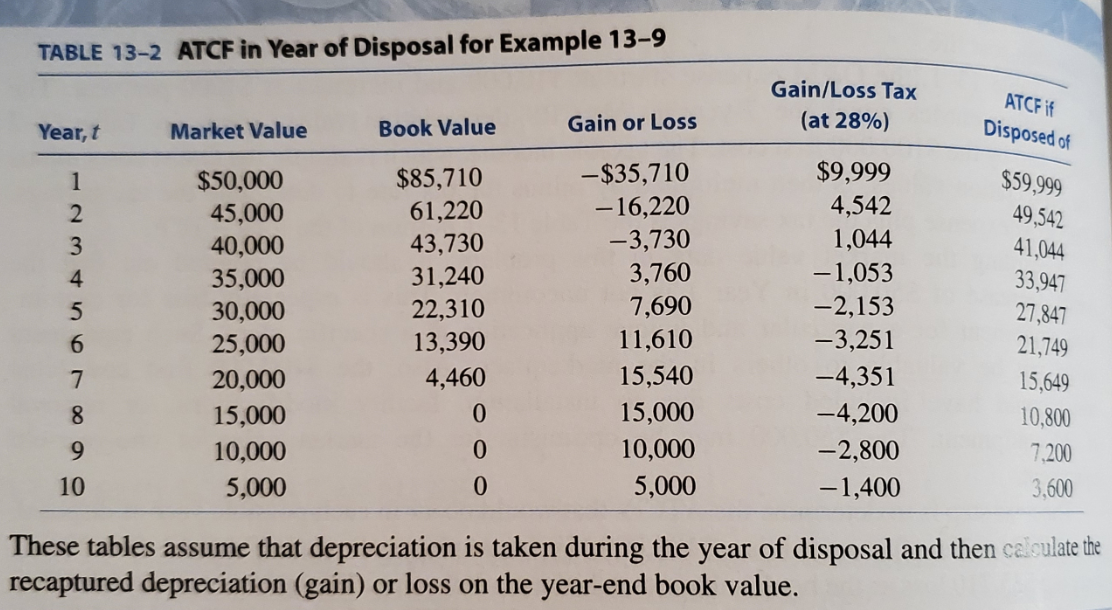
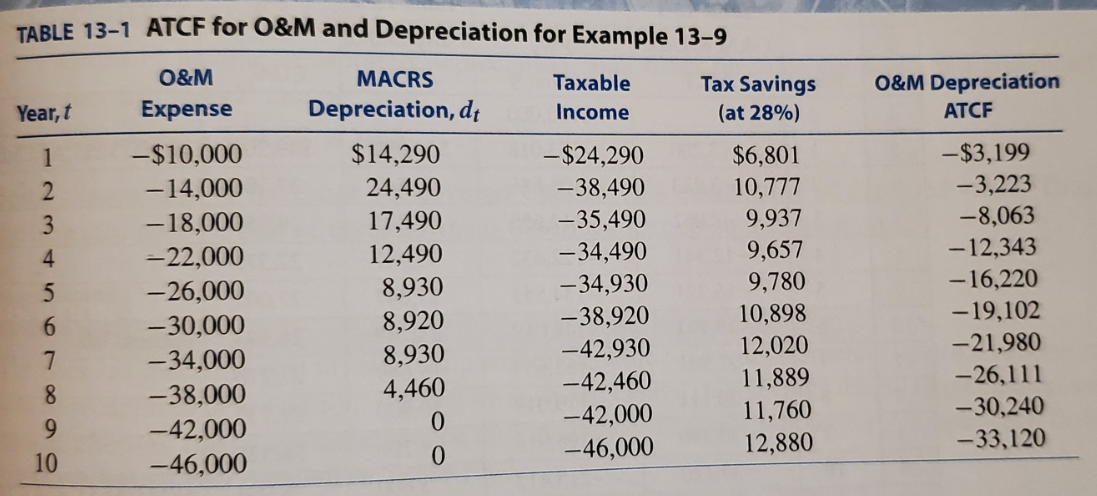
Table 13.1 and 13.2 is the solution for example 13.9
TABLE 13-2 ATCF in Year of Disposal for Example 13-9 Gain/Loss Tax (at 28%) ATCF if Disposed of Year,t Market Value Book Value Gain or Loss $59,999 49,542 41,044 1 2 3 4 5 6 7 $50,000 45,000 40,000 35,000 30,000 25,000 20,000 15,000 10,000 5,000 $85,710 61,220 43,730 31,240 22,310 13,390 4,460 0 0 -$35,710 - 16,220 -3,730 3,760 7,690 11,610 15,540 15,000 10,000 5,000 $9,999 4,542 1,044 -1,053 -2,153 -3,251 -4,351 -4,200 -2,800 -1,400 33,947 27,847 21,749 8 15,649 10,800 7.200 3.600 9 10 0 These tables assume that depreciation is taken during the year of disposal and then calculate the recaptured depreciation (gain) or loss on the year-end book value. O&M Depreciation ATCF TABLE 13-1 ATCF for O&M and Depreciation for Example 13-9 O&M MACRS Taxable Tax Savings Year, t Expense Depreciation, dt Income (at 28%) 1 -$10,000 $14,290 -$24,290 $6,801 2 - 14,000 24,490 -38,490 10,777 3 -18,000 17,490 -35,490 9,937 4 - 22,000 12,490 -34,490 9,657 5 -26,000 8,930 -34,930 9,780 6 -30,000 8,920 -38,920 10,898 -34,000 8,930 -42,930 12,020 11,889 8 -38,000 -42,460 4,460 9 11,760 -42,000 0 - 42,000 10 12,880 -46,000 0 -46,000 nora -$3,199 -3,223 -8,063 -12,343 - 16,220 -19,102 -21,980 -26,111 -30,240 -33,120Step by Step Solution
There are 3 Steps involved in it
1 Expert Approved Answer
Step: 1 Unlock

Question Has Been Solved by an Expert!
Get step-by-step solutions from verified subject matter experts
Step: 2 Unlock
Step: 3 Unlock
 Study Help