







Question: Switch back to the All Types worksheet. Use the Scenario Manager as follows to compare the profit per hour in each scenario: a. Create a
Switch back to the All Types worksheet. Use the Scenario Manager as follows to compare the profit per hour in each scenario: a. Create a Scenario PivotTable report for result cells B17:D17. Added a pic of the question and of the worksheet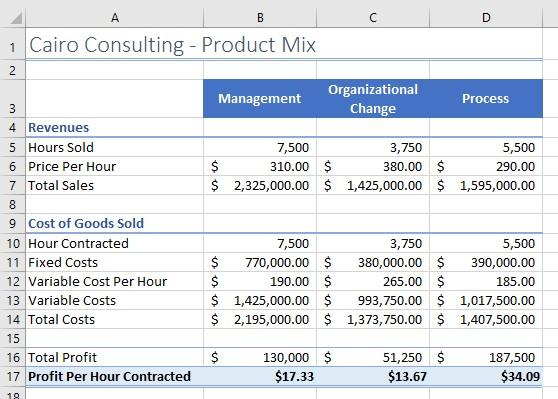
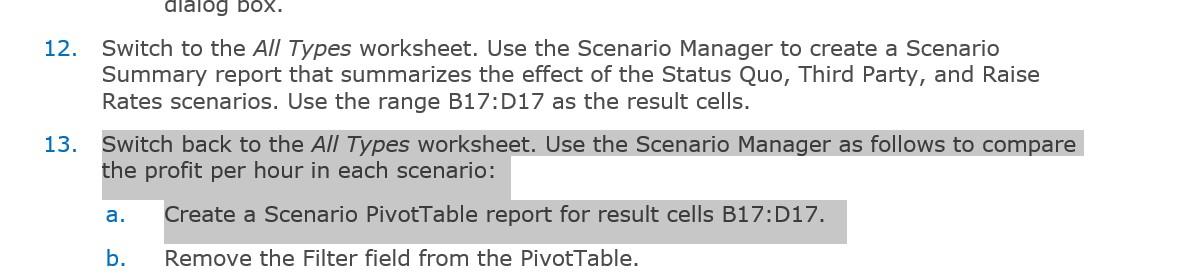
12. Switch to the All Types worksheet. Use the Scenario Manager to create a Scenario Summary report that summarizes the effect of the Status Quo, Third Party, and Raise Rates scenarios. Use the range B17:D17 as the result cells. 13. Switch back to the All Types worksheet. Use the Scenario Manager as follows to compare the profit per hour in each scenario: a. Create a Scenario PivotTable report for result cells B17:D17. b. Remove the Filter field from the PivotTable
Step by Step Solution
There are 3 Steps involved in it

Get step-by-step solutions from verified subject matter experts
 Study Help