







Question: Text: Web Development and Design Foundations with HTML5 (7th edition) Chapter 11. Pacific Trails Resort Pacific Trails Resort Home Yurts Activities Enjoy Nature in Luxury
Text: Web Development and Design Foundations with HTML5 (7th edition) Chapter 11. Pacific Trails Resort
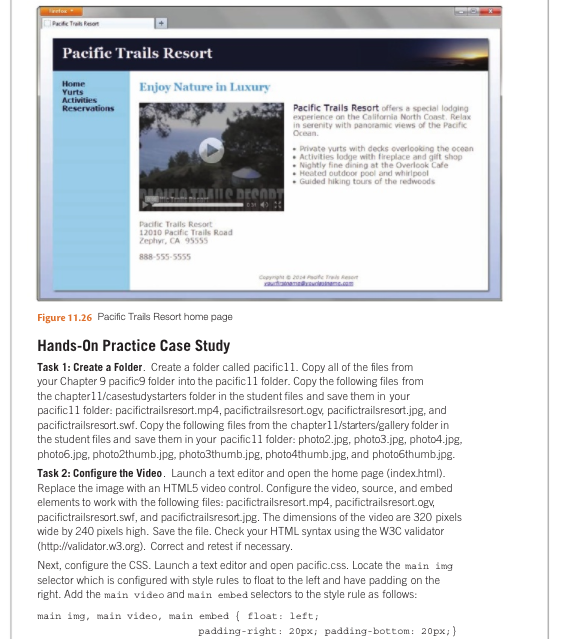
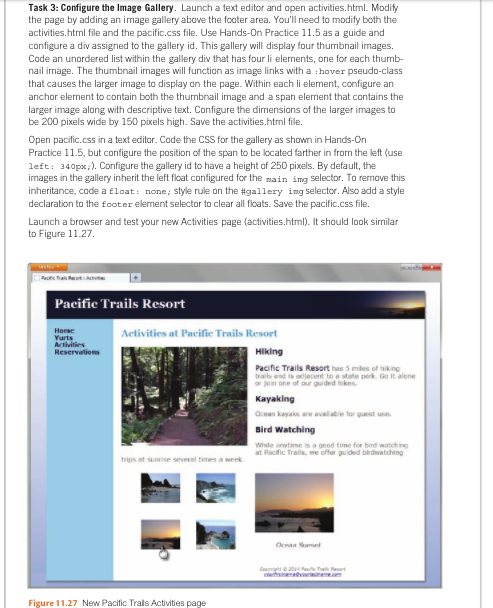
Pacific Trails Resort Home Yurts Activities Enjoy Nature in Luxury Pacific Trails Resort offers a special lodging experience on the Califomia North Coast. Relax in serenity with panoramic views of the Pacific Ocean Private yurts with decks overloolding the ocean Activities lodge with fireplace and gilt shop Nightly fine dining at the Overlook Cafe Heated outdoor pool and whirlpool Guided hiking tours of the redwoods Pacific Trails Resort 2010 Pacific Trails Road Zephyr, CA 95555 88-555-5555 Figure 11.26 Pacific Trais Resort home page Hands-0n Practice Case Study Task 1: Create a Folder. Create a folder called pacific11. Copy all of the files from your Chapter 9 pacific9 folder into the pacific11 folder. Copy the following files from the chapterl1/casestudystarters folder in the student files and save them in your pacificl1 folder: pacifictrailsresort.mp4, pacifictrailsresort.ogv, pacifictrailsresort.jpg, and pacifictrailsresort.swf. Copy the following files from the chapter1 l/starters/gallery folder in the student files and save them in your pacific11 folder: photo2.jpg, photo3.jpg, photo4.jpg. photo6.jpg, photo2thumb.jpg, photo3thumb.jpg, photo4thumb.jpg, and photo6thumb.jpg Task 2: Configure the Video. Launch a text editor and open the home page (index.html) Replace the image with an HTML5 video control. Configure the video, source, and embed elements to work with the following files: pacifictrailsresort.mp4, pacifictrailsresort.ogv, pacifictrailsresort.swf, and pacifictrailsresort.jpg. The dimensions of the video are 320 pixels wide by 240 pixels high. Save the file. Check your HTML syntax using the W3C validator (http:validator.w3.org). Correct and retest if necessary Next, configure the CSS. Launch a text editor and open pacific.css. Locate the main img selector which is configured with style rules to float to the left and have padding on the right. Add the main video and main embed selectors to the style rule as follows: main img, main video, main embed float: left; padding-right: 20px; padding-bottom: 20px
Step by Step Solution
There are 3 Steps involved in it

Get step-by-step solutions from verified subject matter experts
 Study Help