







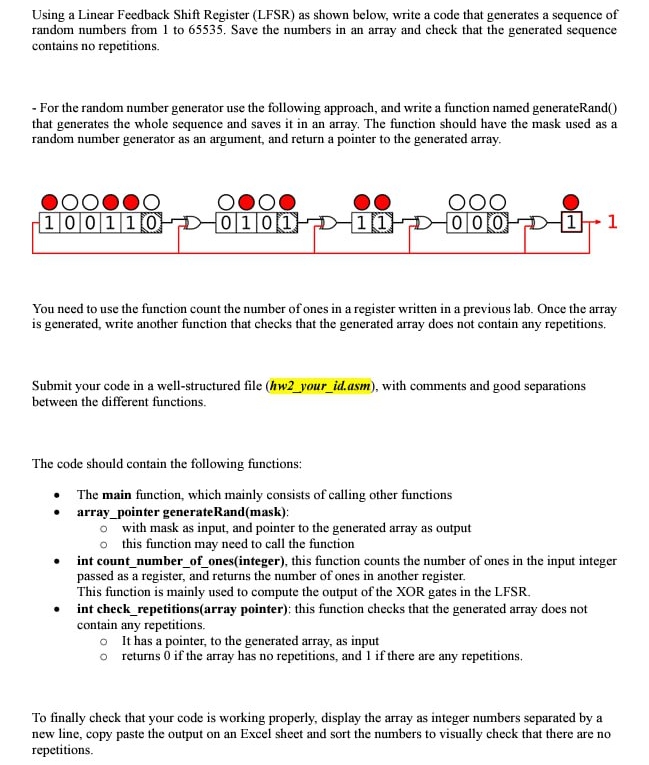
Question: Using a Linear Feedback Shift Register ( LFSR ) as shown below, write a code in assembly mips 3 2 that generates a sequence of
Using a Linear Feedback Shift Register LFSR as shown below, write a code in assembly mips that generates a sequence of
random numbers from to Save the numbers in an array and check that the generated sequence
contains no repetitions.
For the random number generator use the following approach, and write a function named generateRand
that generates the whole sequence and saves it in an array. The function should have the mask used as a
random number generator as an argument, and return a pointer to the generated array.
You need to use the function count the number of ones in a register written in a previous lab. Once the array
is generated, write another function that checks that the generated array does not contain any repetitions.
Submit your code in a wellstructured file hwyouridasm with comments and good separations
between the different functions.
The code should contain the following functions:
The main function, which mainly consists of calling other functions
arraypointer generateRandmask:
with mask as input, and pointer to the generated array as output
this function may need to call the function
int countnumberofonesinteger this function counts the number of ones in the input integer
passed as a register, and returns the number of ones in another register.
This function is mainly used to compute the output of the XOR gates in the LFSR
int checkrepetitionsarray pointer: this function checks that the generated array does not
contain any repetitions.
It has a pointer, to the generated array, as input
returns if the array has no repetitions, and if there are any repetitions.
To finally check that your code is working properly, display the array as integer numbers separated by a
new line, copy paste the output on an Excel sheet and sort the numbers to visually check that there are no
repetitions.
Step by Step Solution
There are 3 Steps involved in it
1 Expert Approved Answer
Step: 1 Unlock

Question Has Been Solved by an Expert!
Get step-by-step solutions from verified subject matter experts
Step: 2 Unlock
Step: 3 Unlock
 Study Help