







Question: Using Cisco Packet Tracer simulate the internetwork depicted in the Figure below 172.16.0.1/24 192.168.1.1/24 PC-PT Hosti 2960-24T SW1 60-24TT SW3 Server-PT wwwi Fao/o 192.168.1.100/24 Fao/o
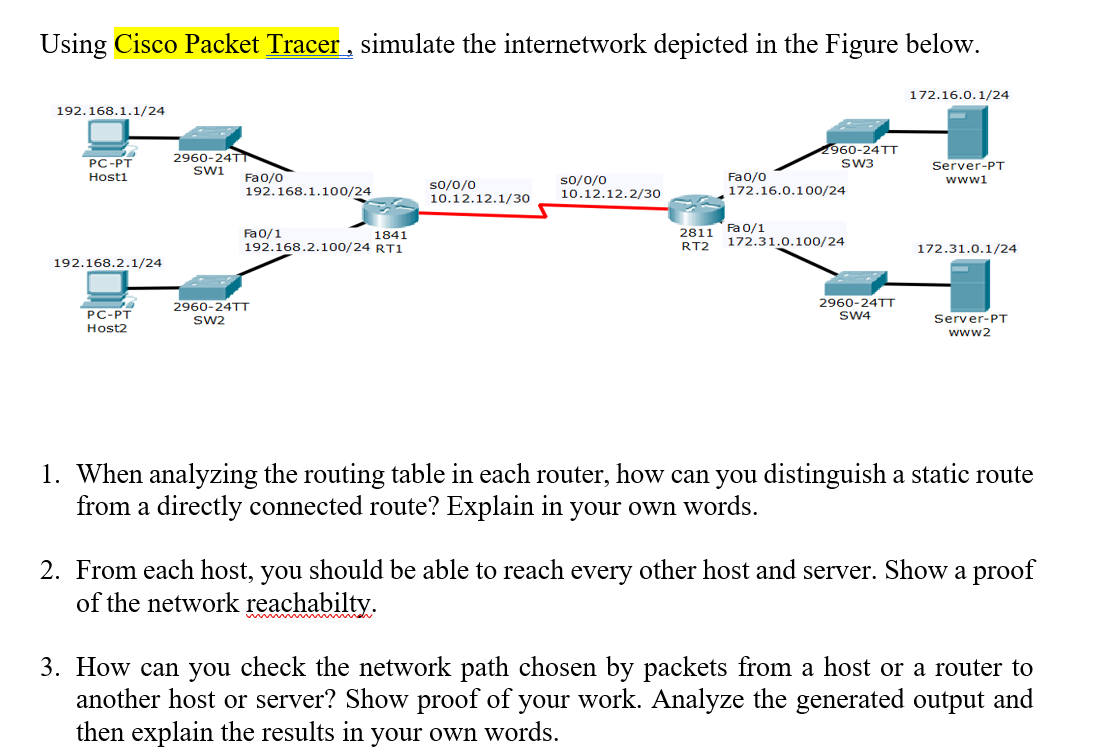
Using Cisco Packet Tracer simulate the internetwork depicted in the Figure below 172.16.0.1/24 192.168.1.1/24 PC-PT Hosti 2960-24T SW1 60-24TT SW3 Server-PT wwwi Fao/o 192.168.1.100/24 Fao/o 172.16.0.100/24 so/0/0 So/o/o 10.12.12.1/30 0.12.12.2/30 Fa0/1 192.168.2.100/24 RT1 2811 Fa 0/1 RT2 172.31.0.100/24 1841 172.31.0.1/24 192.168.2.1/24 PC-PT Host2 2960-24TT SW2 2960-24TT SW4 Server-PT www2 1 . When analyzing the routing table in each router, how can you distinguish a static route from a directly connected route? Explain in your own words. 2. From each host, you should be able to reach every other host and server. Show a proof of the network reachabilty 3. How can you check the network path chosen by packets from a host or a router to another host or server? Show proof of your work. Analyze the generated output and then explain the results in your own words. Using Cisco Packet Tracer simulate the internetwork depicted in the Figure below 172.16.0.1/24 192.168.1.1/24 PC-PT Hosti 2960-24T SW1 60-24TT SW3 Server-PT wwwi Fao/o 192.168.1.100/24 Fao/o 172.16.0.100/24 so/0/0 So/o/o 10.12.12.1/30 0.12.12.2/30 Fa0/1 192.168.2.100/24 RT1 2811 Fa 0/1 RT2 172.31.0.100/24 1841 172.31.0.1/24 192.168.2.1/24 PC-PT Host2 2960-24TT SW2 2960-24TT SW4 Server-PT www2 1 . When analyzing the routing table in each router, how can you distinguish a static route from a directly connected route? Explain in your own words. 2. From each host, you should be able to reach every other host and server. Show a proof of the network reachabilty 3. How can you check the network path chosen by packets from a host or a router to another host or server? Show proof of your work. Analyze the generated output and then explain the results in your own words
Step by Step Solution
There are 3 Steps involved in it

Get step-by-step solutions from verified subject matter experts
 Study Help