







Question: Using Cisco Packet Tracer simulate the internetwork depicted in the Figure below. 172.16.0.1/24 192.168.1.1/24 PC-PT Hosti 2960-24T SWI 60-24TT SW3 Server-PT wwwi Fa0/o 192.168.1.100/24 Fao/o
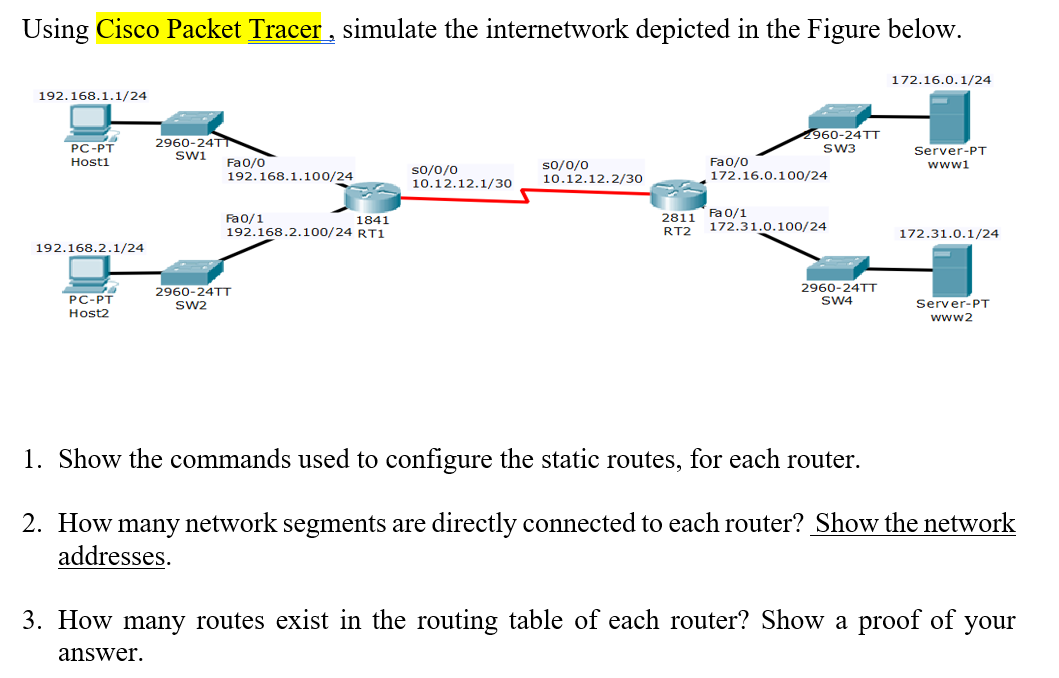
Using Cisco Packet Tracer simulate the internetwork depicted in the Figure below. 172.16.0.1/24 192.168.1.1/24 PC-PT Hosti 2960-24T SWI 60-24TT SW3 Server-PT wwwi Fa0/o 192.168.1.100/24 Fao/o 172.16.0.1 00/24 so/0/0 So/o/o 10.12.12.1/30 10.12.12.2/3 Fa0/1 192.168.2.100/24 RT1 2811 Fa 0/1 RT2 172.31.0.100/24 1841 172.31.0.1/24 192.168.2.1/24 PC-PT Host2 2960-24TT SW2 2960-24TT SW4 Server-PT www2 1. Show the commands used to configure the static routes, for each router. 2. How many network segments are directly connected to each router? Show the network addresses. 3. How many routes exist in the routing table of each router? Show a proof of your answer. Using Cisco Packet Tracer simulate the internetwork depicted in the Figure below. 172.16.0.1/24 192.168.1.1/24 PC-PT Hosti 2960-24T SWI 60-24TT SW3 Server-PT wwwi Fa0/o 192.168.1.100/24 Fao/o 172.16.0.1 00/24 so/0/0 So/o/o 10.12.12.1/30 10.12.12.2/3 Fa0/1 192.168.2.100/24 RT1 2811 Fa 0/1 RT2 172.31.0.100/24 1841 172.31.0.1/24 192.168.2.1/24 PC-PT Host2 2960-24TT SW2 2960-24TT SW4 Server-PT www2 1. Show the commands used to configure the static routes, for each router. 2. How many network segments are directly connected to each router? Show the network addresses. 3. How many routes exist in the routing table of each router? Show a proof of your
Step by Step Solution
There are 3 Steps involved in it

Get step-by-step solutions from verified subject matter experts
 Study Help