







Question: Using the code snippet how can one extend the above functionality using two additional LED modules such that your program displays a creative blinking pattern?
Using the code snippet how can one extend the above functionality using two additional LED modules such that your program displays a creative blinking pattern? The pattern should continue to appear as long as the program is running. Your pattern should be smooth and clearly demonstrate creativity based on changing LED speeds (e.g. sleep frequency). A pattern, for example, could be a representation of a musical notation, or an advertisement scrolling pattern, among others.
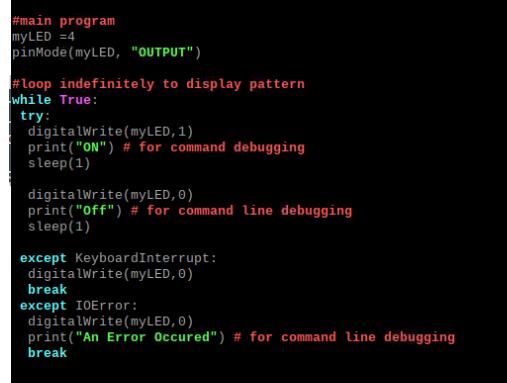
#main program my LED =4 pinMode (my LED, "OUTPUT") #loop indefinitely to display pattern while True: try: digitalWrite(my LED, 1) print("ON") # for command debugging sleep (1) digitalWrite(myLED, 0) print("Off") # for command line debugging sleep (1) except KeyboardInterrupt: digitalWrite(myLED, 0) break except 10Error: digitalWrite (my LED, 0) print("An Error Occured") # for command line debugging break
Step by Step Solution
There are 3 Steps involved in it
To create a creative blinking pattern using two additional LED modules with varying speeds you can m... View full answer

Get step-by-step solutions from verified subject matter experts
 Study Help