







Question: Using the data set on this Excel, do the behind the scene ANOVA using the template provided and then run the single factor ANOVA and
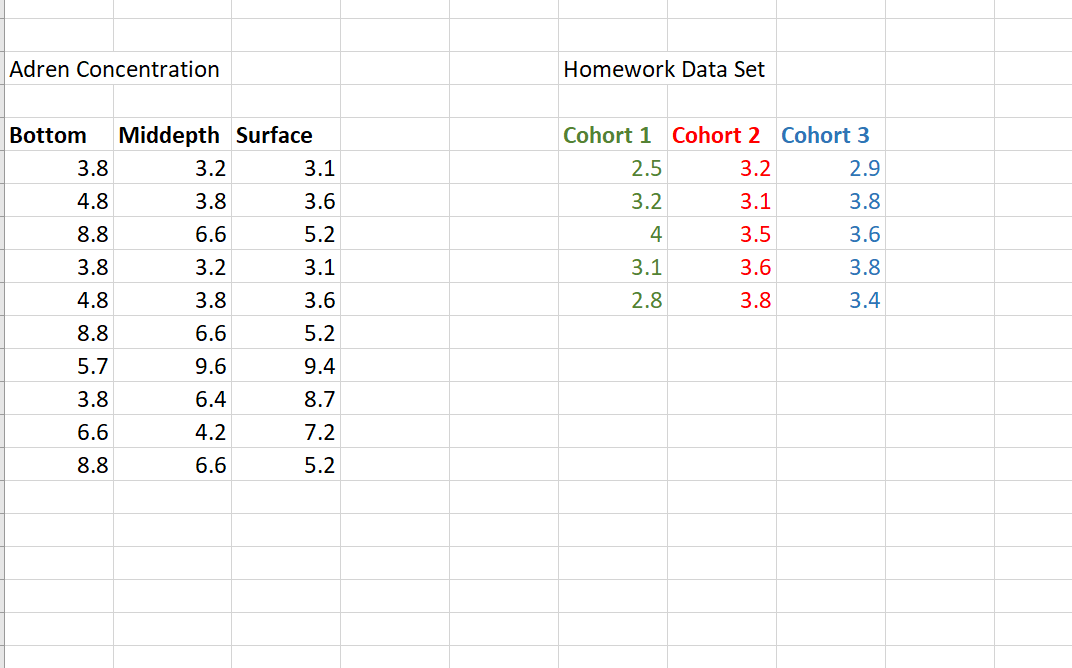
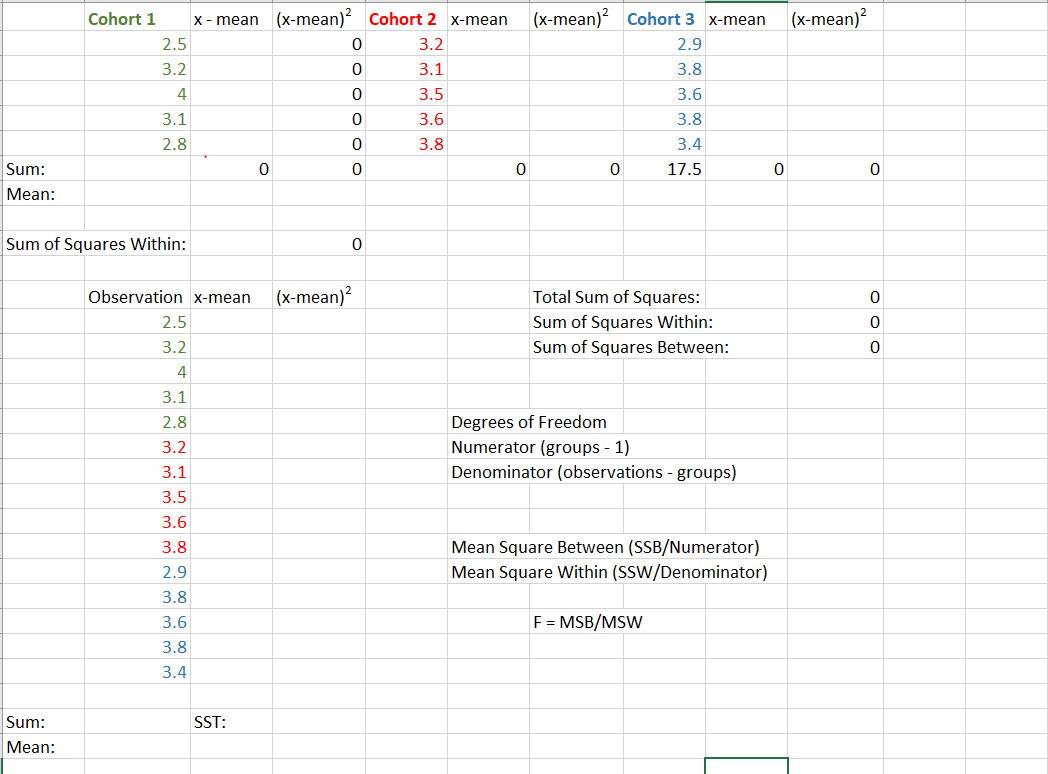
Using the data set on this Excel, do the "behind the scene" ANOVA using the template provided and then run the single factor ANOVA and state your conclusion based on the reported p-value.
Adren Concentration Homework Data Set Cohort 1 Cohort 2 Cohort 3 2.5 3.2 2.9 3.2 3.1 3.8 4 3.5 3.6 3.1 3.6 3.8 Bottom Middepth Surface 3.8 3.2 3.1 4.8 3.8 3.6 8.8 6.6 5.2 3.8 3.2 3.1 4.8 3.8 3.6 8.8 6.6 5.2 5.7 9.6 9.4 3.8 6.4 8.7 6.6 4.2 7.2 8.8 6.6 5.2 2.8 3.8 3.4 (x-mean)? Cohort 1 x - mean (x-mean)? Cohort 2 x-mean (x-mean) Cohort 3 x-mean 2.5 0 3.2 2.9 3.2 0 3.1 3.8 4 0 3.5 3.6 3.1 0 3.6 3.8 2.8 0 3.8 3.4 0 0 0 0 17.5 0 0 Sum: Mean: Sum of Squares Within: 0 (x-mean)? 0 Observation x-mean 2.5 3.2 Total Sum of Squares: Sum of Squares Within: Sum of Squares Between: 4 Degrees of Freedom Numerator (groups - 1) Denominator (observations - groups) 3.1 2.8 3.2 3.1 3.5 3.6 3.8 2.9 3.8 3.6 3.8 3.4 Mean Square Between (SSB/Numerator) Mean Square Within (SSW/Denominator) F = MSB/MSW SST: Sum: Mean: Adren Concentration Homework Data Set Cohort 1 Cohort 2 Cohort 3 2.5 3.2 2.9 3.2 3.1 3.8 4 3.5 3.6 3.1 3.6 3.8 Bottom Middepth Surface 3.8 3.2 3.1 4.8 3.8 3.6 8.8 6.6 5.2 3.8 3.2 3.1 4.8 3.8 3.6 8.8 6.6 5.2 5.7 9.6 9.4 3.8 6.4 8.7 6.6 4.2 7.2 8.8 6.6 5.2 2.8 3.8 3.4 (x-mean)? Cohort 1 x - mean (x-mean)? Cohort 2 x-mean (x-mean) Cohort 3 x-mean 2.5 0 3.2 2.9 3.2 0 3.1 3.8 4 0 3.5 3.6 3.1 0 3.6 3.8 2.8 0 3.8 3.4 0 0 0 0 17.5 0 0 Sum: Mean: Sum of Squares Within: 0 (x-mean)? 0 Observation x-mean 2.5 3.2 Total Sum of Squares: Sum of Squares Within: Sum of Squares Between: 4 Degrees of Freedom Numerator (groups - 1) Denominator (observations - groups) 3.1 2.8 3.2 3.1 3.5 3.6 3.8 2.9 3.8 3.6 3.8 3.4 Mean Square Between (SSB/Numerator) Mean Square Within (SSW/Denominator) F = MSB/MSW SST: Sum: MeanStep by Step Solution
There are 3 Steps involved in it
1 Expert Approved Answer
Step: 1 Unlock

Question Has Been Solved by an Expert!
Get step-by-step solutions from verified subject matter experts
Step: 2 Unlock
Step: 3 Unlock
 Study Help