







Question: Writing a shell script using getopts. Write a shell script to accept a file name and do an octal dump and print statistics about the
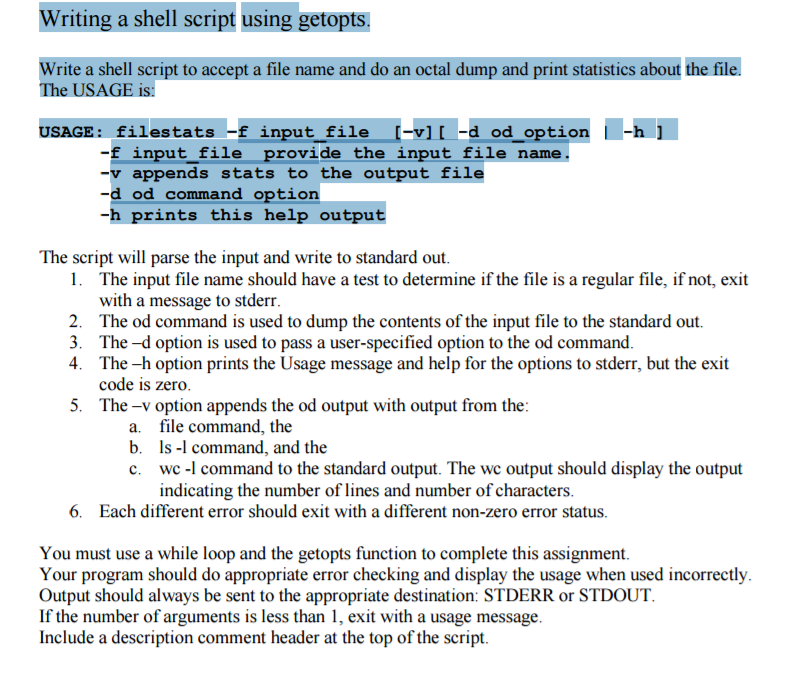
Writing a shell script using getopts. Write a shell script to accept a file name and do an octal dump and print statistics about the file. The USAGE is: USAGE: filestats -f input file -vi -d od optionh -f input file provide the input file name. -v appends stats to the output file -d od command option -h prints this help output The script will parse the input and write to standard out The input file name should have a test to determine if the file is a regular file, if not, exit with a message to stderr The od command is used to dump the contents of the input file to the standard out. The -d option is used to pass a user-specified option to the od command The -h option prints the Usage message and help for the options to stderr, but the exit code is zero The-v option appends the od output with output from the 1. 2. 3. 4. 5. a. file command, the b. s - command, and the c. wc -l command to the standard output. The wc output should display the output indicating the number of lines and number of characters 6. Each different error should exit with a different non-zero error status You must use a while loop and the getopts function to complete this assignment. Your program should do appropriate error checking and display the usage when used incorrectly Output should always be sent to the appropriate destination: STDERR or STDOUT If the number of arguments is less than 1, exit with a usage message Include a description comment header at the top of the script Writing a shell script using getopts. Write a shell script to accept a file name and do an octal dump and print statistics about the file. The USAGE is: USAGE: filestats -f input file -vi -d od optionh -f input file provide the input file name. -v appends stats to the output file -d od command option -h prints this help output The script will parse the input and write to standard out The input file name should have a test to determine if the file is a regular file, if not, exit with a message to stderr The od command is used to dump the contents of the input file to the standard out. The -d option is used to pass a user-specified option to the od command The -h option prints the Usage message and help for the options to stderr, but the exit code is zero The-v option appends the od output with output from the 1. 2. 3. 4. 5. a. file command, the b. s - command, and the c. wc -l command to the standard output. The wc output should display the output indicating the number of lines and number of characters 6. Each different error should exit with a different non-zero error status You must use a while loop and the getopts function to complete this assignment. Your program should do appropriate error checking and display the usage when used incorrectly Output should always be sent to the appropriate destination: STDERR or STDOUT If the number of arguments is less than 1, exit with a usage message Include a description comment header at the top of the script
Step by Step Solution
There are 3 Steps involved in it

Get step-by-step solutions from verified subject matter experts
 Study Help