





Question: a) Create a new blank project in MS project 2019. Using Figure 6-2 in the textbook, enter the activities, their durations (in days), and their
a) Create a new blank project in MS project 2019.

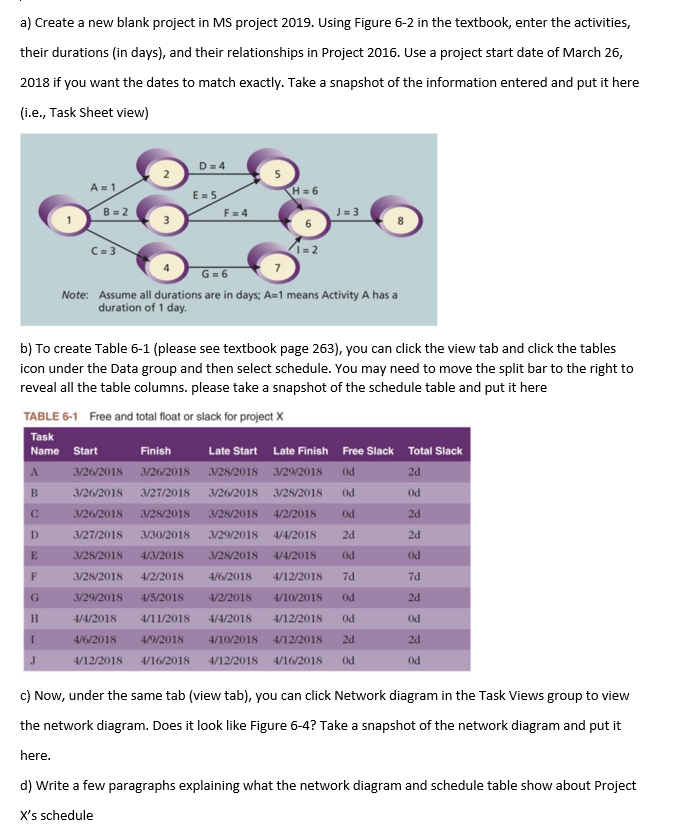
a) Create a new blank project in MS project 2019. Using Figure 6-2 in the textbook, enter the activities, their durations (in days), and their relationships in Project 2016. Use a project start date of March 26, 2018 if you want the dates to match exactly. Take a snapshot of the information entered and put it here (i.e., Task Sheet view) b) To create Table 6-1 (please see textbook page 263), you can click the view tab and click the tables icon under the Data group and then select schedule. You may need to move the split bar to the right to reveal all the table columns. please take a snapshot of the schedule table and put it here TABLE 6-1 Free and total float or slack for project X c) Now, under the same tab (view tab), you can click Network diagram in the Task Views group to view the network diagram. Does it look like Figure 6-4? Take a snapshot of the network diagram and put it here. d) Write a few paragraphs explaining what the network diagram and schedule table show about Project X s schedule

Step by Step Solution

There are 3 Steps involved in it

1 Expert Approved Answer
Step: 1 Unlock blur-text-image

Question Has Been Solved by an Expert!

Get step-by-step solutions from verified subject matter experts

Step: 2 Unlock
Step: 3 Unlock

Students Have Also Explored These Related General Management Questions!