





Question: Please use Python. 0 Problem 3 Modification of the ground (5 pts) In this problem, we want to replace the flat ground from the previous

Please use Python.
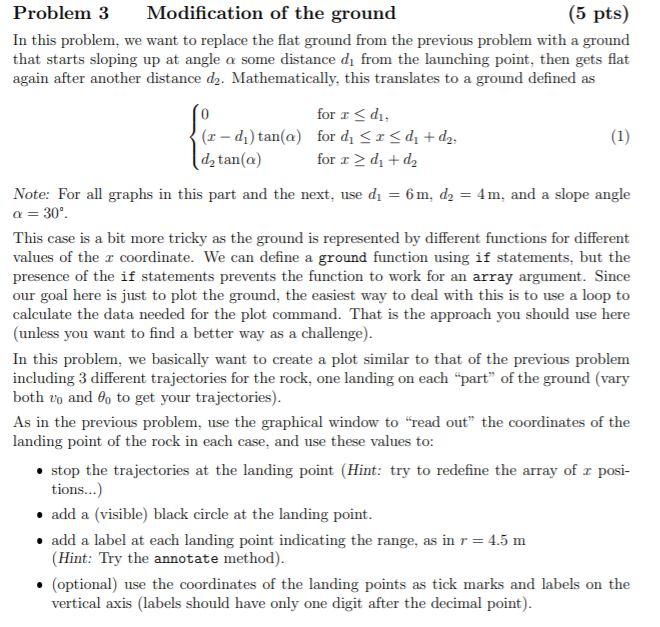
Please use Python. 0 Problem 3 Modification of the ground (5 pts)

0 Problem 3 Modification of the ground (5 pts) In this problem, we want to replace the flat ground from the previous problem with a ground that starts sloping up at angle a some distance d, from the launching point, then gets flat again after another distance d2. Mathematically, this translates to a ground defined as for r d. + d. Note: For all graphs in this part and the next, use dy = 6 m. d2 = 4 m, and a slope angle a=30 This case is a bit more tricky as the ground is represented by different functions for different values of the I coordinate. We can define a ground function using if statements, but the presence of the if statements prevents the function to work for an array argument. Since our goal here is just to plot the ground, the easiest way to deal with this is to use a loop to calculate the data needed for the plot command. That is the approach you should use here (unless you want to find a better way as a challenge). In this problem, we basically want to create a plot similar to that of the previous problem including 3 different trajectories for the rock, one landing on each "part of the ground (vary both vo and 8, to get your trajectories). As in the previous problem, use the graphical window to "read out" the coordinates of the landing point of the rock in each case, and use these values to: stop the trajectories at the landing point (Hint: try to redefine the array of r posi- tions...) add a (visible) black circle at the landing point. add a label at each landing point indicating the range, as in r = 4.5 m (Hint: Try the annotate method). (optional) use the coordinates of the landing points as tick marks and labels on the vertical axis (labels should have only one digit after the decimal point)

Step by Step Solution

There are 3 Steps involved in it

1 Expert Approved Answer
Step: 1 Unlock blur-text-image
Question Has Been Solved by an Expert!

Get step-by-step solutions from verified subject matter experts

Step: 2 Unlock
Step: 3 Unlock

Students Have Also Explored These Related Databases Questions!