







Question: Run the following T-SQL code DECLARE @date DATETIME SET @date= getdate(); -- set @date as current date SELECT @date as 'Current Date', -- display current
Run the following T-SQL code
DECLARE @date DATETIME
SET @date= getdate(); -- set @date as current date
SELECT @date as 'Current Date', -- display current date
DATEADD(year, 1, @date) AS 'Plus one Year',
DATEADD(week, 1, @date) AS 'Plus one week',
DATEADD(day, 1, @date) AS 'Plus one Day';
convert anonymous block to a stored procedure that will accept a date as input and print the original date, the date after one year, week and day.
Execute your stored procedure. Examples of execution
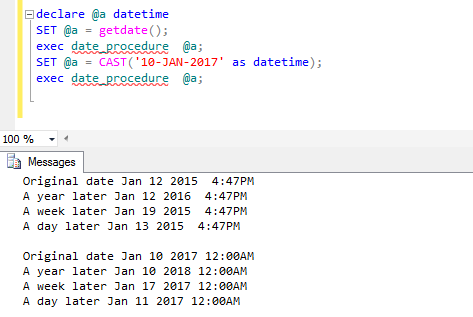
Edeclare SET @a @a datetime getdate(); exec date procedure @a; SET @a CAST ('10-JAN-2017' as datetime); exec date procedure @a; 100 % Messages Original date Jan 12 2015 4:47PM A year later Jan 12 2016 4:47PM A week later Jan 19 2015 4:47PM A day later Jan 13 2015 4:47PM Original date Jan 10 2017 12:00AM A year later Jan 10 2018 12:00AM A week later Jan 17 2017 12:00AM A day later Jan 11 2017 12:00AM
Step by Step Solution
3.43 Rating (159 Votes )
There are 3 Steps involved in it
Heres the converted TSQL code to create a stored procedure that ... View full answer

Get step-by-step solutions from verified subject matter experts
 Study Help