Question: The coursework will be marked for 2 main criteria: 1. Identifying a real data analytics problem with strong motivation for using distributed processing methods (L01)

The coursework will be marked for 2 mainThe coursework will be marked for 2 mainThe coursework will be marked for 2 mainThe coursework will be marked for 2 mainThe coursework will be marked for 2 mainThe coursework will be marked for 2 main

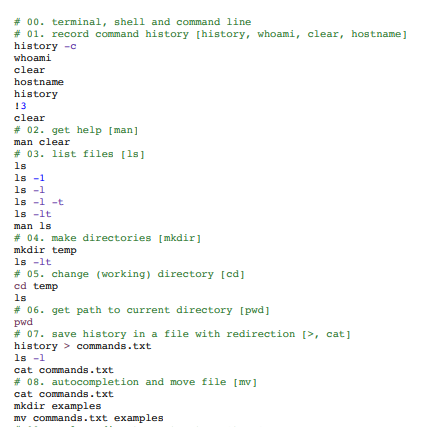
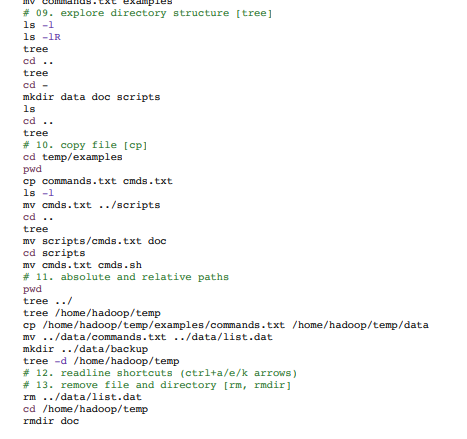
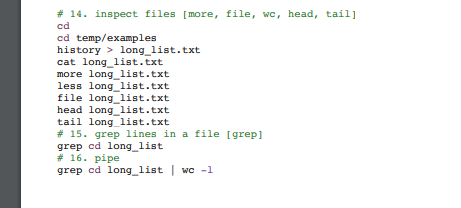
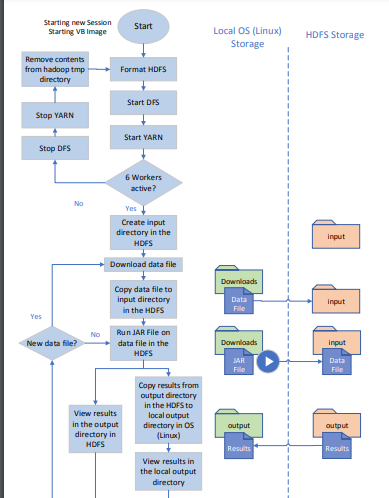
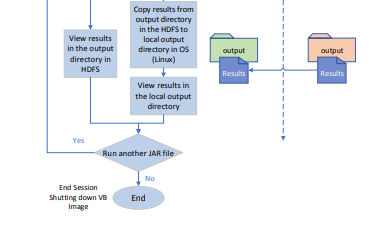
The coursework will be marked for 2 main criteria: 1. Identifying a real data analytics problem with strong motivation for using distributed processing methods (L01) 2. Designing, Implementing and Evaluating a working solution using distributed analytical techniques (MapReduce Algorithms) (L01 & LO2) Starting new Session Starting VB Image Start Local OS (Linux) Storage HDFS Storage Remove contents from hadoop tmp directory Format HDFS Start DFS Stap YARN Start YARN Stop DFS 6 Workers active? No Yes Create input directory in the HDFS Input Download data file Downloads Copy data file to input directory in the HDFS Data File Input Yes No New data file? Run JAR File on data file in the HDFS Downloads Input JAR File Data Fille View results in the output directory in HDFS Copy results from output directory in the HDFS to local output directory in Os (Linux) output output Results Results View results in the local output directory View results in the output directory in HDFS Copy results from output directory in the HDFS to local output directory in OS (Linux) output output Results Results View results in the local output directory Yes Run another JAR file No End Session Shutting down VB Image End # 00. terminal, shell and command line # 01. record command history [history, whoami, clear, hostname] history - whoami clear hostname history 13 clear # 02. get help [man] man clear # 03. list files [ls] ls ls -1 ls -1 ls -l -t ls -lt man ls # 04. make directories [mkdir] mkdir temp ls -lt # 05. change (working) directory [cd] cd temp ls # 06. get path to current directory [pwd] pwd # 07. save history in a file with redirection [>, cat] history > commands.txt ls -1 cat commands.txt # 08. autocompletion and move file [mv] cat commands.txt mkdir examples my commands.txt examples # 09. explore directory structure [tree] ls -l ls -lR tree cd .. tree cd - mkdir data doc scripts ls cd .. tree # 10. copy file [op] cd temp/examples pwd cp commands.txt cmds.txt ls -1 mv cmds.txt ../scripts cd .. tree my scripts/cmds.txt doc cd scripts mv cmds.txt cmds.sh # 11. absolute and relative paths pwd tree ../ tree /home/hadoop/temp cp /home/hadoop/temp/examples/commands.txt /home/hadoop/temp/data mv ../data/commands.txt ../data/list.dat mkdir ../data/backup tree -d /home/hadoop/temp # 12. readline shortcuts (ctrl+a/e/k arrows) # 13. remove file and directory [rm, rmdir] rm ../data/list.dat cd /home/hadoop/temp rmdir doc # 14. inspect files [more, file, wc, head, tail] cd cd temp/examples history > long_list.txt cat long_list.txt more long_list.txt less long list.txt file long list.txt head long list.txt tail long_list.txt # 15. grep lines in a file [grep] grep cd long list # 16. pipe grep od long_list wc -1
Step by Step Solution

There are 3 Steps involved in it

1 Expert Approved Answer
Step: 1 Unlock blur-text-image

Question Has Been Solved by an Expert!

Get step-by-step solutions from verified subject matter experts

Step: 2 Unlock
Step: 3 Unlock

Students Have Also Explored These Related General Management Questions!