







Question: Using Scenario Manager Please create scenarios based on the possibilities shown below Using Scenario Manager, please create scenarios based on the possibilities shown below. The
Using Scenario Manager Please create scenarios based on the possibilities shown below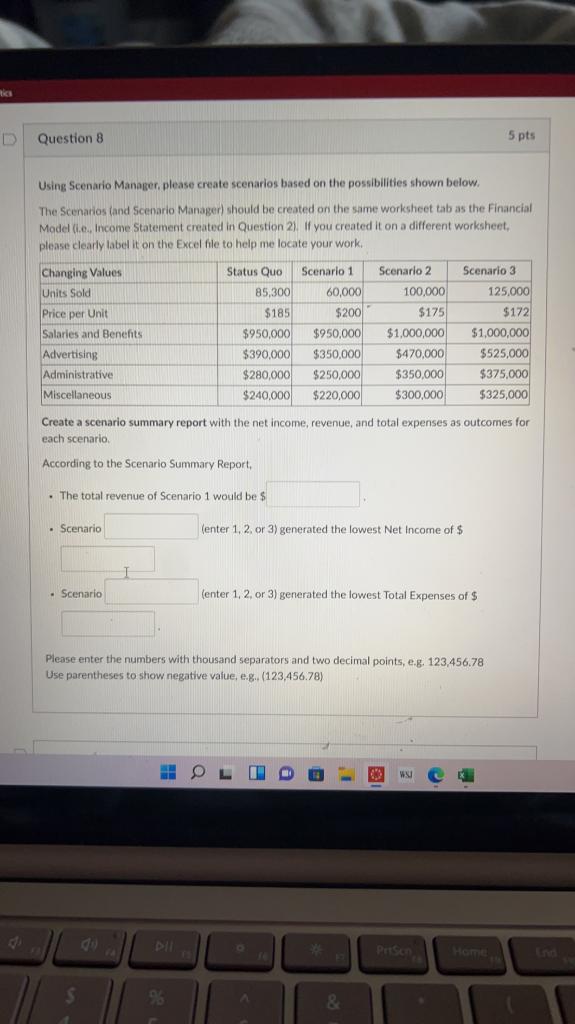
Using Scenario Manager, please create scenarios based on the possibilities shown below. The Scenanos tand Scenario Manager) should be created on the same worksheet tab as the Financial Model (i.e., Income Statement ereated in Question 2). If you created it on a different worksheet, please clearly label it on the Excel file to help me locate your work. Create a scenario summary report with the net income, revenue, and total expenses as outcomes for each scenario. According to the Scenario Summary Report, - The total revenue of Scenario 1 would be \$ - Scenario (enter 1,2 , or 3 ) generated the lowest Net income of $ - Scenario (enter 1,2 , or 3 ) generated the lowest Total Expenses of $ Please enter the numbers with thousand separators and two decimal points, e.g. 123,456.78 Use parentheses to show negative value, e.g. (123,456.78)
Step by Step Solution
There are 3 Steps involved in it

Get step-by-step solutions from verified subject matter experts
 Study Help