







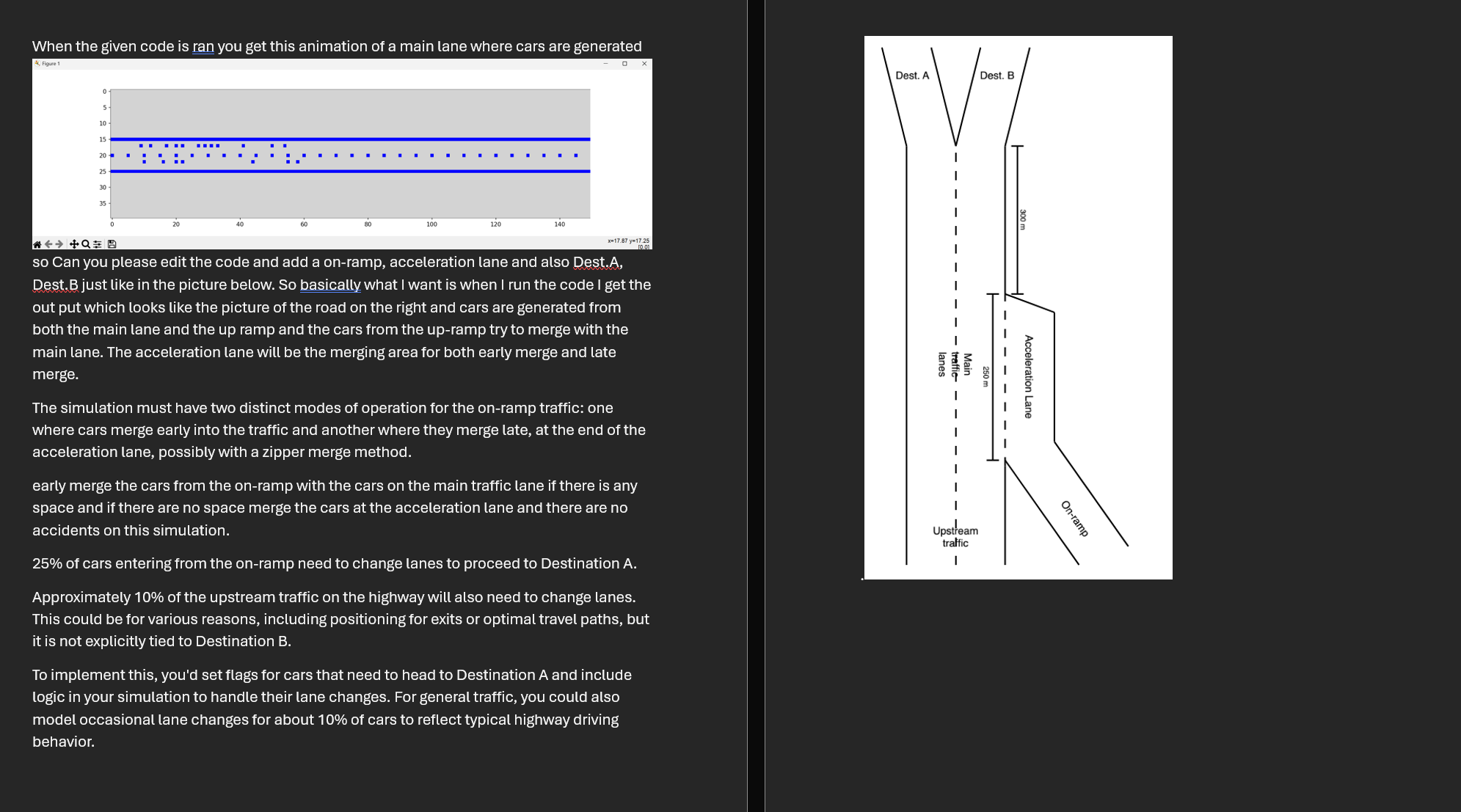
Question: can you edit the python code below according to the question in the screenshot. import math from matplotlib import pyplot as plt , colors from
can you edit the python code below according to the question in the screenshot.
import math
from matplotlib import pyplot as plt colors
from matplotlib.animation import FuncAnimation
import random
import numpy as np
from matplotlib.patches import Polygon
rand random.Random
LANEWIDTH
NUMLANES
HIGHWAYLENGTH
HIGHWAYWIDTH
INTERARRIVAL
CARSPEED
totalcars
newcars
totalinhighway
totalcarslist
newcarslist
colourmap colors.ListedColormaplightgrey "blue"
normalizer colors.Normalizevmin vmax
class Car:
def initself id highway:
self.id id
self.active False
self.highway highway
self.lane None
self.position None
if rand.choiceTrue False:
self.startlane
else:
self.startlane
self.startposition
def enterhighwayself lane, position:
if self.highway.enterhighwayself lane, position:
self.active True
def stepself:
if self.position HIGHWAYLENGTH :
self.highway.movecarself self.lane, self.position
else:
self.highway.leavehighwayself
def strself:
return id: d lane: d position: dselfid self.lane, self.position
class Highway:
def initself:
self.storage HighwayGrid
self.bitmap for in rangeHIGHWAYLENGTH for in rangeHIGHWAYWIDTH
self.timesteps
def enterhighwayself car, lane, position:
global totalcars
if not lane NUMLANES:
printInvalid lane!"
return False
if self.storage.isoccupiedlane position:
printMove rejected: occupied"
return False
self.storage.addcarlane position, car
car.lane lane
car.position position
totalcars
return True
def leavehighwayself car:
self.storage.removecarcar
def movecarself car, lane, position:
if position HIGHWAYLENGTH:
if not self.storage.isoccupiedlane position:
self.storage.movecarlane car.position, position, car
car.position position
def runstepself timestep:
for lane in rangeNUMLANES:
if rand.random INTERARRIVAL:
car Cartotalcars self
car.enterhighwaylane car.startposition
self.timestepslane
totalcarslist.appendtotalcars
newcarslist.appendnewcars
self.timestepslane
for car in self.storage.getlist:
if car.active:
if rand.random CARSPEED:
car.step
def refreshimageself:
# Clear the bitmap
self.bitmap for in rangeHIGHWAYLENGTH for in rangeHIGHWAYWIDTH
for position in rangeHIGHWAYLENGTH:
self.bitmapposition
self.bitmapposition
if position :
self.bitmapposition
for car in self.storage.getlist:
lane car.lane
position car.position
self.bitmap lane position
def isoccupiedself lane, position:
return self.storage.isoccupiedlane position
class HighwayGrid:
def initself:
self.grid None for in rangeHIGHWAYLENGTH for in rangeNUMLANES
def isoccupiedself lane, position:
return self.gridlaneposition is not None
def addcarself lane, position, car:
if self.gridlaneposition is None:
self.gridlaneposition car
return True
return False
def movecarself lane, oldposition, newposition, car:
self.gridlaneoldposition None
self.gridlanenewposition car
def removecarself car:
lane car.lane
position car.position
self.gridlaneposition None
def getlistself:
cars
for lane in self.grid:
for car in lane:
if car is not None:
cars.appendcar
return cars
hw Highway
display pltfigurefigsize
image pltimshowhwbitmap, cmapcolourmap, normnormalizer, animatedTrue
t
def updatefigureargs:
global t
t
hwrunstept
hwrefreshimage
image.setarrayhwbitmap
return image,
anim FuncAnimationdisplay updatefigure, frames interval blitTrue, repeatFalse
pltshow
Step by Step Solution
There are 3 Steps involved in it
1 Expert Approved Answer
Step: 1 Unlock

Question Has Been Solved by an Expert!
Get step-by-step solutions from verified subject matter experts
Step: 2 Unlock
Step: 3 Unlock
 Study Help