







Question: Create a Windows Forms application. Use the following names for the project and solution, respectively: Chopkins Project and Chopkins Solution. Save the application in
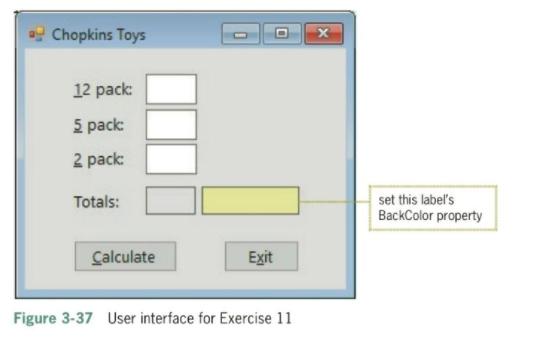
Create a Windows Forms application. Use the following names for the project and solution, respectively: Chopkins Project and Chopkins Solution. Save the application in the VB2017\Chap03 folder. Change the form file's name to Main Form.vb. Change the form's name to frmMain. Create the interface shown in Figure 3-37. The interface contains six labels, three text boxes, and two buttons. The application calculates and displays the total number of packs ordered and the total price of the order. The prices of a 12 pack, a 5 pack, and a 2 pack are $14.99, $6.99, and $2.50, respectively. Use variables and named constants in your code. Enter the three Option statements in the Code Editor window. The total sales amount should be displayed with a comma (if necessary), a dollar sign and two decimal places. Code each text box's TextChanged and Enter event procedures. Save the solution and then start and test the application. 11. INTERMEDIATE * Chopkins Toys 12 pack: 5 pack: 2 pack: Totals: set this label's BackColor property Calculate Exit Figure 3-37 User interface for Exercise 11
Step by Step Solution
There are 3 Steps involved in it
ANSWER OUTPUT THANK YOU IN TEXT FORMAT Public Class form1 Private ... View full answer

Get step-by-step solutions from verified subject matter experts
 Study Help