







Question: SOLUTION REQUIREMENTS Write a sub procedure named Sort _ Flight _ Information that will: a . Use the End property of the Range object to
SOLUTION REQUIREMENTS
Write a sub procedure named SortFlightInformation that will:
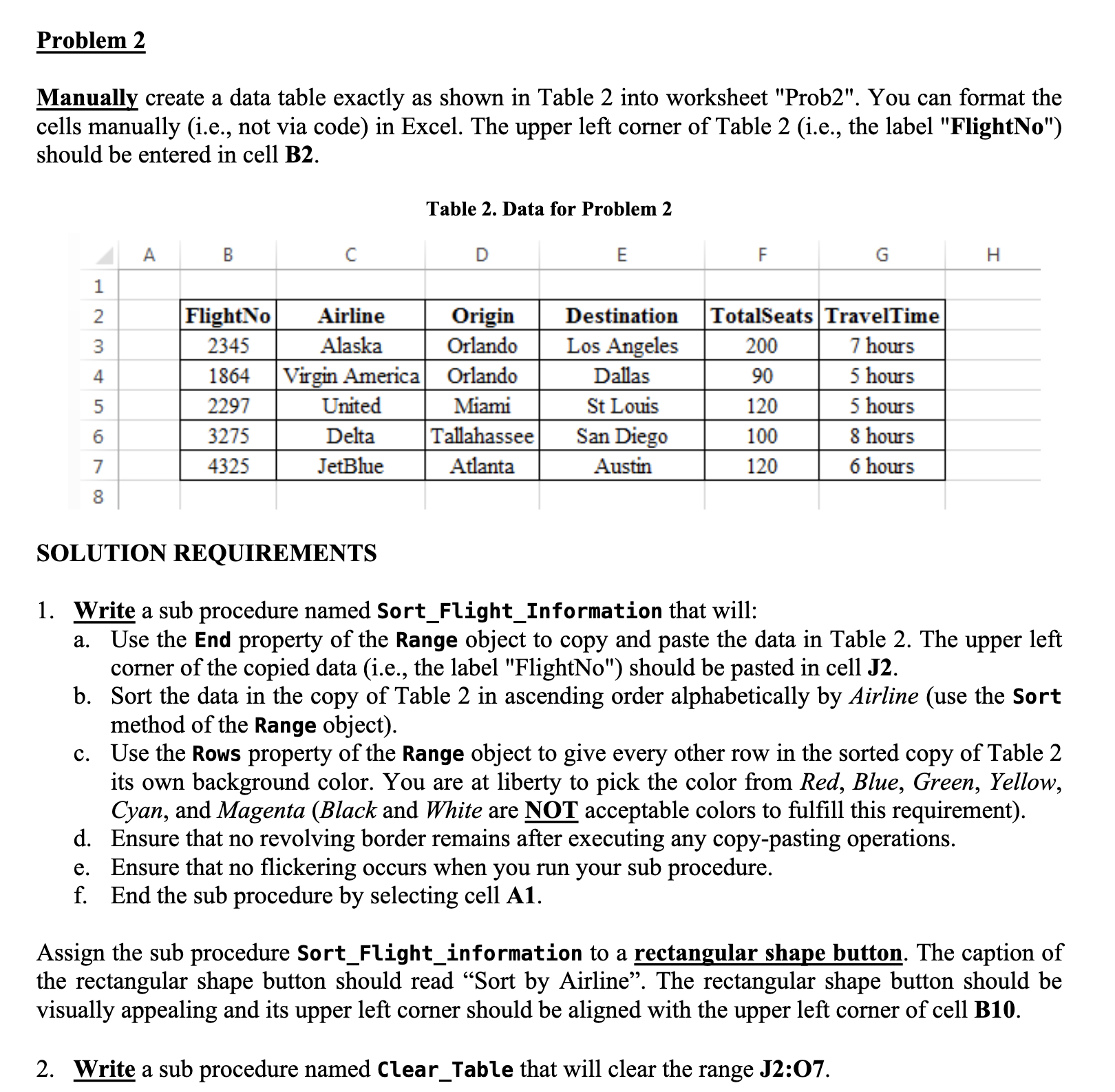
a Use the End property of the Range object to copy and paste the data in Table The upper left
corner of the copied data ie the label "FlightNo" should be pasted in cell
b Sort the data in the copy of Table in ascending order alphabetically by Airline use the Sort
method of the Range object
c Use the Rows property of the Range object to give every other row in the sorted copy of Table
its own background color. You are at liberty to pick the color from Red, Blue, Green, Yellow,
Cyan, and Magenta Black and White are NOT acceptable colors to fulfill this requirement
d Ensure that no revolving border remains after executing any copypasting operations.
e Ensure that no flickering occurs when you run your sub procedure.
f End the sub procedure by selecting cell A
Assign the sub procedure SortFlightinformation to a rectangular shape button. The caption of
the rectangular shape button should read "Sort by Airline". The rectangular shape button should be
visually appealing and its upper left corner should be aligned with the upper left corner of cell B
Write a sub procedure named ClearTable that will clear the range J: Please use basic VBA code and Comment your code aswell. I will Like when the work is done and please test the code to see if if it works correctly as well as follows the guidlines. Thank you so much this has been a headache.
Step by Step Solution
There are 3 Steps involved in it
1 Expert Approved Answer
Step: 1 Unlock

Question Has Been Solved by an Expert!
Get step-by-step solutions from verified subject matter experts
Step: 2 Unlock
Step: 3 Unlock
 Study Help