New Semester
Started
Get
50% OFF
Study Help!
--h --m --s
Claim Now
Question Answers
Textbooks
Find textbooks, questions and answers
Oops, something went wrong!
Change your search query and then try again
S
Books
FREE
Study Help
Expert Questions
Accounting
General Management
Mathematics
Finance
Organizational Behaviour
Law
Physics
Operating System
Management Leadership
Sociology
Programming
Marketing
Database
Computer Network
Economics
Textbooks Solutions
Accounting
Managerial Accounting
Management Leadership
Cost Accounting
Statistics
Business Law
Corporate Finance
Finance
Economics
Auditing
Tutors
Online Tutors
Find a Tutor
Hire a Tutor
Become a Tutor
AI Tutor
AI Study Planner
NEW
Sell Books
Search
Search
Sign In
Register
study help
computer science
programming with microsoft visual basic 2015
Programming With Microsoft Visual Basic 2012 6th Edition Diane Zak - Solutions
14. Which of the following For clauses indicates that the loop instructions should be processed as long as the intX variable’s value is less than 100?a. For intX As Integer = 10 To 100b. For intX As Integer = 10 To 99c. For intX As Integer = 10 To 101d. all of the above
13. Which of the following statements is equivalent to the statement dblTotal = dblTotal +dblScore?a. dblTotal += dblScoreb. dblScore += dblTotalc. dblTotal =+ dblScored. dblScore =+ dblTotal
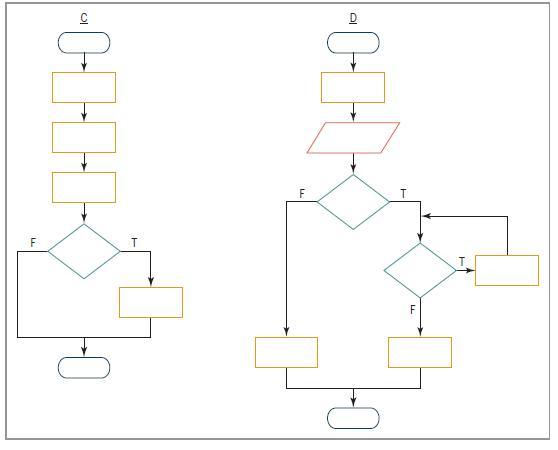
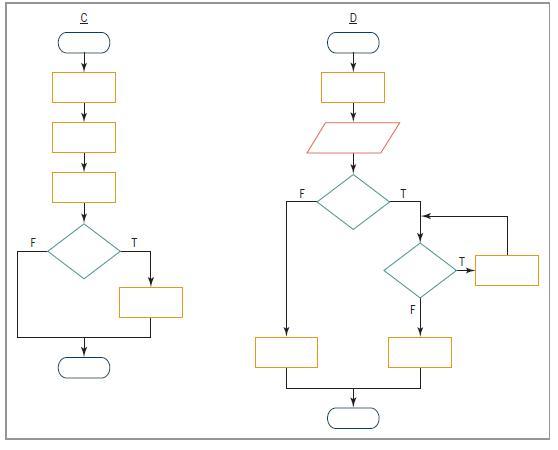
12. Which of the following control structures are used in flowchart D in Figure 6-34?(Select all that apply.)a. sequenceb. selectionc. repetition A |-0- F T
11. Which of the following control structures are used in flowchart C in Figure 6-34?(Select all that apply.)a. sequenceb. selectionc. repetition A |-0- F T
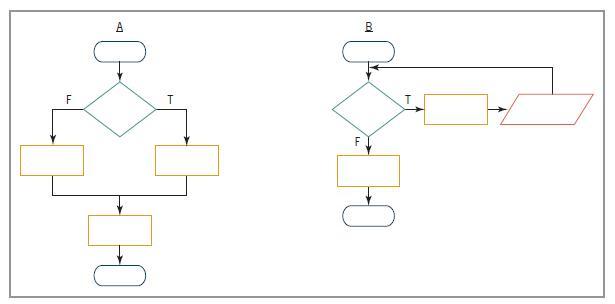
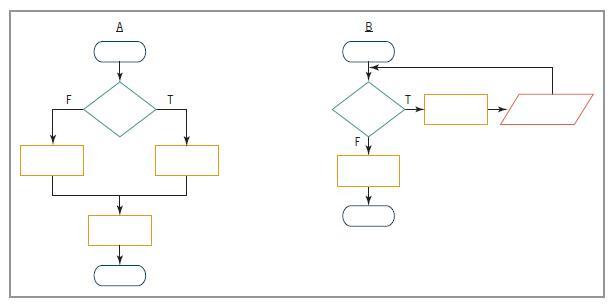
10. Which of the following control structures are used in flowchart B in Figure 6-34?(Select all that apply.)a. sequenceb. selectionc. repetition A |-0- F T
9. Which of the following control structures are used in flowchart A in Figure 6-34?(Select all that apply.)a. sequenceb. selectionc. repetition A F T F B
8. A procedure allows the user to enter one or more values. The first input instruction will get the first value only and is referred to as the read.a. enteringb. initializerc. primingd. starter
7. The computer will stop processing the loop in Review Question 6 when the intCount variable contains the number .a. 11b. 12c. 13d. 14
6. How many times will the MessageBox.Show method in the following code be processed?For intCount As Integer = 6 To 13 Step 2 MessageBox.Show("Hello")Next intCounta. 3b. 4c. 5d. 8
5. How many times will the MessageBox.Show method in the following code be processed?Dim intCount As Integer Do MessageBox.Show("Hello")intCount += 1 Loop While intCount > 4a. 0b. 1c. 4d. 5
4. How many times will the MessageBox.Show method in the following code be processed?Dim intCount As Integer Do While intCount > 4 MessageBox.Show("Hello")intCount = intCount + 1 Loopa. 0b. 1c. 4d. 5
3. The instructions in a loop might not be processed at all, whereas the instructions in a loop are always processed at least once.a. posttest, pretestb. pretest, posttest
2. Which of the following statements can be used to code a loop whose instructions you want processed 10 times?a. Do…Loopb. For…Nextc. either a or b
1. Which of the following clauses stops the loop when the value in the intPopulation variable is less than the number 5000?a. Do While intPopulation >= 5000b. Do Until intPopulation < 5000c. Loop While intPopulation >= 5000d. all of the above
5. If the txtAge control is empty, the blnIsOk = Integer.TryParse(txtAge.Text, intAge) statement will store in the intAge variable and also assign to the blnIsOk variable.a. 0, Trueb. 0, Falsec. False, the empty stringd. the empty string, False
4. Which of the following statements generates a random integer from 1 to 25, inclusive?a. intNum = randGen.Next(1, 25)b. intNum = randGen.Next(1, 26)c. intNum = randGen(1, 25)d. intNum = randGen.NextNumber(1, 26)
3. Which of the following statements declares an object to represent the pseudo-random number generator in a procedure?a. Dim randGen As New RandomNumberb. Dim randGen As New Generatorc. Dim randGen As New Randomd. Dim randGen As New RandomObject
2. Which of the following statements will hide the picCar control?a. picCar.Hideb. picCar.Hide = Truec. picCar.Invisible = Trued. picCar.Visible = False
1. If the txtPrice control contains the value 75, what value will the Decimal.TryParse(txtPrice.Text, decPrice) method return?a. Falseb. Truec. 75d. 75.00
10. If the blnSenior variable contains the Boolean value False, then the Not blnSenior condition will evaluate to .a. Trueb. False
9. Which of the following events occurs when a check box is clicked?a. Checkb. Checkedc. CheckedChanged. CheckedChanged
8. Which of the following If clauses will evaluate to True when the Bonus check box is selected?a. If chkBonus.Check = True Thenb. If chkBonus.Checked Thenc. If chkBonus.Selected = True Thend. If chkBonus.Selected Then
7. If a radio button is selected, its property contains the Boolean value True.a. Checkedb. Onc. Selectedd. Selection
6. A form contains six check boxes. Three of the check boxes are contained in a group box.How many of the check boxes on the form can be selected at the same time?a. oneb. twoc. threed. six
5. A form contains six radio buttons. Three of the radio buttons are contained in a group box. How many of the radio buttons on the form can be selected at the same time?a. oneb. twoc. threed. six
4. It is customary in Windows applications to designate a default check box.a. Trueb. False
3. The text appearing in check boxes and radio buttons should be entered using .a. sentence capitalizationb. book title capitalizationc. either book title capitalization or sentence capitalization
2. If a check box is not selected, what value is contained in its Checked property?a. Trueb. Uncheckedc. Falsed. Unselected
1. What is the minimum number of radio buttons in a group?a. oneb. twoc. threed. There is no minimum number of radio buttons.
4. Write the Visual Basic code that displays the message “Highest honors” when a student’s test score is 90 or above. When the test score is 70 through 89, display the message “Good job”. For all other test scores, display the message “Retake the test”.The test score is stored in the
4. Write the Visual Basic code for the algorithm shown in Figure 5-10 in this lesson.The membership status (either N for non-member or M for member) is stored, in uppercase, in a variable named strStatus. The day of the week information (either D for weekday or E for weekend) is stored, in
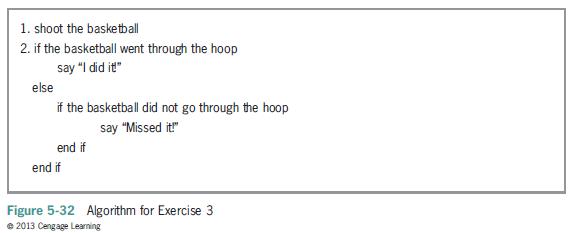
3. What is wrong with the algorithm shown in Figure 5-32? 1. shoot the basketball 2. if the basketball went through the hoop else say "I did it!" if the basketball did not go through the hoop say "Missed it!" end if end if Figure 5-32 Algorithm for Exercise 3 2013 Cengage Learning
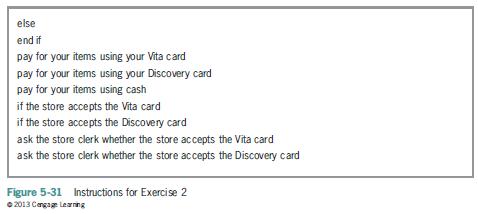
2. Caroline is at a store’s checkout counter. She’d like to pay for her purchase using one of her credit cards—either her Discovery card or her Vita card, but preferably her Discovery card. However, she is not sure whether the store accepts either card. If the store doesn’t accept either
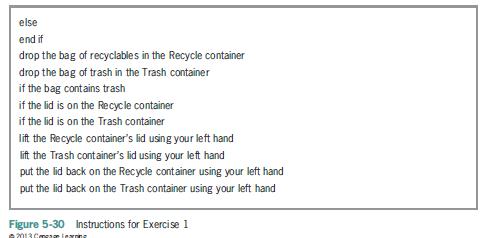
Travis is standing in front of two containers: one marked Trash and the other marked Recycle. In his right hand, he is holding a bag that contains either trash or recyclables.Travis needs to lift the lid from the appropriate container (if necessary), then drop the bag in the container, and then put
15. Explain the meaning of the term “desk-checking.”
14. List the four errors commonly made when writing selection structures. Which errors produce the correct results, but in a less efficient way?
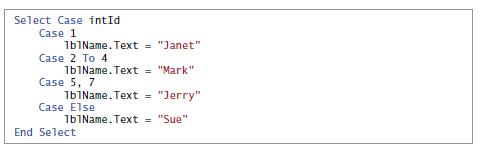
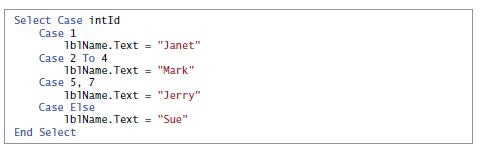
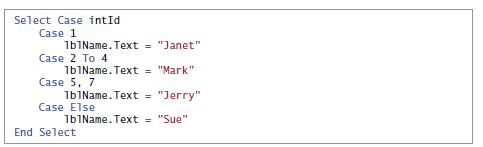
13. What will the code in Figure 5-29 display when the intId variable contains the number 6?a. Janetb. Markc. Jerryd. Sue Select Case intId Case 1 1b1Name.Text = "Janet" Case 2 To 4 1b1Name.Text = "Mark" Case 5, 7 1b1Name.Text = "Jerry" Case Else 1b1Name.Text = "Sue" End Select
12. What will the code in Figure 5-29 display when the intId variable contains the number 3?a. Janetb. Markc. Jerryd. Sue Select Case intId Case 1 1b1Name.Text = "Janet" Case 2 To 4 1b1Name.Text = "Mark" Case 5, 7 1b1Name.Text = "Jerry" Case Else 1b1Name.Text = "Sue" End Select
11. What will the code in Figure 5-29 display when the intId variable contains the number 2?a. Janetb. Markc. Jerryd. Sue Select Case intId Case 1 1b1Name.Text = "Janet" Case 2 To 4 1b1Name.Text = "Mark" Case 5, 7 1b1Name.Text = "Jerry" Case Else 1b1Name.Text = "Sue" End Select
10. Which of the following Case clauses is valid in a Select Case statement whose selectorExpression is an Integer variable named intCode?a. Case Is > 7b. Case 3, 5c. Case 1 To 4d. all of the above
9. A nested selection structure can appear .a. only in an outer selection structure’s false pathb. only in an outer selection structure’s true pathc. in either an outer selection structure’s true path or its false path
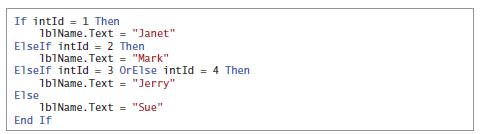
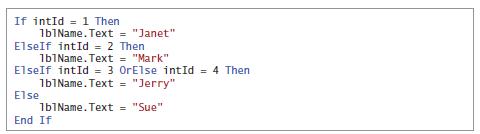
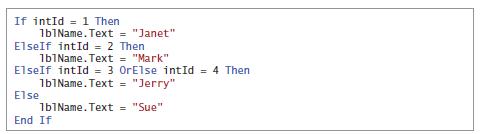
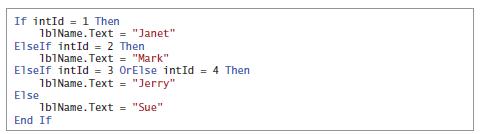
8. What will the code in Figure 5-28 display when the intId variable contains the number 8?a. Janetb. Jerryc. Markd. Sue If intId 1 Then 1b1Name.Text = "Janet" ElseIf intId = 2 Then 1b1Name.Text = "Mark" ElseIf intId = 3 OrElse intId = 4 Then 1b1Name.Text = "Jerry" Else 1b1Name.Text = "Sue" End If
7. What will the code in Figure 5-28 display when the intId variable contains the number 3?a. Janetb. Jerryc. Markd. Sue If intId 1 Then 1b1Name.Text = "Janet" ElseIf intId = 2 Then 1b1Name.Text = "Mark" ElseIf intId = 3 OrElse intId = 4 Then 1b1Name.Text = "Jerry" Else 1b1Name.Text = "Sue" End If
6. What will the code in Figure 5-28 display when the intId variable contains the number 4?a. Janetb. Jerryc. Markd. Sue If intId 1 Then 1b1Name.Text = "Janet" ElseIf intId = 2 Then 1b1Name.Text = "Mark" ElseIf intId = 3 OrElse intId = 4 Then 1b1Name.Text = "Jerry" Else 1b1Name.Text = "Sue" End If
5. What will the code in Figure 5-28 display when the intId variable contains the number 2?a. Janetb. Jerryc. Markd. Sue If intId 1 Then 1b1Name.Text = "Janet" ElseIf intId = 2 Then 1b1Name.Text = "Mark" ElseIf intId = 3 OrElse intId = 4 Then 1b1Name.Text = "Jerry" Else 1b1Name.Text = "Sue" End If
4. If the intNum variable contains the number 2000, what value will be in the variable after the code in Figure 5-27 is processed?a. 0b. 2000c. 4000d. 6000
3. If the intNum variable contains the number 500, what value will be in the variable after the code in Figure 5-27 is processed?a. 0b. 500c. 1000d. 1500
2. If the intNum variable contains the number 1000, what value will be in the variable after the code in Figure 5-27 is processed?a. 0b. 1000c. 2000d. 3000
1. If the intNum variable contains the number 600, what value will be in the variable after the code in Figure 5-27 is processed?a. 0b. 600c. 1200d. 1800
6. Which of the following tells the computer to highlight all of the text contained in the txtName control?a. txtName.SelectAll()b. txtName.HighlightAll()c. Highlight(txtName)d. SelectAll(txtName.Text)
5. When a user tabs to a text box, the text box’s event occurs.a. Accessb. Enterc. TabOrderd. TabbedTo
4. Which of the following If clauses determines whether the user pressed the % key?a. If ControlChars.PercentSign = True Thenb. If e.KeyChar = "%" Thenc. If e.KeyChar = Chars.PercentSign Thend. If KeyChar.ControlChars = "%" Then
3. Which of the following If clauses determines whether the user pressed the Backspace key?a. If e.KeyChar = ControlChars.Back Thenb. If e.KeyChar = Backspace Thenc. If e.KeyChar = ControlChars.Backspace Thend. If ControlChars.BackSpace = True Then
2. When entered in the appropriate event procedure, which of the following statements cancels the key pressed by the user?a. e.Cancel = Trueb. e.Cancel = Falsec. e.Handled = Trued. e.Handled = False
1. A control’s event occurs each time a user presses a key while the control has the focus.a. Focusb. Keyc. KeyFocusd. KeyPress
5. If the user clicks the Yes button in a message box, the message box returns the number 6, which is equivalent to which value?a. Windows.Forms.DialogResultButton.Yesb. Windows.Forms.DialogResult.Yesc. Windows.Forms.DialogResult.YesButtond. none of the above
4. If a message is for informational purposes only and does not require the user to make a decision, the message box should display which of the following?a. an OK button and the Information iconb. an OK button and the Exclamation iconc. a Yes button and the Information icond. any button and the
3. You use the constant to include the Exclamation icon in a message box.a. MessageBox.Exclamationb. MessageBox.IconExclamationc. MessageBoxIcon.Exclamationd. MessageBox.WarningIcon
2. What is the TabIndex value of the first control added to a group box whose TabIndex value is 3?a. 3b. 3.0c. 3.1d. none of the above
1. Which of the following statements is false?a. When you delete a group box, the controls contained within the group box are also deleted.b. Moving a group box also moves all of the controls contained within the group box.c. A group box’s Label property specifies its identifying label.d. You can
12. Write the Visual Basic code that swaps the values stored in the decLow and decHigh variables, but only if the value stored in the decHigh variable is less than the value stored in the decLow variable.
11. Assume that a customer purchases either a Harris Brothers item or a Jacob Co.item. If the item is a sweater manufactured by Harris Brothers, the customer is entitled to a 5% discount. Write the Visual Basic code for a procedure that calculates and displays the discount (if any) and the new
10. In this exercise, you modify the Kettleson application from this lesson. Use Windows to make a copy of the Kettleson Solution folder. Rename the copy Modified Kettleson Solution. Open the Kettleson Solution (Kettleson Solution.sln) file contained in the Modified Kettleson Solution folder. Open
9. A procedure should calculate a 2.5% commission when the strCommType variable contains the string “Prime” (in any case); otherwise, it should calculate a 2% commission. The commission is calculated by multiplying the commission rate by the contents of the dblSales variable. Display the
8. Write an If…Then…Else statement that displays the string “Cat” in the lblAnimal control when the strAnimal variable contains the letter “C” (in any case); otherwise, display the string “Dog”. Also draw the flowchart.
7. Write an If…Then…Else statement that displays the value 25 in the lblShipping control when the strState variable contains the string “Alaska” (in any case);otherwise, display the value 15.
6. Write an If…Then…Else statement that assigns the number 35 to the intCommission variable when the decSales variable contains a number that is less than or equal to$250; otherwise, assign the number 50.
5. Write an If…Then…Else statement that displays the string “Time to reorder” in the lblMsg control when the intNumUnits variable contains a number that is less than 5;otherwise, display the string “We have enough in stock”.
4. Write an If…Then…Else statement that displays the string “Incorrect quantity” in the lblMsg control when the intQuantity variable contains a number that is less than 0;otherwise, display the string “Valid quantity”.
3. Write an If…Then…Else statement that displays the string “Please enter the invoice number” in the lblMsg control when the txtInvoiceNumcontrol does not contain any data.
2. Write an If…Then…Else statement that displays the string “Vegetable” in the lblType control when the txtFood control contains the string “Corn” (in any case).
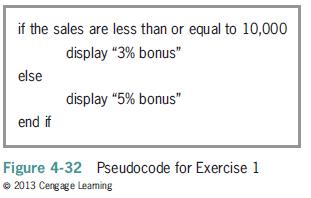
1. Draw the flowchart corresponding to the pseudocode shown in Figure 4-32. if the sales are less than or equal to 10,000 display "3% bonus" else display "5% bonus" end if Figure 4-32 Pseudocode for Exercise 1 2013 Cengage Leaming
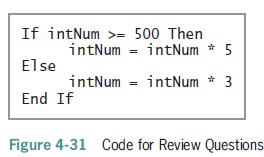
14. If the intNum variable contains the number 500, what value will be in the variable after the selection structure in Figure 4-31 is processed?a. 0b. 500c. 1500d. 2500
13. If the intNum variable contains the number 1000, what value will be in the variable after the selection structure in Figure 4-31 is processed?a. 0b. 1000c. 3000d. 5000
12. If the intNum variable contains the number 90, what value will be in the variable after the selection structure in Figure 4-31 is processed?a. 0b. 90c. 270d. 450
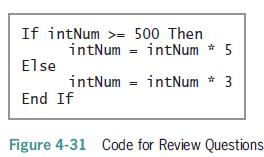
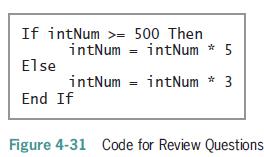
14. If the intNum variable contains the number 500, what value will be in the variable after the selection structure in Figure 4-31 is processed?a. 0b. 500c. 1500d. 2500 If intNum >= 500 Then intNum intNum * 5 Else intNum = intNum * 3 End If Figure 4-31 Code for Review Questions
13. If the intNum variable contains the number 1000, what value will be in the variable after the selection structure in Figure 4-31 is processed?a. 0b. 1000c. 3000d. 5000 If intNum >= 500 Then intNum intNum * 5 Else intNum = intNum * 3 End If Figure 4-31 Code for Review Questions
12. If the intNum variable contains the number 90, what value will be in the variable after the selection structure in Figure 4-31 is processed?a. 0b. 90c. 270d. 450 If intNum >= 500 Then intNum intNum * 5 Else intNum = intNum * 3 End If Figure 4-31 Code for Review Questions
11. The expression 5 * 4 > 6 ˆ 2 AndAlso True OrElse False evaluates to .a. Trueb. False
10. The expression 5 * 4 > 6 ˆ 2 evaluates to .a. Trueb. False
9. The expression 7 + 3 * 2 > 5 * 3 AndAlso True evaluates to .a. Trueb. False
8. The expression 8 >= 4 + 6 OrElse 5 > 6 AndAlso 4 < 7 evaluates to .a. Trueb. False
7. The expression 6 + 3 > 7 AndAlso 11 > 2 * 5 evaluates to .a. Trueb. False
6. The expression 6 > 12 OrElse 4 < 5 evaluates to .a. Trueb. False
5. An expression can contain arithmetic, comparison, and logical operators. Indicate the order of precedence for the three types of operators by placing a number (1, 2, or 3) on the line to the left of the operator type.Arithmetic Logical Comparison
4. The six logical operators are listed below. Indicate their order of precedence by placing a number (1, 2, and so on) on the line to the left of the operator. (If two or more operators have the same precedence, assign the same number to each.)Xor And Not Or AndAlso OrElse
3. Which of the following If clauses compares the string contained in the txtId control with the state abbreviation Tx? (Be sure the clause will handle Tx, TX, tx, and tX.)a. If txtId.Text = ToUpper("TX") Thenb. If txtId.Text = ToLower("tx") Thenc. If ToUpper(txtId.Text) = "TX" Thend. If
2. Which of the following is a valid condition for an If…Then…Else statement?a. intQuantity > 0 AndAlso < 500b. intQuantity < 0 AndAlso intQuantity > 5000c. intQuantity < 0 OrElse intQuantity > 5000d. intQuantity > 0 OrElse > 500
1. What is the scope of variables declared in an If…Then…Else statement’s true path?a. only the true path in the If…Then…Else statementb. the entire applicationc. the procedure in which the If…Then…Else statement appearsd. the entire If…Then…Else statement
Create a Visual Basic Windows application. Use the following names for the solution and project, respectively: Credit Card Solution and Credit Card Project. Save the application in the VB2012\Chap03 folder. Change the form file’s name to Main Form.vb. Change the form’s name to frmMain. Create
Create a Visual Basic Windows application. Use the following names for the solution and project, respectively: Car Solution and Car Project. Save the application in the VB2012\Chap03 folder. Change the form file’s name to Main Form.vb. Change the form’s name to frmMain. The application’s
5. Which of the following statements declares a procedure-level variable that retains its value after the procedure in which it is declared ends?a. Const intCounter As Integerb. Dim intCounter As Constantc. Dim intCounter As Integerd. Static intCounter As Integer
4. Which of the following statements declares a procedure-level variable that is removed from the computer’s memory when the procedure ends?a. Const intCounter As Integerb. Dim intCounter As Integerc. Local intCounter As Integerd. Static intCounter As Integer
3. Which of the following clauses associates a procedure with the TextChanged event of the txtMid and txtFinal controls?a. Associates txtMid_TextChanged, txtFinal_TextChangedb. Handled txtMid_TextChanged, txtFinal_TextChangedc. Controls txtMid.TextChanged And txtFinal.TextChangedd. Handles
2. A variable is a procedure-level variable that retains its value after the procedure in which it is declared ends.a. constantb. staticc. stationaryd. term
1. Which of the following events occurs when a change is made to the contents of a text box?a. Changeb. Changedc. TextChangedd. TextChange
12. In this exercise, you learn about the CancelButton property of a Windows form. Open the Cancel Solution (Cancel Solution.sln) file contained in the VB2012\Chap03\Cancel Solution folder.a. Open the Code Editor window and review the existing code. Start the application.Type your first name in the
11. In this exercise, you modify the Turner application from Exercise 8. The modified application will allow the user to enter a separate raise percentage for each job code. Use Windows to make a copy of the Turner Solution folder. Rename the copy Modified Turner Solution. Open the Turner Solution
10. Create a Visual Basic Windows application. Use the following names for the solution and project, respectively: Martin Motors Solution and Martin Motors Project. Save the application in the VB2012\Chap03 folder. Change the form file’s name to Main Form.vb.Change the form’s name to frmMain.
9. Create a Visual Basic Windows application. Use the following names for the solution and project, respectively: Red Lion Solution and Red Lion Project. Save the application in the VB2012\Chap03 folder. Change the form file’s name to Main Form.vb. Change the form’s name to frmMain. The
Showing 1000 - 1100
of 1847
First
4
5
6
7
8
9
10
11
12
13
14
15
16
17
18
Last
Step by Step Answers

 Get 50% OFF
Claim Now
Get 50% OFF
Claim Now