New Semester
Started
Get
50% OFF
Study Help!
--h --m --s
Claim Now
Question Answers
Textbooks
Find textbooks, questions and answers
Oops, something went wrong!
Change your search query and then try again
S
Books
FREE
Study Help
Expert Questions
Accounting
General Management
Mathematics
Finance
Organizational Behaviour
Law
Physics
Operating System
Management Leadership
Sociology
Programming
Marketing
Database
Computer Network
Economics
Textbooks Solutions
Accounting
Managerial Accounting
Management Leadership
Cost Accounting
Statistics
Business Law
Corporate Finance
Finance
Economics
Auditing
Tutors
Online Tutors
Find a Tutor
Hire a Tutor
Become a Tutor
AI Tutor
AI Study Planner
NEW
Sell Books
Search
Search
Sign In
Register
study help
computer science
programming with microsoft visual basic 2015
Programming With Microsoft Visual Basic 2015 7th Edition Diane Zak - Solutions
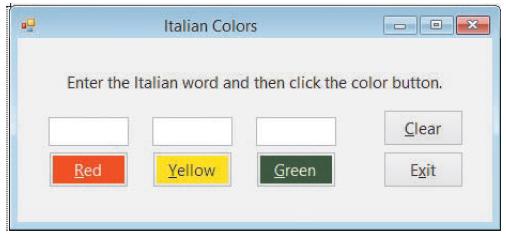
Create an application that can be used to teach the Italian words for the colors red, yellow, and green. Use the following names for the solution and project, respectively: Colors Solution and Colors Project. Save the application in the VB2015\Chap04 folder. Create the interface shown in Figure
The statement txtHours.Focus() invokes the txtHours _____________________ event.a. Clickb. Enterc. Focusd. SetFocus
Write an If...Then...Else statement that displays the value 25 in the lblShipping control when the strState variable contains the string “Alaska” (in any case); otherwise, display the value 15.
The expression 6 > 12 OrElse 4 < 5 evaluates to _____________________.a. Trueb. False
In this exercise, you create an application for Beachwood Industries. Use the following names for the solution and project, respectively: Beachwood Solution and Beachwood Project. Save the application in the VB2015\Chap04 folder. The application’s interface should provide text boxes for the user
Which of the following tells the computer to highlight all of the text contained in the txtName control?a. txtName.SelectAll()b. txtName.HighlightAll()c. Highlight(txtName)d. SelectAll(txtName.Text)
Write an If...Then...Else statement that assigns the number 35 to the intCommission variable when the decSales variable contains a number that is less than or equal to $250; otherwise, assign the number 50.
Marcy’s Department store is having a BoGoHo (Buy One, Get One Half Off) sale. The store manager wants an application that allows the salesclerk to enter the prices of two items. The application should calculate and display the total amount the customer owes. The half-off should always be applied
When a user tabs to a text box, the text box’s _____________________ event occurs.a. Accessb. Enterc. TabOrderd. TabbedTo
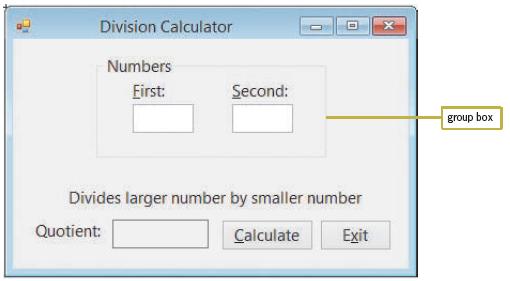
Create an application that displays the result of dividing the larger of two numbers entered by the user by the smaller one, as indicated in Figure 4-48. Use the following names for the solution and project, respectively: Division Solution and Division Project. Save the application in the
If the user clicks the Yes button in a message box, the message box returns the number 6, which is equivalent to which value?a. DialogResultButton.Yesb. DialogResult.Yesc. DialogResult.YesButtond. None of the above
Write an If...Then...Else statement that displays the string “Time to reorder” in the lblMsg control when the intInStock variable contains a number that is less than 250; otherwise, display the string “We have enough in stock”.
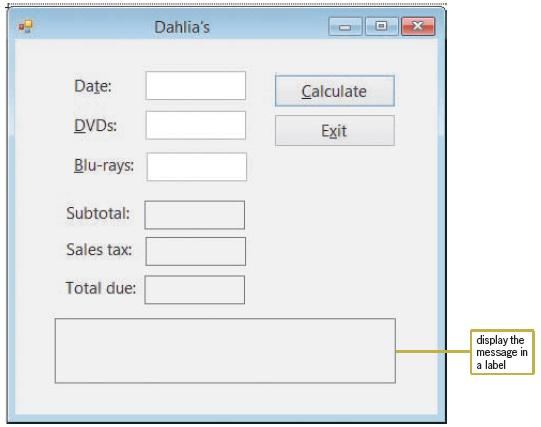
Create an application, using the following names for the solution and project, respectively: Dahlia Solution and Dahlia Project. Save the application in the VB2015\ Chap04 folder. Create the interface shown in Figure 4-56. The interface provides text boxes for the salesclerk to enter the numbers of
Triple County Electric wants you to create an application that calculates a customer’s monthly electric bill, given the customer’s name and his or her current and previous meter readings. If the current reading is less than the previous reading, use the MessageBox.Show method to display an
Write an If...Then...Else statement that displays the string “Incorrect quantity” in the lblMsg control when the intQuantity variable contains a number that is less than 0; otherwise, display the string “Valid quantity”.
Which of the following If clauses should you use to compare the string contained in the txtId control with the state abbreviation CA?a. If txtId.Text = ToUpper(“CA”) Thenb. If txtId.Text = ToLower(“ca”) Thenc. If txtId.Text.ToUpper = “CA” Thend. If ToUpper(txtId.Text) = “CA” Then
Open the MessageBox Value Solution (MessageBox Value Solution.sln) file contained in the VB2015\Chap04\MessageBox Value Solution folder. Open the Code Editor window. When the Hours worked text box receives the focus, its existing text should be selected. The text box should accept only numbers, the
Tea Time Company wants you to create an application that allows a clerk to enter the number of pounds of tea ordered, the price per pound, and whether the customer should be charged a $15 shipping fee. The application should calculate and display the total amount the customer owes. Use the
You use the _____________________ constant to include the Exclamation icon in a message box.a. MessageBox.Exclamationb. MessageBox.IconExclamationc. MessageBoxIcon.Exclamationd. MessageBox.WarningIcon
Write an If...Then...Else statement that displays the string “Please enter ZIP code” in the lblMsg control when the txtZip control does not contain any data.
Which of the following compound conditions can be used to determine whether the value in the intQuantity variable is outside the range of 0 through 500?a. intQuantity < 0 OrElse intQuantity > 500b. intQuantity > 0 AndAlso intQuantity < 500c. intQuantity <= 0 OrElse intQuantity >=
In this exercise, you modify the bakery application from Chapter 3. Use Windows to copy the Bakery Solution folder from the VB2015\Chap03 folder to the VB2015\Chap04 folder, and then open the Bakery Solution (Bakery Solution.sln) file. When a text box in the interface receives the focus, its
When entered in the appropriate event procedure, which of the following statements cancels the key pressed by the user?a. e.Cancel = Trueb. e.Cancel = Falsec. e.Handled = Trued. e.Handled = False
In this exercise, you modify the Net Income or Loss application from Lesson A. Use Windows to make a copy of the Net Solution folder. Rename the copy Net Solution- Print. Open the Net Solution (Net Solution.sln) file contained in the Net Solution-Print folder. Locate the btnCalc_Click procedure in
What is the TabIndex value of the first control added to a group box whose TabIndex value is 3?a. 3b. 3.0c. 3.1d. None of the above
Write an If...Then...Else statement that displays the string “Columbia” in the lblCapital control when the txtState control contains the string “SC” (in any case).
An If...Then...Else statement in the btnCalc_Click procedure declares a variable in its false path. Where can the variable be used?a. in the entire Code Editor windowb. in the entire btnCalc_Click procedurec. in both paths in the If...Then...Else statementd. only in the false path in the
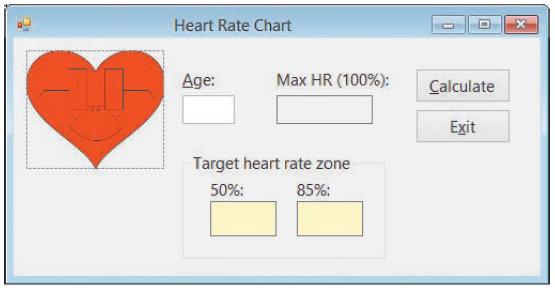
Create an application that displays a person’s maximum heart rate, given his or her age. The maximum heart rate is calculated by subtracting the person’s age from the number 220. The application should also display the person’s target heart rate zone, which is 50% to 85% of the maximum heart
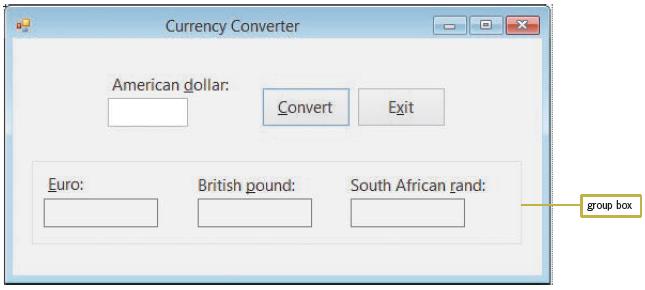
Create an application that converts American dollars to the three currencies indicated in Figure 4-47. Use the following names for the solution and project, respectively: Converter Solution and Converter Project. Save the application in the VB2015\Chap04 folder. Make the Convert button the default
Which of the following statements is false?a. When you delete a group box, the controls contained within the group box are also deleted.b. Moving a group box also moves all of the controls contained within the group box.c. A group box’s Label property specifies its identifying label.d. You can
Open the VB2015\Chap03\Debug Solution-Lesson A\Debug Solution (Debug Solution.sln) file. The application is supposed to display the number of times the Count button is pressed, but it is not working correctly.a. Start the application. Click the Count button. The message indicates that you have
In this exercise, you experiment with procedure-level and class-level variables. Open the VB2015\Chap03\Scope Solution\Scope Solution (Scope Solution.sln) file. The application allows the user to calculate either a 5% or 10% commission on a sales amount. It displays the sales and commission amounts
Open the VB2015\Chap03\Width Solution\Width Solution (Width Solution.sln) file. The application calculates a rectangle’s width, given its perimeter and length. In the General Declarations section of the Code Editor window, enter your name, the current date, and the three Option statements. Use
Open the VB2015\Chap03\Floor Solution\Floor Solution (Floor Solution.sln) file. The application displays the area of a floor in square yards, given its length and width (both measured in feet). In the General Declarations section of the Code Editor window, enter your name, the current date, and the
Write the statement to declare a Double variable that can be used by two procedures in the same form. Name the variable dblNetIncome. Also specify where you will need to enter the statement in the Code Editor window and whether the variable is a procedure-level or class-level variable.
Write an assignment statement that adds together the values stored in the decDomestic and decInternational variables and then assigns the result to a String variable named strIncome.
Write an assignment statement that increases the contents of the decPrice variable by 2%.
In this exercise, you will learn about a form’s CancelButton property, which specifies the button whose Click event procedure is processed when the user presses the Esc key. Open the VB2015\Chap03\Cancel Solution\Cancel Solution (Cancel Solution.sln) file.a. Open the Code Editor window and review
Open the VB2015\Chap03\Tax Solution\Tax Solution (Tax Solution.sln) file. The application displays a 5% sales tax on the purchase amount entered by the user. In the General Declarations section of the Code Editor window, enter your name, the current date, and the three Option statements. Use
Open the VB2015\Chap03\Debug Solution-Lesson C\Debug Solution (Debug Solution. sln) file. Start and then test the application. Locate and correct any errors.
Create an application that displays a circle’s area and circumference, given its radius. Use the following names for the solution and project, respectively: Circle Solution and Circle Project. Save the application in the VB2015\Chap03 folder. Change the form file’s name to Main Form.vb. Change
Open the VB2015\Chap03\Mileage Solution\Mileage Solution (Mileage Solution.sln) file. The application displays the miles per gallon, given the miles driven and gallons used. In the General Declarations section of the Code Editor window, enter your name, the current date, and the three Option
Create an application using the following names for the solution and project, respectively: Pink Elephant Solution and Pink Elephant Project. Save the application in the VB2015\Chap03 folder. Change the form file’s name to Main Form.vb. Change the form’s name to frmMain. The application’s
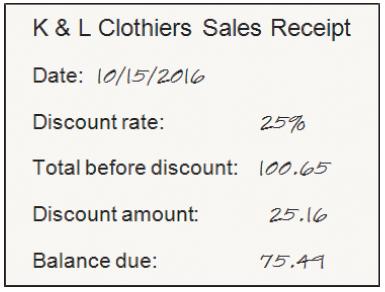
K & L Clothiers wants you to create an application that prints a customer’s sales receipt. A sample receipt is shown in Figure 3-49. Use the following names for the solution and project, respectively: Clothiers Solution and Clothiers Project. Save the application in the VB2015\Chap03 folder.
Write an assignment statement that subtracts the contents of the dblExpenses variable from the contents of the dblIncome variable and then assigns the result to the dblNet variable.
If Option Strict is set to On, which of the following statements assigns the sum of two Integer variables to the Text property of the lblTotal control?a. lblTotal.Text = Convert.ToInteger(intN1 + intN2)b. lblTotal.Text = Convert.ToInt32(intN1 + intN2)c. lblTotal.Text = Convert.ToString(intN1) +
Create an application using the following names for the solution and project, respectively: Credit Card Solution and Credit Card Project. Save the application in the VB2015\ Chap03 folder. Change the form file’s name to Main Form.vb. Change the form’s name to frmMain. Create an interface that
The strFirst, strMiddle, strLast, and strNickname variables contain the strings “Addison”, “Grace”, “Carson”, and “Addi G”, respectively. Write an assignment statement that will display the string “My name is Addison Grace Carson, but you can call me Addi G.” in the lblMsg
The InputBox function’s prompt argument should be entered using which type of capitalization?a. Book titleb. Sentence
Write a Private statement to declare a class-level variable named dblGrandTotal.
Create an application using the following names for the solution and project, respectively: Pennies Solution and Pennies Project. Save the application in the VB2015\ Chap03 folder. Change the form file’s name to Main Form.vb. Change the form’s name to frmMain. Create an interface that allows
The strCity and strState variables contain the strings “Scottsdale” and “AZ”, respectively. Write an assignment statement to display the string “They live in Scottsdale, AZ.” in the lblMsg control.
Which of the following statements correctly assigns the InputBox function’s return value to a String variable named strCity?a. String.TryParse(InputBox(strMSG, "City"), strCity)b. strCity = String.TryParse(InputBox(strMSG, "City"))c. strCity = InputBox(strMSG, "City")d. None of the above
Write the statement to assign the contents of the dblTotalSales variable to the lblTotal control.
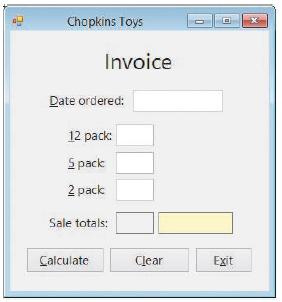
In this exercise, you modify the Chopkins Toys application from Exercise 2. Use Windows to make a copy of the Chopkins Solution folder. Rename the copy Modified Chopkins Solution. Open the Chopkins Solution (Chopkins Solution.sln) file contained in the Modified Chopkins Solution folder. Modify the
The strFirst and strLast variables contain the strings “Kate” and “Juarez”, respectively. Write an assignment statement to display the string “Kate Juarez” in the lblName control.
Which of the following statements correctly assigns the InputBox function’s return value to a Double variable named dblNum?a. Double.TryParse(InputBox(strMSG, "Number"), dblNum)b. dblNum = Double.TryParse(InputBox(strMSG, "Number"))c. dblNum = InputBox(strMSG, "Number")d.
Write the statement to store the contents of the txtAge control in an Integer variable named intAge.
Which of the following are computer memory locations that can temporarily store information?a. Literal constantsb. Named constantsc. Variablesd. Both b and c
Create an application using the following names for the solution and project, respectively: Retirement Solution and Retirement Project. Save the application in the VB2015\Chap03 folder. Change the form file’s name to Main Form.vb. Change the form’s name to frmMain. Pamela receives 52 weekly
In this exercise, you modify the bakery application from this lesson. Use Windows to make a copy of the Bakery Solution folder. Rename the copy Modified Bakery Solution-Lesson B. Open the Bakery Solution (Bakery Solution.sln) file contained in the Modified Bakery Solution-Lesson B folder. Modify
The strCity and strState variables contain the strings “Louisville” and “KY”, respectively. Which of the following will display the string “Louisville, KY” (the city, a comma, a space, and the state) in the lblCityState control?a. lblCityState.Text = strCity & ', ' & strStateb.
Write the statement to declare the procedure-level decINTEREST_RATE named constant whose value is 0.075.
Create an application using the following names for the solution and project, respectively: Van Solution and Van Project. Save the application in the VB2015\Chap03 folder. Change the form file’s name to Main Form.vb. Change the form’s name to frmMain. Rent-A-Van wants you to create an
Which of the following statements declares a procedure-level variable that retains its value after the procedure in which it is declared ends?a. Const intCounter As Integerb. Dim intCounter As Constantc. Dim intCounter As Integerd. Static intCounter As Integer
The strWord1 and strWord2 variables contain the strings “Input” and “Box”, respectively. Which of the following will display the string “InputBox” (one word) in the lblWord control?a. lblWord.Text = strWord1 & strWord2b. lblWord.Text = "strWord1" & "strWord2"c. lblWord.Text =
Write an assignment statement that assigns the name Carol Jones to a String variable named strEmployee. Also write assignment statements that assign the numbers 34 and 15.99 to variables named intAge and dblPayRate, respectively.
Which of the following statements declares a class-level variable?a. Class intNum As Integerb. Private intNum As Integerc. Private Class intNum As Integerd. Private Dim intNum As Integer
In this exercise, you modify the bakery application from this lesson. Use Windows to make a copy of the Bakery Solution folder. Rename the copy Modified Bakery Solution-Lesson C-Intermediate. Open the Bakery Solution (Bakery Solution.sln) file contained in the Modified Bakery Solution-Lesson
Which of the following statements declares a procedure-level variable that is removed from the computer’s memory when the procedure ends?a. Const intCounter As Integerb. Dim intCounter As Integerc. Local intCounter As Integerd. Static intCounter As Integer
Open the VB2015\Chap03\Bonus Solution\Bonus Solution (Bonus Solution.sln) file. The application displays a salesperson’s total sales and bonus amounts. The bonus is calculated by multiplying the total sales by 10%. Make the Calculate button the default button. Open the Code Editor window and
Which of the following Visual Basic constants advances the insertion point to the next line?a. Advanceb. ControlChars.Advancec. ControlChars.NewLined. None of the above
Write an assignment statement that assigns Georgia to a String variable named strState.
Which of the following keywords can be used to declare a variable within a procedure?a. Dimb. Procedurec. Staticd. Both a and c
Create an application using the following names for the solution and project, respectively: Tile Solution and Tile Project. Save the application in the VB2015\Chap03 folder. Change the form file’s name to Main Form.vb. Change the form’s name to frmMain. The manager of Tile Unlimited wants you
Which of the following clauses associates a procedure with the TextChanged event of the txtMid and txtFinal controls?a. Associates txtMid_TextChanged, txtFinal_TextChangedb. Handled txtMid_TextChanged, txtFinal_TextChangedc. Controls txtMid.TextChanged And txtFinal.TextChangedd. Handles
This exercise assumes you have completed the Cranston Berries application from Exercise 3 in each of Chapter 2’s lessons. Use Windows to copy the Cranston Solution folder from the VB2015\Chap02 folder to the VB2015\Chap03 folder, and then open the Cranston Solution (Cranston Solution.sln) file.
Which of the following is the concatenation operator?a. @b. &c. $d. #
A procedure needs to store the name of a business, the number of its employees at the beginning of the current year, the number of new employees hired during the current year, the number of employees who left the business during the current year, and the number of its employees at the end of the
Which of the following statements declares a procedure-level variable that remains in the computer’s memory until the application ends?a. Dim Static intScore As Integerb. Private Static intScore As Integerc. Static intScore As Integerd. Both b and c
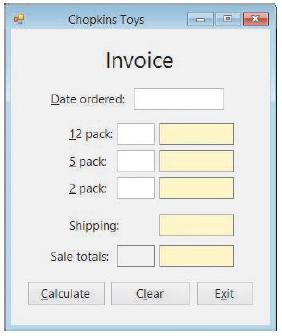
Create an application using the following names for the solution and project, respectively: Chopkins Solution and Chopkins Project. Save the application in the VB2015\Chap03 folder. Change the form file’s name to Main Form.vb. Change the form’s name to frmMain. Create the interface shown in
A _____________________ variable is a procedure-level variable that retains its value after the procedure in which it is declared ends.a. Constantb. Staticc. Stationaryd. Term
This exercise assumes you have completed the Jordan Sports Store application from Exercise 2 in each of Chapter 2’s lessons. Use Windows to copy the Jordan Solution folder from the VB2015\Chap02 folder to the VB2015\Chap03 folder, and then open the Jordan Solution (Jordan Solution.sln) file. Open
The InputBox function displays a dialog box containing which of the following?a. Input areab. OK and Cancel buttonsc. Promptd. All of the above
A procedure needs to store a person’s height and weight. The height may have a decimal place; the weight will always be a whole number. Write the appropriate Dim statements to declare the necessary procedure-level variables.
Which of the following is a data item whose value does not change during run time?a. Literal constantb. Literal variablec. Named constantd. Variable
In this exercise, you modify the bakery application from this lesson. Use Windows to make a copy of the Bakery Solution folder. Rename the copy Modified Bakery Solution-Lesson C-Intro. Open the Bakery Solution (Bakery Solution.sln) file contained in the Modified Bakery Solution-Lesson C-Intro
Which of the following events occurs when a change is made to the contents of a text box?a. Changeb. Changedc. TextChangedd. TextChange
This exercise assumes you have completed the Richardson County application from Exercise 1 in each of Chapter 2’s lessons. Use Windows to copy the Richardson Solution folder from the VB2015\Chap02 folder to the VB2015\Chap03 folder, and then open the Richardson Solution (Richardson Solution.sln)
The name of a form’s default button is specified in the _____________________ property.a. button’s AcceptButtonb. button’s DefaultButtonc. form’s AcceptButtond. form’s DefaultButton
A procedure needs to store a salesperson’s name and bonus amount (which may have decimal places). Write the appropriate Dim statements to declare the necessary procedure-level variables.
Which of the following keywords is used to declare a class-level variable?a. Classb. Dimensionc. Globald. Private
Open the VB2015\Chap02\Debug Solution\Debug Solution (Debug Solution.sln) file. Locate and then correct the syntax errors in the Code Editor window. Save the solution, and then start and test the application.
In this exercise, you learn about a text box’s Clear method, which can be used to remove the contents of the text box during run time. Use Windows to make a copy of the Bakery Solution folder from the chapter. Rename the copy Discovery Bakery Solution. Open the Bakery Solution (Bakery
The payroll clerk at Photo Workshop has asked you to create an application that displays an employee’s net pay. The application should allow the payroll clerk to enter the employee’s name, hours worked, and rate of pay. For this application, you do not have to worry about overtime because this
A group of people needs to be transported to a concert. If an SUV can accommodate seven people, how many SUVs will be completely full and how many people will still need transportation? Create an application that displays the answers. The user will enter the number of people in the group. You can
Create an application that displays the average of three test scores entered by the user. Use the following names for the solution and project, respectively: Average Solution and Average Project. Save the application in the VB2015\Chap02 folder. Change the form file’s name to Main Form.vb. Change
In this exercise, you modify the bakery application from the chapter. Use Windows to make a copy of the Bakery Solution folder contained in the VB2015\Chap02 folder. Rename the copy Modified Bakery Solution. Open the Bakery Solution (Bakery Solution. sln) file contained in the Modified Bakery
Your science teacher has asked you to create an application that displays how much a person would weigh on the following planets: Venus, Mars, and Jupiter. The application’s interface should allow the user to enter the person’s weight on Earth.a. Perform the steps involved in creating an OO
Jefferson Sales wants you to create an application that displays a salesperson’s monthly commission, given his or her monthly sales and commission rate (entered in decimal form). The commission is calculated by multiplying the monthly sales by the commission rate.a. Perform the steps involved in
Showing 1700 - 1800
of 1847
First
5
6
7
8
9
10
11
12
13
14
15
16
17
18
19
Step by Step Answers

 Get 50% OFF
Claim Now
Get 50% OFF
Claim Now