New Semester
Started
Get
50% OFF
Study Help!
--h --m --s
Claim Now
Question Answers
Textbooks
Find textbooks, questions and answers
Oops, something went wrong!
Change your search query and then try again
S
Books
FREE
Study Help
Expert Questions
Accounting
General Management
Mathematics
Finance
Organizational Behaviour
Law
Physics
Operating System
Management Leadership
Sociology
Programming
Marketing
Database
Computer Network
Economics
Textbooks Solutions
Accounting
Managerial Accounting
Management Leadership
Cost Accounting
Statistics
Business Law
Corporate Finance
Finance
Economics
Auditing
Tutors
Online Tutors
Find a Tutor
Hire a Tutor
Become a Tutor
AI Tutor
AI Study Planner
NEW
Sell Books
Search
Search
Sign In
Register
study help
computer science
programming with microsoft visual basic 2015
Programming With Microsoft Visual Basic 2015 7th Edition Diane Zak - Solutions
8. Open the Turner Solution (Turner Solution.sln) file contained in the VB2012\Chap03\Turner Solution folder. If necessary, open the designer window. The application calculates the new hourly pay for each of three job codes, given the current hourly pay for each job code and the raise percentage
2. The strCity variable contains the string “Bowling Green”. Write an assignment statement to display the string “Our office is in Bowling Green, KY.” in the lblMsg control.
1. The strFirst and strLast variables contain the strings “Dolly” and “Pershing”, respectively. Write an assignment statement to display the string “Pershing, Dolly” in the lblName control.
10. If the decPay variable contains the number 1200.76, which of the following statements displays the number as $1,200.76?a. lblPay.Text = decPay.ToString("N2")b. lblPay.Text = decPay.ToString("F2")c. lblPay.Text = decPay.ToString("D2")d. lblPay.Text = decPay.ToString("C2")
9. The InputBox function’s prompt argument should be entered using .a. book title capitalizationb. sentence capitalization
8. Which of the following statements correctly assigns the InputBox function’s return value to a String variable named strCity?a. String.TryParse(InputBox(strMSG,"City"), strCity)b. strCity = String.TryParse(InputBox(strMSG, "City"))c. strCity = InputBox(strMSG, "City")d. none of the above
7. Which of the following statements correctly assigns the InputBox function’s return value to a Double variable named dblNum?a. Double.TryParse(InputBox(strMSG,"Number"), dblNum)b. dblNum = Double.TryParse(InputBox(strMSG, "Number"))c. dblNum = InputBox(strMSG, "Number")d.
6. The strCity and strState variables contain the strings “Tampa” and “Florida”, respectively. Which of the following will display the string “Tampa, Florida” (the city, a comma, a space, and the state) in the lblCityState control?a. lblCityState.Text = strCity , & strStateb.
5. The strWord1 and strWord2 variables contain the strings “Input” and “Box”, respectively. Which of the following will display the string “InputBox” (one word) in the lblWord control?a. lblWord.Text = strWord1 & strWord2b. lblWord.Text = "strWord1 " & "strWord2 "c. lblWord.Text =
4. Which of the following Visual Basic constants advances the insertion point to the next line?a. Advanceb. ControlChars.Advancec. ControlChars.NewLined. none of the above
3. Which of the following is the concatenation operator?a. @b. &c. $d. #
2. The InputBox function displays a dialog box containing which of the following?a. input areab. OK and Cancel buttonsc. promptd. all of the above
1. The name of a form’s default button is specified in the property.a. button’s AcceptButtonb. button’s DefaultButtonc. form’s AcceptButtond. form’s DefaultButton
19. Open the Debug Solution (Debug Solution.sln) file contained in the VB2012\Chap03\Debug Solution-Lesson A folder. The application is supposed to display the number of times the Count button is pressed, but it is not working correctly.a. Start the application. Click the Count button. The message
18. In this exercise, you experiment with procedure-level and class-level variables. Open the Scope Solution (Scope Solution.sln) file contained in the VB2012\Chap03\Scope Solution folder. The Scope application allows the user to calculate either a 5% or 10%commission on a sales amount. It displays
17. Open theMason Solution (Mason Solution.sln) file contained in the VB2012\Chap03\Mason Solution folder. If necessary, open the designer window. The application should calculate the projected sales for each sales region.a. Open the Code Editor window. In the General Declarations section, enter
16. Open the Happy Flooring Solution (Happy Flooring Solution.sln) file contained in the VB2012\Chap03\Happy Flooring Solution folder. If necessary, open the designer window. The application should calculate the area of a floor in square yards. Open the Code Editor window. In the General
15. Write the statement to declare a String variable that can be used by two procedures in the same form. Name the variable strEmployeeName. Also specify where you will need to enter the statement in the Code Editor window and whether the variable is a procedure-level or class-level variable.
14. Write an assignment statement that adds together the values stored in the decRegion1 and decRegion2 variables, and then assigns the result to a String variable named strTotalSales.
13. Write an assignment statement that increases the contents of the decSalary variable by 2%.
12. Open the Age Solution (Age Solution.sln) file contained in the VB2012\Chap03\Age Solution folder. If necessary, open the designer window. The Calculate button should calculate your age this year by subtracting your birth year from the current year. Open the Code Editor window. In the General
11. Open the Shiloh Solution (Shiloh Solution.sln) file contained in the VB2012\Chap03\Shiloh Solution folder. If necessary, open the designer window. At the end of the year, each salesperson at Shiloh Products is paid a bonus of 1% of his or her annual sales.a. Open the Code Editor window. In the
10. Write an assignment statement that subtracts the contents of the dblExpenses variable from the contents of the dblIncome variable and then assigns the result to the dblNet variable.
9. An application needs to store the name of an item and its price (which may contain a decimal place). Write the appropriate Private statements to declare the necessary classlevel variables.
8. Write the statement to assign the contents of an Integer variable named intPopulation to the lblPopulation control.
7. Write the statement to store the contents of the txtQuantity control in an Integer variable named intQuantity.
6. Write the statement to declare the procedure-level decINTEREST_RATE named constant whose value is .075.
5. Write an assignment statement that assigns the word July to a String variable named strMonth. Also write assignment statements that assign the numbers 4 and 20 to Integer variables named intMomBirthday and intDadBirthday, respectively.
4. Write an assignment statement that assigns Alabama to a String variable named strState.
3. A procedure needs to store the name of an inventory item, the number of units in stock at the beginning of the current month, the number of units purchased during the current month, the number of units sold during the current month, and the number of units in stock at the end of the current
2. A procedure needs to store a person’s height and weight. The height may have a decimal place; the weight will always be a whole number. Write the appropriate Dim statements to declare the necessary procedure-level variables.
1. A procedure needs to store an employee’s name and net pay amount (which may have decimal places). Write the appropriate Dim statements to declare the necessary procedure-level variables.
11. Which of the following statements prevents data loss due to implicit type conversions?a. Option Explicit Onb. Option Strict Onc. Option Implicit Offd. Option Convert Off
10. If Option Strict is set to On, which of the following statements assigns the sum of two Integer variables to the Text property of the lblTotal control.a. lblTotal.Text = Convert.ToInteger(intN1 + intN2)b. lblTotal.Text = Convert.ToInt32(intN1 + intN2)c. lblTotal.Text = Convert.ToString(intN1) +
9. Which of the following declares a named constant having the Double data type?a. Const dblRATE As Double = .09b. Const dblRATE As Doublec. Constant dblRATE = .09d. both a and b
8. If Option Strict is set to On, which of the following statements will assign the contents of the txtSales control to a Double variable named dblSales?a. dblSales = txtSales.Textb. dblSales = txtSales.Text.Convert.ToDoublec. Double.TryParse(txtSales.Text, dblSales)d.
7. Which of the following are computer memory locations that can temporarily store information?a. Literal constantsb. Named constantsc. Variablesd. both b and c
6. Which of the following declares a procedure-level String variable?a. Dim String strCityb. Dim strCity As Stringc. Private strCity As Stringd. String strCity
5. Which of the following statements declares a class-level variable?a. Class intNum As Integerb. Private intNum As Integerc. Private Class intNum As Integerd. Private Dim intNum As Integer
4. Which of the following keywords can be used to declare a procedure-level variable?a. Dimb. Procedurec. Staticd. both a and c
3. Which of the following statements declares a procedure-level variable that remains in the computer’s memory until the application ends?a. Dim Static intScore As Integerb. Private Static intScore As Integerc. Static intScore As Integerd. both b and c
2. Which of the following is a data item whose value does not change during run time?a. literal constantb. literal variablec. named constantd. variable
1. Which of the following keywords is used to declare a class-level variable?a. Classb. Dimensionc. Globald. Private
5. What value is assigned to the lblNum control when the lblNum.Text = 99 Mod 25 instruction is processed by the computer?
4. What value is assigned to the lblNum control when the lblNum.Text = 99 \ 25 instruction is processed by the computer?
3. Which symbol is used in a flowchart to represent an output task?a. circleb. ovalc. parallelogramd. rectangle
2. The function temporarily converts a string to a number, and then returns the number.a. Formatb. FormatNumberc. StringToNumberd. Val
1. Which of the following assignment statements will not calculate correctly?a. lblTotal.Text = Val(txtSales1.Text) + Val(txtSales2.Text)b. lblTotal.Text = 4 – Val(txtSales1.Text)c. lblTotal.Text = Val(txtQuantity.Text + 3)d. All of the above assignment statements will calculate correctly.
5. Explain the method for providing keyboard access to a text box.
4. Which of the following specifies the letter D as the access key?a. &Displayb. #Displayc. ^Displayd. D&isplay
3. You assign an access key using a control’s property.a. Accessb. Captionc. Keyd. Text
2. An Exit button’s access key is always the letter .a. Eb. xc. id. t
1. Which property determines the tab order for the controls in an interface?a. SetOrderb. SetTabc. TabIndexd. TabOrder
5. Listed below are the six steps you should follow when creating an OO application.Put the steps in the proper order by placing a number (1 through 6) on the line to the left of the step.Test and debug the application Build the user interface Code the application Assemble the documentation Plan
4. Listed below are the four steps you should follow when planning an OO application. Put the steps in the proper order by placing a number (1 through 4) on the line to the left of the step.Identify the objects to which you will assign the tasks Draw a sketch of the user interface Identify the
3. Which of the following statements is false?a. The text contained in identifying labels should be left-aligned within the label.b. An identifying label should be positioned either above or to the right of the control it identifies.c. Identifying labels should be entered using sentence
2. A button’s caption should be entered using .a. book title capitalizationb. sentence capitalizationc. either book title capitalization or sentence capitalization
1. When designing a user interface, the most important information should be placed in the corner of the interface.a. lower-leftb. lower-rightc. upper-leftd. upper-right
8. Open the Debug Solution (Debug Solution.sln) file contained in the VB2012\Chap01\Debug Solution folder. If necessary, open the designer window. Start the application. The application is not working correctly because the splash screen does not disappear after four seconds have elapsed. Click
7. In this exercise, you learn how to display a tooltip. Open the ToolTip Solution (ToolTip Solution.sln) file contained in the VB2012\Chap01\ToolTip Solution folder. If necessary, open the designer window. Click the ToolTip tool in the toolbox and then drag the tool to the form. Notice that a
6. In this exercise, you will learn how to display a splash screen followed by another form.a. Open the Two Form Solution (Two Form Solution.sln) file contained in the VB2012\Chap01\Two Form Solution folder. If necessary, open the Solution Explorer and designer windows. Notice that the project
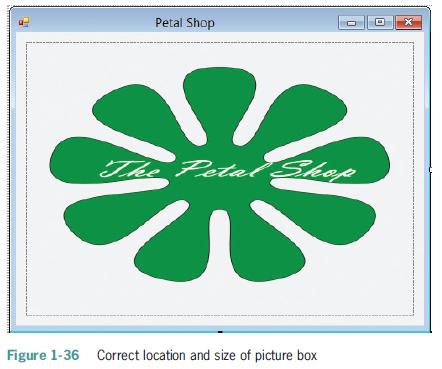
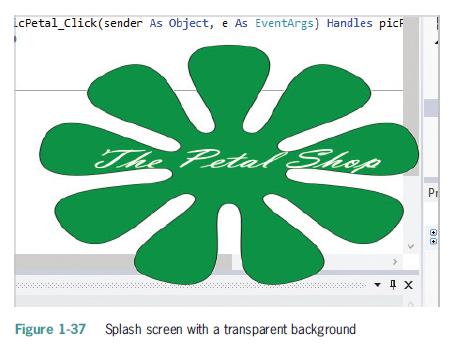
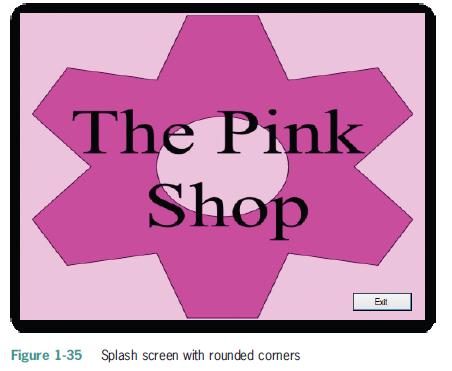
5. In this exercise, you will create a splash screen that has a transparent background.a. Open the Petal Solution (Petal Solution.sln) file contained in the VB2012\Chap01\Petal Solution folder. If necessary, open the designer window.b. Add a picture box control to the form. The picture box should
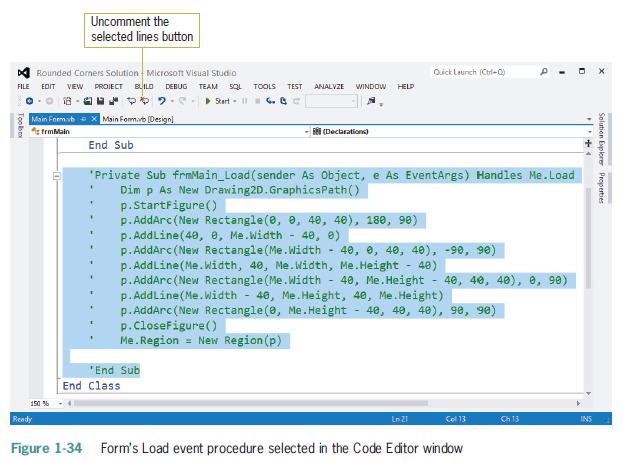
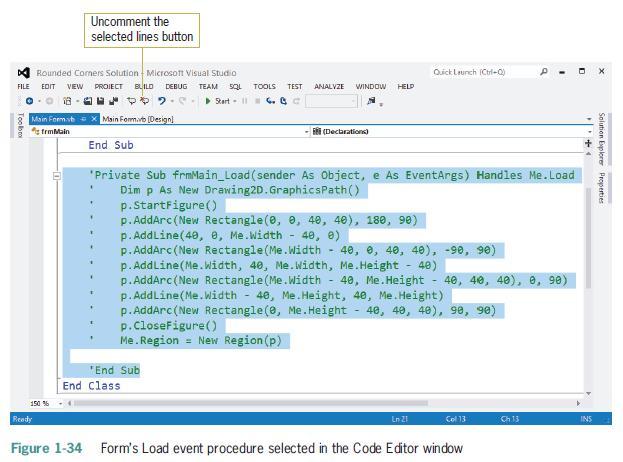
4. The Internet contains a vast amount of code snippets that you can use in your Visual Basic applications. And in many cases, you can use the snippet without fully understanding each line of its code. In this exercise, you will use a code snippet that rounds the corners on a splash screen.a. Open
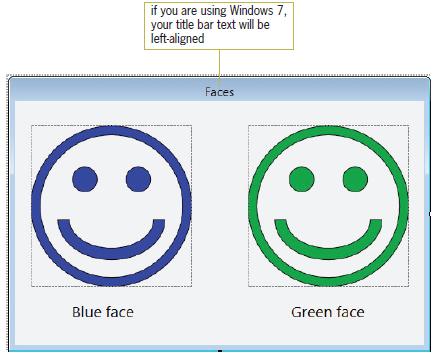
2. Create a Visual Basic Windows application. Use the following names for the solution and project, respectively: Faces Solution and Faces Project. Save the application in the VB2012\Chap01 folder. Change the form file’s name to Main Form.vb. Create the interface shown in Figure 1-33. The picture
1. In this exercise, you modify an existing form by replacing its Exit button with a timer.a. Open the Williams Solution (Williams Solution.sln) file contained in the VB2012\Chap01\Williams Solution folder. If necessary, open the designer window.b. Delete the Exit button from the form and then
5. Explain how you delete a control that contains code.
4. You can remove the Minimize, Maximize, and Close buttons from a form’s title bar by setting the form’s property to False.a. ControlBoxb. ControlButtonc. TitleBard. TitleBarElements
3. To disable the Minimize button on a form’s title bar, set the form’s property to False.a. ButtonMinimizeb. Minimizec. MinimizeBoxd. MinimizeButton
2. Which of the following is false?a. When you add a timer control to a form, the control appears in the component tray.b. The user can see a timer control during run time.c. You stop a timer by setting its Enabled property to False.d. The number entered in a timer’s Interval property represents
1. If a timer is running, the code in its event procedure is processed each time an interval has elapsed.a. Intervalb. Tickc. Timedd. Timer
4. You can use the instruction to terminate a running application.a. Me.Close()b. Me.Done()c. Me.Finish()d. Me.Stop()5. Define the term “syntax.”
3. The Format menu contains options that allow you to .a. align two or more controlsb. center one or more controls horizontally on the formc. make two or more controls the same sized. all of the above
2. The text displayed on a button’s face is stored in the button’s property.a. Captionb. Labelc. Named. Text
1. The purpose of the control is to display text that the user is not allowed to edit while the application is running.a. Buttonb. DisplayBoxc. Labeld. PictureBox
11. What does the dot member access operator indicate in the text System.Windows.Forms.Label?
10. Explain the difference between a form file and a form.
9. Explain the difference between a form’s Text property and its Name property.
8. The property determines the initial position of a form when the application is started.a. InitialLocationb. Locationc. StartLocationd. StartPosition
7. You give an object a more meaningful name by setting the object’s property.a. Applicationb. Captionc. Named. Text
6. The property controls the text displayed in a form’s title bar.a. Captionb. Textc. Titled. TitleBar
5. Which of the following statements is true?a. You can auto-hide a window by clicking the Auto-Hide (vertical pushpin) button on its title bar.b. An auto-hidden window appears as a tab on the edge of the IDE.c. You temporarily display an auto-hidden window by clicking its tab.d. all of the above
4. The names of solution files in Visual Basic 2012 end with .a. .prgb. .slnc. .srcd. .vb
3. The window lists the projects and files included in a solution.a. Objectb. Projectc. Propertiesd. Solution Explorer
2. You use the window to set the characteristics that control an object’s appearance and behavior.a. Characteristicsb. Objectc. Propertiesd. Toolbox
1. When a form has been modified since the last time it was saved, what appears on its tab in the designer window?a. an ampersand (&)b. an asterisk (*)c. a percent sign (%)d. a plus sign (+)
The statement Constant dblRATE As Double is an example of a _____________________.a. Correct statementb. Logic errorc. Syntax errord. Run time error
Open the Martins Solution (Martins Solution.sln) file contained in the VB2015\AppA\Martins Solution folder. Use what you learned in the appendix to debug the application.
Which key is used to step through code?a. F5b. F6c. F7d. F8
Open the Hawkins Solution (Hawkins Solution.sln) file contained in the VB2015\AppA\Hawkins Solution folder. Use what you learned in the appendix to debug the application.
The SQL SELECT statement performs case-sensitive comparisons.a. Trueb. False
If a funnel symbol appears next to a field’s name in the Query Builder dialog box, it indicates that the field is ___________________.a. Used in an ORDER BY clause in a SELECT statementb. Used in a WHERE clause in a SELECT statementc. The primary keyd. The foreign key
Open the Adalene Solution (Adalene Solution.sln) file contained in the VB2015\Chap14\Adalene Solution-Sort folder. The btnSort_Click procedure should sort the records in alphabetical order by city name within state name. Code the procedure and then test the application appropriately.
In this exercise, you modify the Oscar Winners application from this lesson. Use Windows to make a copy of the Oscars Solution folder. Rename the copy Oscars Solution-Advanced. Open the Oscars Solution (Oscars Solution.sln) file contained in the Oscars Solution-Advanced folder. Use the Delete
In this exercise, you modify the application from Exercise 2. Use Windows to make a copy of the Jacoby Solution folder. Rename the copy Jacoby Solution-LINQ. Open the Jacoby Solution (Jacoby Solution.sln) file contained in the Jacoby Solution-LINQ folder. Add a button named btnTotal to the form.
Which of the following will delete the record associated with a DataRow variable named findRow?a. findRow.Delete()b. findRow.Remove()c. delete(findRow)d. None of the above
Open the Morgan Industries Solution (Morgan Industries Solution.sln) file contained in the VB2015\Chap14\Morgan Industries Solution folder. The application is connected to the Employees database, which contains a table named tblEmploy. Each record in the table contains seven fields. The EmpNum
You can use the SQL ___________________ statement to remove a record from a database.a. DELETEb. DETACHc. ERASEd. REMOVE
Open the VB2015\Chap14\Valentia Solution\Valentia Solution (Valentia Solution.sln) file. The application is connected to the Employees database, which contains a table named tblEmploy. Each record in the table contains seven fields. The EmpNum field is the primary key. The Status field contains the
Using the StatesDataSet from Review Question 1, which of the following will assign the Atlanta record to the row variable?a. row =StatesDataSet.tblStates.FindCapital("Atlanta")b. row =StatesDataSet.tblStates.FindByCapital("Atlanta")c. row =StatesDataSet.tblStates.FindByState("Georgia")d. Both b and
Open the VB2015\Chap14\Polter Solution\Polter Solution (Polter Solution.sln) file. The application is connected to the Products database, which contains a table named tblProducts. Each record in the table has three fields. The ItemNum (primary key) and ItemName fields contain text; the Price field
Showing 1100 - 1200
of 1847
First
5
6
7
8
9
10
11
12
13
14
15
16
17
18
19
Step by Step Answers

 Get 50% OFF
Claim Now
Get 50% OFF
Claim Now