New Semester
Started
Get
50% OFF
Study Help!
--h --m --s
Claim Now
Question Answers
Textbooks
Find textbooks, questions and answers
Oops, something went wrong!
Change your search query and then try again
S
Books
FREE
Study Help
Expert Questions
Accounting
General Management
Mathematics
Finance
Organizational Behaviour
Law
Physics
Operating System
Management Leadership
Sociology
Programming
Marketing
Database
Computer Network
Economics
Textbooks Solutions
Accounting
Managerial Accounting
Management Leadership
Cost Accounting
Statistics
Business Law
Corporate Finance
Finance
Economics
Auditing
Tutors
Online Tutors
Find a Tutor
Hire a Tutor
Become a Tutor
AI Tutor
AI Study Planner
NEW
Sell Books
Search
Search
Sign In
Register
study help
computer science
programming with microsoft visual basic 2015
Programming With Microsoft Visual Basic 2015 7th Edition Diane Zak - Solutions
What value is assigned to the lblNum control when the lblNum. Text = 99 Mod 25 instruction is processed by the computer?
Listed below are the six steps you should follow when creating an OO application. Put the steps in the proper order by placing a number (1 through 6) on the line to the left of the step._____________________ Test and debug the application._____________________ Build the user
In this exercise, you complete the application from Lesson B’s Exercise 4. Open the VB2015\Chap02\Age Solution\Age Solution (Age Solution.sln) file. The Calculate button should calculate your age by subtracting your birth year from the current year. Code the Calculate button using the Val
What value is assigned to the lblNum control when the lblNum. Text = 99 \ 25 instruction is processed by the computer?
Open the Age Solution (Age Solution.sln) file contained in the VB2015\Chap02\Age Solution folder. If necessary, open the designer window. The application allows you to enter the year you were born and the current year. When it is coded, the Calculate button will calculate your age by subtracting
Listed below are the four steps you should follow when planning an OO application. Put the steps in the proper order by placing a number (1 through 4) on the line to the left of the step._____________________ Identify the objects to which you will assign the tasks._____________________ Draw a
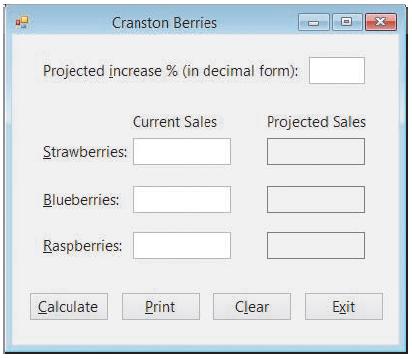
In this exercise, you complete the Cranston Berries application from Exercise 3 in both Lesson A and Lesson B. Open the VB2015\Chap02\Cranston Solution\Cranston Solution (Cranston Solution.sln) file.a. The Calculate button should display the projected sales for each type of berry. Code the
Which symbol is used in a flowchart to represent an output task?a. Circleb. Ovalc. Parallelogramd. Rectangle
In this exercise, you will continue creating the Cranston Berries application from Lesson A’s Exercise 3. Create a Visual Basic Windows application. Use the following names for the solution and project, respectively: Cranston Solution and Cranston Project. Save the application in the
Cranston Berries sells three types of berries: strawberries, blueberries, and raspberries. Sales have been booming this year and are expected to increase next year. The sales manager wants you to create an application that allows him to enter the projected increase (expressed as a decimal number)
Which of the following statements is false?a. The text contained in identifying labels should be left-aligned within the label.b. An identifying label should be positioned either above or to the right of the control it identifies.c. Identifying labels should use sentence capitalization.d.
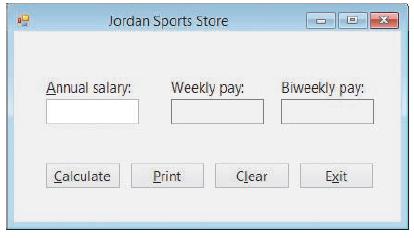
In this exercise, you complete the Jordan Sports Store application from Exercise 2 in both Lesson A and Lesson B. Open the VB2015\Chap02\Jordan Solution\Jordan Solution (Jordan Solution.sln) file.a. The Calculate button should display two amounts: the weekly gross pay and the biweekly gross pay.
Which function temporarily converts a string to a number and then returns the number?a. Formatb. FormatNumberc. Stringd. Val
In this exercise, you will continue creating the Jordan Sports Store application from Lesson A’s Exercise 2. Create a Visual Basic Windows application. Use the following names for the solution and project, respectively: Jordan Solution and Jordan Project. Save the application in the VB2015\Chap02
Which letter should always be used for the Exit button’s access key?a. Eb. xc. id. t
All employees at Jordan Sports Store are paid based on an annual salary rather than an hourly wage. However, some employees are paid weekly, while others are paid every other week. Employees paid weekly receive 52 paychecks; employees paid every other week receive 26 paychecks. The payroll clerk
A button’s caption should be entered using which type of capitalization?a. Book titleb. Sentencec. Either book title or sentence
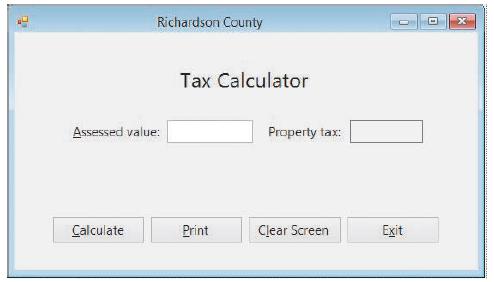
In this exercise, you complete the Richardson County application from Exercise 1 in both Lesson A and Lesson B. Open the VB2015\Chap02\Richardson Solution\Richardson Solution (Richardson Solution.sln) file.a. The Calculate button should display the annual property tax, which is $1.50 for each $100
Which of the following assignment statements will not calculate correctly?a. lblTotal.Text = Val(txtSales1.Text) + Val(txtSales2.Text)b. lblTotal.Text = 4 – Val(txtSales1.Text)c. lblTotal.Text = Val(txtQuantity.Text + 3)d. All of the above assignment statements will calculate correctly.
In this exercise, you will continue creating the Richardson County application from Lesson A’s Exercise 1. Open the VB2015\Chap02\Richardson Solution\Richardson Solution (Richardson Solution.sln) file. If necessary, open the designer window. Figure 2-18 shows the completed interface. Add the
The annual property tax in Richardson County is $1.50 for each $100 of a property’s assessed value. The county clerk wants you to create an application that will display the property tax after he enters the property’s assessed value. Prepare a TOE chart ordered by task, and then rearrange the
In which corner should the most important information be placed in a user interface?a. Lower leftb. Lower rightc. Upper leftd. Upper right
Open the VB2015\Chap01\Debug Solution\Debug Solution (Debug Solution.sln) file. If necessary, open the designer window. Start the application. The application is not working correctly because the splash screen does not disappear after four seconds have elapsed. Click Debug on the menu bar and then
In this exercise, you learn how to display a tooltip. Open the VB2015\Chap01\ToolTip Solution\ToolTip Solution (ToolTip Solution.sln) file. If necessary, open the designer window. Click the ToolTip tool in the toolbox and then drag the tool to the form. Notice that a tooltip control appears in the
In this exercise, you will learn how to display a splash screen followed by another form.a. Open the Two Form Solution (Two Form Solution.sln) file contained in the VB2015\Chap01\Two Form Solution folder. If necessary, open the Solution Explorer and designer windows. Notice that the project
Which property is used to give an object a more meaningful name?a. Applicationb. Captionc. Named. Text
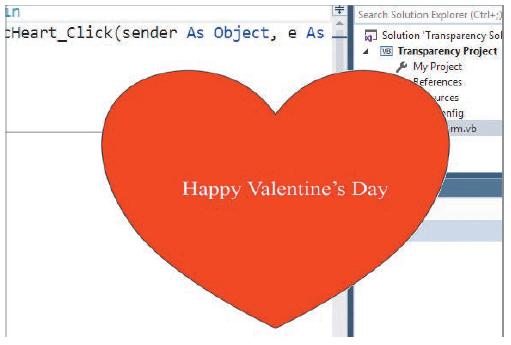
In this exercise, you will create a splash screen that has a transparent background.a. Open the VB2015\Chap01\Transparency Solution\Transparency Solution (Transparency Solution.sln) file. If necessary, open the designer window.b. Click the form’s title bar to select the form. Set the form’s
The Internet contains a vast amount of code snippets that you can use in your Visual Basic applications. And in many cases, you can use the snippet without fully understanding each line of its code. In this exercise, you will use a code snippet that rounds the corners on a splash screen.a. Open the
Explain how to delete a control that contains code.
Define the term “syntax.”
Which of the following statements is true?a. You can auto-hide a window by clicking the Auto Hide (vertical pushpin) button on its title bar.b. An auto-hidden window appears as a tab on the edge of the IDE.c. You temporarily display an auto-hidden window by clicking its tab.d. All of the above
Create a Visual Basic Windows application. Name the solution, project, and form file My Splash Solution, My Splash Project, and Splash Form.vb, respectively. Save the application in the VB2015\Chap01 folder. Create your own splash screen. Save the solution and then start the application. Close the
You can remove the Minimize, Maximize, and Close buttons from a form’s title bar by setting the form’s _____________________ property to False.a. ControlBoxb. ControlButtonc. TitleBard. TitleBarElements
In this exercise, you learn about the Format menu’s Align, Make Same Size, and Center in Form options.a. Open the VB2015\Chap01\Format Solution\Format Solution (Format Solution.sln) file. If necessary, open the designer window.b. Click the Button2 control, and then press and hold down the Ctrl
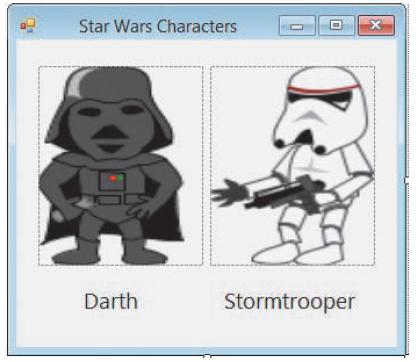
Create a Visual Basic Windows application. Use the following names for the solution and project, respectively: Characters Solution and Characters Project. Save the application in the VB2015\Chap01 folder. Change the form file’s name to Main Form.vb. Create the interface shown in Figure 1-35. The
To disable the Minimize button on a form’s title bar, set the form’s _____________________ property to False.a. ButtonMinimizeb. Minimizec. MinimizeBoxd. MinimizeButton
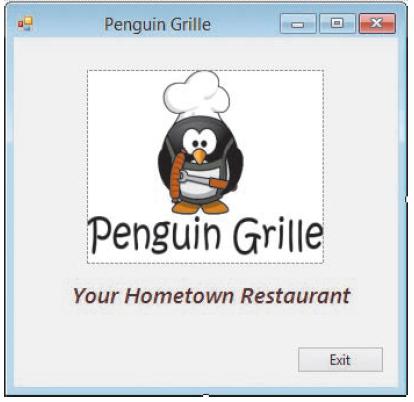
Create a Visual Basic Windows application. Use the following names for the solution and project, respectively: Penguin Solution and Penguin Project. Save the application in the VB2015\Chap01 folder. Change the form file’s name to Main Form.vb. Change the form’s Font property to Segoe UI, 9pt.
If necessary, start Visual Studio 2015 and permanently display the Solution Explorer window. Create a Visual Basic Windows application. Use the following names for the solution and project, respectively: Millers Solution and Millers Project. Save the solution in the VB2015\Chap01 folder. Change the
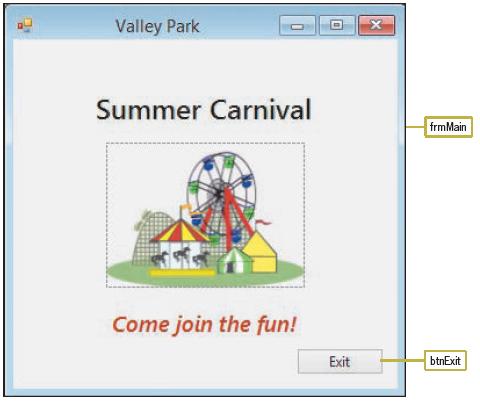
In this exercise, you modify the Valley Park application created in Lesson B’s Exercise 2.a. Open the VB2015\Chap01\Valley Solution\Valley Solution (Valley Solution.sln) file. If necessary, open the designer window.b. Replace the Exit button with a timer control named tmrExit. The timer should
Which of the following is false?a. When you add a timer control to a form, the control appears in the component tray.b. The user can see a timer control during run time.c. You stop a timer by setting its Enabled property to False.d. The number entered in a timer’s Interval property represents the
Create a Visual Basic Windows application. Use the following names for the solution and project, respectively: Valley Solution and Valley Project. Save the application in the VB2015\Chap01 folder. Change the form file’s name to Main Form.vb. Change the form’s Font property to Segoe UI, 9pt.
If necessary, start Visual Studio 2015 and permanently display the Solution Explorer window. Create a Visual Basic Windows application. Use the following names for the solution and project, respectively: Merriton Solution and Merriton Project. Save the application in the VB2015\Chap01 folder.
In this exercise, you modify the Warren Fire Department application created in Lesson B’s Exercise 1.a. Open the VB2015\Chap01\Warren Solution\Warren Solution (Warren Solution.sln) file. If necessary, open the designer window.b. Delete the Exit button from the form and then delete the button’s
If a timer is running, the code in its _____________________ event procedure is processed each time an interval has elapsed.a. Intervalb. Tickc. Timedd. Timer
Create a Visual Basic Windows application. Use the following names for the solution and project, respectively: Warren Solution and Warren Project. Save the application in the VB2015\Chap01 folder.a. Change the form file’s name to Main Form.vb.b. Change the form’s name to frmMain. Change its
You use the _____________________ control to display text that the user is not allowed to edit while the application is running.a. Buttonb. DisplayBoxc. Labeld. PictureBox
If necessary, start Visual Studio 2015 and permanently display the Solution Explorer window. Use the File menu to open the VB2015\Chap01\Jackson Solution\Jackson Solution (Jackson Solution.sln) file. If necessary, right-click the form file’s name in the Solution Explorer window and then click
Showing 1800 - 1900
of 1847
First
5
6
7
8
9
10
11
12
13
14
15
16
17
18
19
Step by Step Answers

 Get 50% OFF
Claim Now
Get 50% OFF
Claim Now


![Start Uncomment the selected lines button Main Form.vb x Main Form v [Design] O Rounded Cormers Project End Sub frmMain a, InitialiteCormponent](https://dsd5zvtm8ll6.cloudfront.net/si.question.images/images/question_images/1608/1/9/9/3315fdb2ca3763ca1608199330446.jpg)