New Semester
Started
Get
50% OFF
Study Help!
--h --m --s
Claim Now
Question Answers
Textbooks
Find textbooks, questions and answers
Oops, something went wrong!
Change your search query and then try again
S
Books
FREE
Study Help
Expert Questions
Accounting
General Management
Mathematics
Finance
Organizational Behaviour
Law
Physics
Operating System
Management Leadership
Sociology
Programming
Marketing
Database
Computer Network
Economics
Textbooks Solutions
Accounting
Managerial Accounting
Management Leadership
Cost Accounting
Statistics
Business Law
Corporate Finance
Finance
Economics
Auditing
Tutors
Online Tutors
Find a Tutor
Hire a Tutor
Become a Tutor
AI Tutor
AI Study Planner
NEW
Sell Books
Search
Search
Sign In
Register
study help
computer science
programming with microsoft visual basic 2015
Programming With Microsoft Visual Basic 2015 7th Edition Diane Zak - Solutions
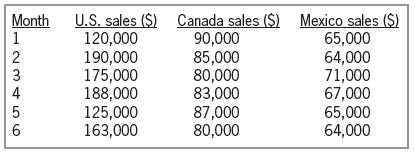
The sales manager at Lorenzo Markets wants you to create an application that displays the total sales made in each of three regions: the U.S., Canada, and Mexico. The application should also display the total company sales as well as the percentage that each region contributed to the total sales.
In this exercise, you modify the application from Exercise 13. The modified application allows the user to update a specific price. Use Windows to make a copy of the Retail Solution folder. Rename the folder Modified Retail Solution. Open the Retail Solution (Retail Solution.sln) file contained in
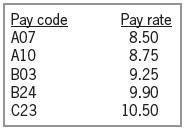
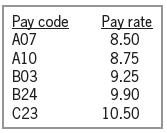
Open the VB2015\Chap09\Gross Solution\Gross Solution (Gross Solution.sln) file. The application should store the pay codes and rates listed in Figure 9-59 in a twodimensional array. It should also display the pay codes from the array in a list box. The btnCalc_Click procedure should display the
Open the VB2015\Chap09\Retail Solution\Retail Solution (Retail Solution.sln) file. Open the Code Editor window. Notice that the code declares and initializes a class-level array named dblWholesale. The btnRetail_Click procedure should ask the user for a percentage amount and then use that amount to
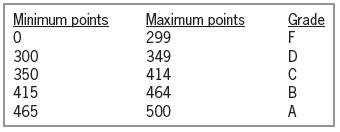
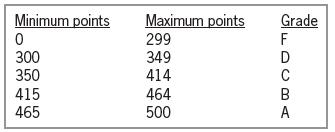
In this exercise, you code an application that displays a grade based on the number of points entered by the user. Open the VB2015\Chap09\Kranton Solution\Kranton Solution (Kranton Solution.sln) file. The grading scale is shown in Figure 9-58. Store the minimum points and grades in a
Open the VB2015\Chap09\Inventory Solution\Inventory Solution (Inventory Solution.sln) file. The interface provides a text box for entering an amount that represents the preferred quantity on hand. The application should display the number of array elements containing at least that amount. Finish
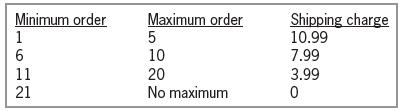
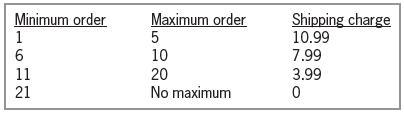
Open the Shipping Solution (Shipping Solution.sln) file contained in the VB2015\ Chap09\Shipping Solution-Two-Dimensional folder. The btnDisplay_Click procedure should display a shipping charge that is based on the number of items a customer orders. The order amounts and shipping charges are listed
Open the VB2015\Chap09\Projected Solution\Projected Solution (Projected Solution.sln) file. The btnIncrease_Click procedure should increase each element in the intSales array by 10%, displaying the results in the lstProjected control. Test the application appropriately.
Open the VB2015\Chap09\Sales Solution\Sales Solution (Sales Solution.sln) file. The btnCalc_Click procedure should increase the value stored in each array element by 25% and then display the results in the list box. Use two For...Next statements. Test the application appropriately.
Create an application, using the following names for the solution and project, respectively: Stock Market Solution and Stock Market Project. Save the application in the VB2015\Chap09 folder. The application should declare a Double array that contains 30 elements. Each element will store the price
In this exercise, you modify one of the Waterson Company applications from this lesson. Use Windows to make a copy of the Stock Solution-Highest folder. Rename the copy Stock Solution-Highest-Lowest. Open the Stock Solution (Stock Solution.sln) file contained in the Stock Solution-Highest-Lowest
Open the VB2015\Chp09\Bonus Solution\Bonus Solution (Bonus Solution.sln) file. The btnCalc_Click procedure should display the sum of the numbers stored in the following three array elements: the second row, second column; the first row, fourth column; and the third row, first column. Test the
In this exercise, you code a modified version of the Die Tracker application completed in this lesson. Open the Dice Solution (Dice Solution.sln) file contained in the VB2015\ Chap09\Dice Solution-Advanced folder. The application should simulate the roll of two dice (rather than one die). It also
Open the VB2015\Chap09\Sold Solution\Sold Solution (Sold Solution.sln) file. The For...Next, For Each...Next, and Do...Loop buttons should display the average number sold. Open the Code Editor window. Enter the statement to declare and initialize a class-level one-dimensional array named intSold.
What will the code in Review Question 5’s answer d assign to the dblAvg variable?a. 0b. 5c. 6d. 8
Open the VB2015\Chap09\Westin Solution\Westin Solution (Westin Solution.sln) file. The btnForEach_Click procedure should use the For Each...Next statement to display the contents of the strParts array in the lstForEachParts control. The btnFor_Click procedure should use the For...Next statement to
Open the Shipping Solution (Shipping Solution.sln) file contained in the VB2015\ Chap09\Shipping Solution-Parallel folder. The btnDisplay_Click procedure should display a shipping charge that is based on the number of items a customer orders. The order amounts and shipping charges are listed in
Open the VB2015\Chap09\Tea Solution\Tea Solution (Tea Solution.sln) file. Open the Code Editor window. Enter the statement to declare and initialize a class-level onedimensional array named dblPounds. Use the following numbers to initialize the array: 35.6, 15, 67.9, 78.8, 12.5, and 27.5. The
What will the code in Review Question 5’s answer c assign to the dblAvg variable?a. 0b. 5c. 6d. 8
Write the statement that determines the number of elements in a two dimensional array named strTypes. The statement should assign the number to the intNumTypes variable.
Write the Visual Basic statements to accomplish the following tasks:a. In the lblSize control, display the number of characters contained in the strMsg variable.b. Remove the leading and trailing spaces from the strState variable.c. Use the Insert and Remove methods to change the contents of the
Which property determines whether a control is available to the user during run time?a. Availableb. Enabledc. Unavailabled. Disabled
Which of the following returns the Boolean value True when the strPetName variable contains the string “Felix”?a. strPetName.Contains("x")b. strPetName Like "F*"c. strPetName.Substring(1, 2) = "el"d. All of the above
Open the VB2015\Chap08\Proper Solution\Proper Solution (Proper Solution.sln) file. The interface provides a text box for entering a person’s first and last names. The btnProper_Click procedure should display the first and last names in the proper case. In other words, the first and last names
The strAmount variable contains the string “3,123,560”. Write the Visual Basic statements to change the contents of the variable to “3123560”; use the Remove method.
Explain the difference between a menu item’s access key and its shortcut keys.
Open the VB2015\Chap08\Shipping Solution\Shipping Solution (Shipping Solution.sln) file. The interface provides a text box for entering a shipping code, which should consist of two numbers followed by either one or two letters. The letter(s) represent the delivery method, as follows: MS represents
If the strPresident variable contains the string “Abraham Lincoln”, what value will the strPresident.IndexOf("Lincoln") method return?a. –1b. 8c. 9d. True
Write the Visual Basic statement that uses the Contains method to determine whether the strAddress variable contains the string “Jefferson Street” (entered in uppercase, lowercase, or a combination of uppercase and lowercase). Assign the method’s return value to a Boolean variable named
Open the VB2015\Chap08\Jacobson Solution\Jacobson Solution (Jacobson Solution.sln) file. The interface provides a text box for entering a password. The password can contain five, six, or seven characters; however, none of the characters can be a space. The btnDisplay_Click procedure should create
The strAmount variable contains the string “3123560”. Write the Visual Basic statements to change the variable’s contents to “$3,123,560”.
If the strWord variable contains the string “chimes”, which of the following statements assigns the letter m to the strLetter variable?a. strLetter = strWord.Substring(3)b. strLetter = strWord.Substring(3, 1)c. strLetter = strWord.Substring(4, 1)d. None of the above
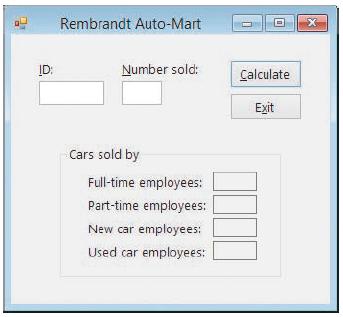
Each salesperson at Rembrandt Auto-Mart is assigned an ID number that consists of five characters. The first three characters are numbers. The fourth character is a letter: either the letter N if the salesperson sells new cars or the letter U if the salesperson sells used cars. The fifth character
The strAmount variable contains the string “3123560”. Write the Visual Basic statements to change the variable’s contents to “$3,123,560”.
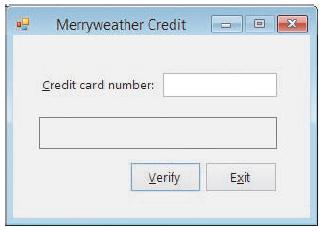
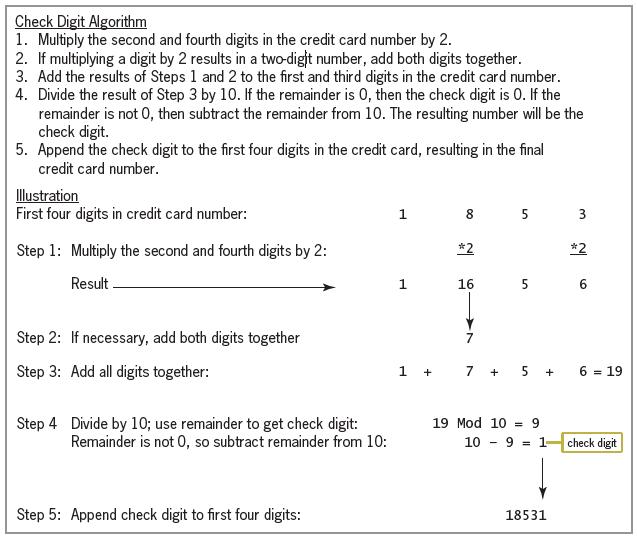
Credit card companies typically assign a special digit, called a check digit, to the end of each customer’s credit card number. The check digit allows companies to verify that the credit card number was entered accurately. Many methods for creating the check digit have been developed, including
The strName variable contains the string “Jones John”. Which of the following changes the variable’s contents to the string “Jones, John”?a. strName = strName.Insert(5, ",")b. strName = strName.Insert(6, ",")c. strName = strName.Insert(6, 1, ",")d. None of the above
Open the VB2015\Chap08\Prices Solution\Prices Solution (Prices Solution.sln) file. Modify the frmMain_Load procedure so that it right-aligns the prices listed in the cboRight control and then selects the first price. Save the solution and then start the application. (The prices listed in the
Open the VB2015\Chap08\Count Solution\Count Solution (Count Solution.sln) file. The interface provides a text box for the user to enter a string. The btnSearch_Click procedure should prompt the user to enter the sequence of characters for which he or she wants to search. The procedure should
If the strMsg variable contains the string “The party is Saturday.”, which of the following assigns the number 13 to the intNum variable?a. intNum = strMsg.Substring(0, "S")b. intNum = strMsg.Contains("S")c. intNum = strMsg.IndexOf("S")d. intNum = strMsg.IndexOf(0, "S")
Open the VB2015\Chap08\Date Solution\Date Solution (Date Solution.sln) file. The interface provides a text box for entering a date. The btnChange_Click procedure should verify that the date was entered in the correct format, which is two numbers followed by a slash, two numbers, a slash, and two
Open the Debug Solution (Debug Solution.sln) file contained in the VB2015\Chap08\ Debug Solution 1 folder. Open the Code Editor window and review the existing code. Start and then test the application. Notice that the application is not working correctly. Correct the application’s code, and then
If the strName variable contains the string “Sam Harris”, which of the following changes the contents of the variable to the string “Sam H. Harris”?a. strName = strName.Insert(3, " H.")b. strName = strName.Insert(4, "H.")c. strName = strName.Insert(5, "H. ")d. None of the above
Open the VB2015\Chap08\Tax Solution\Tax Solution (Tax Solution.sln) file. The interface provides a text box and a combo box for entering a sales amount and a tax rate, respectively. The btnCalc_Click procedure should remove the percent sign and the space that precedes it from the tax rate before
Open the Debug Solution (Debug Solution.sln) file contained in the VB2015\Chap08\ Debug Solution 2 folder. Open the Code Editor window and review the existing code. Start and then test the application. Notice that the application is not working correctly. Correct the application’s code, and then
The strAmount variable contains the string “245.69”. Which of the following statements changes the contents of the variable to the string “245.69!!”?a. strAmount = strAmount.PadLeft(8, "!"c)b. strAmount = strAmount.PadRight(8, "!"c)c. strAmount = strAmount.PadRight(2, "!"c)d. None of the
Open the VB2015\Chap08\Zip Solution\Zip Solution (Zip Solution.sln) file. The btnDisplay_Click procedure should display the correct shipping charge based on the ZIP code entered by the user. To be valid, the ZIP code must contain exactly five digits, and the first three digits must be either
Which of the following declares a five-element one-dimensional array?a. Dim intSold(4) As Integerb. Dim intSold(5) As Integer = {4, 78, 65, 23, 2}c. Dim intSold() As Integer = {4, 78, 65, 23, 2}d. Both a and c
Write the statement to declare a procedure-level one-dimensional array named intOrders. The array should be able to store 20 integers. Then write the statement to store the number 25 in the third element.
Open the VB2015\Chap09\Days Solution\Days Solution (Days Solution.sln) file. The frmMain_Load procedure should declare a one-dimensional String array, using the names of the seven days of the week to initialize the array. The procedure should use the For Each...Next statement to display the
Write the statement to declare a procedure-level array named intBalances. The array should have seven rows and three columns. Then write the statement to store the number 100 in the element located in the third row, second column.
Write the statement to declare a class-level one-dimensional array named strStates. The array should be able to store 50 strings. Then write the statement to store the string “North Dakota” in the first element.
Open the VB2015\Chap09\Pay Solution\Pay Solution (Pay Solution.sln) file. The application should allow the user to select a pay code from the list box. The btnCalc_ Click procedure should display the gross pay, using the number of hours worked and the pay rate corresponding to the selected code.
Write a loop to store the number 0 in each element in the intBalances array from Exercise 1. Use the For...Next statement.Data From Exercise 1:Write the statement to declare a procedure-level array named intBalances. The array should have seven rows and three columns. Then write the statement to
Write the statement to declare and initialize a procedure-level one dimensional array named dblTaxRates. Use the following numbers to initialize the array: 5.5, 7.25, and 3.4.
Rewrite the code from Exercise 2 using a Do...Loop statement.Data From Exercise 2:Write the statement to declare a procedure-level array named intBalances. The array should have seven rows and three columns. Then write the statement to store the number 100 in the element located in the third row,
The intNumbers array is a one-dimensional array. Write the statement to multiply the number stored in the first array element by 3, storing the result in the intResult variable.
In this exercise, you modify the Die Tracker application completed in this lesson. Use Windows to make a copy of the Die Solution folder. Rename the copy Modified Die Solution. Open the Die Solution (Die Solution.sln) file contained in the Modified Die Solution folder. Code the application without
Write the statement to assign the Boolean value True to the variable located in the second row, third column of a two-dimensional Boolean array named blnAnswers.
The intNumbers array is a one-dimensional array. Write the statement to add together the numbers stored in the first and second array elements, displaying the sum in the lblSum control.
Open the VB2015\Chap09\Computer Solution\Computer Solution (Computer Solution.sln) file. The interface allows the user to enter the number of either new or refurbished computers sold. The Add to Total button should use an array to accumulate the numbers sold by type. It also should display (in the
Write the Private statement to declare an Integer array named intOrders that has three rows and two columns. Use the following values to initialize the array: 1, 2, 10, 20, 100, 200.
What will the code in Review Question 5’s answer a assign to the dblAvg variable?a. 0b. 5c. 6d. 8
In this exercise, you modify one of the Waterson Company applications from this lesson. Use Windows to make a copy of the Stock Solution-Highest folder. Rename the copy Stock Solution-Highest-DoLoop. Open the Stock Solution (Stock Solution.sln) file contained in the Stock Solution-Highest-DoLoop
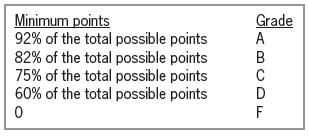
In this exercise, you code an application that displays a grade based on the number of points entered by the user. The grading scale is shown in Figure 9-43. Open the VB2015\Chap09\Chang Solution\Chang Solution (Chang Solution.sln) file. Store the minimum points and grades in two parallel
Write the statements that determine the highest row and highest column subscripts in the strTypes array. The statements should assign the subscripts to the intHighRow and intHighCol variables, respectively.
What will the code in Review Question 5’s answer b assign to the dblAvg variable?a. 0b. 5c. 6d. 8
In this exercise, you modify one of the Waterson Company applications from this lesson. Use Windows to make a copy of the Stock Solution-Highest folder. Rename the copy Stock Solution-Highest-ForEachNext. Open the Stock Solution (Stock Solution.sln) file contained in the Stock
In this exercise, you code an application that displays a grade based on the number of points entered by the user. The grading scale is shown in Figure 9-44. Open the VB2015\ Chap09\Perez Solution\Perez Solution (Perez Solution.sln) file. The user will enter the total possible points in the
Which of the following methods can be used to determine whether the strAmount variable contains the dollar sign?a. blnResult = strAmount.Contains("$")b. intResult = strAmount.IndexOf("$")c. intResult = strAmount.IndexOf("$", 0)d. All of the above
Open the VB2015\Chap08\Reverse Solution\Reverse Solution (Reverse Solution.sln) file. The interface provides a text box for the user to enter one or more words. The btnReverse_Click procedure should display the letters in reverse order. In other words, if the user enters the words “Have a great
The strItem variable contains uppercase letters only. Which of the following determines whether the variable contains either the word “SHIRT” or the word “SKIRT”?a. If strItem Like "S[H-K]IRT" Thenb. If strItem Like "S[HK]IRT" Thenc. If strItem = "S[HK]IRT" Thend. If strItem = "SHIRT"
Which of the following is false?a. Menu titles should be one word only.b. Each menu title should have a unique access key.c. You should assign shortcut keys to commonly used menu titles.d. Menu items should be entered using book title capitalization.
The strItem variable contains the string “YMBlueX”. Write a Visual Basic statement that assigns the string “Blue” from the strItem variable to the strColor variable.
Which of the following statements changes the contents of the strZip variable from 60521 to 60561?a. strZip = strZip.Insert(3, "6") strZip = strZip.Remove(4, 1)b. strZip = strZip.Insert(4, "6") strZip = strZip.Remove(3, 1)c. strZip = strZip.Remove(3, 1) strZip = strZip.Insert(3, "6")d. All of the
In this exercise, you modify the Pizza Game application completed in this lesson. Use Windows to make a copy of the Pizza Solution folder. Rename the copy Modified Pizza Solution. Open the Pizza Solution (Pizza Solution.sln) file contained in the Modified Pizza Solution folder. Modify the code to
If the strWord variable contains the string “Irene Turner”, what value will the strWord.Contains("e") method return?a. Trueb. Falsec. 2d. 3
Open the VB2015\Chap08\Bonus Solution\Bonus Solution (Bonus Solution.sln) file. Add a File menu and a Calculate menu to the form. Include an Exit menu item on the File menu. Include two menu items on the Calculate menu: 10% Bonus and 15% Bonus. Assign shortcut keys to the Calculate menu’s items.
Which of the following allows the user to access a menu item without opening the menu?a. An access keyb. A menu keyc. Shortcut keysd. None of the above
Using the Insert and Remove methods, write the Visual Basic statements to change the contents of the strWord variable from “late” to “crate”.
The strName variable contains the string “Carlson”. Which of the following statements changes the contents of the variable to the string “Carl”?a. strName = strName.Remove(0, 4)b. strName = strName.Remove(4, 3)c. strName = strName.Remove(5, 3)d. strName = strName.Remove(5)
Open the VB2015\Chap08\Color Solution\Color Solution (Color Solution.sln) file. The btnDisplay_Click procedure should display the color of the item whose item number is entered by the user. All item numbers contain exactly five characters. All items are available in four colors: blue, green, red,
Which of the following changes the contents of the strName variable from Will to William?a. strName = strName.Append(5, "iam")b. strName = strName.Append(4, "iam")c. strName = strName.Insert(5, "iam")d. strName = strName.Insert(4, "iam")
Open the VB2015\Chap08\Commission Solution\Commission Solution (Commission Solution.sln) file. Add a File menu that contains an Exit menu item. The menu item should end the application. Save the solution and then start the application. Use the Exit menu item to end the application.
The underlined letter in a menu element’s caption is called _____________________ .a. An access keyb. A menu keyc. A shortcut keyd. None of the above
Write a Visual Basic statement that uses the Insert method to change the contents of the strState variable from “Il” to “Illinois”.
Open the VB2015\Chap08\Item Solution\Item Solution (Item Solution.sln) file. The btnVerify_Click procedure should determine whether the item number was entered in the required format: two digits, a letter, a hyphen, a letter, a hyphen, and a digit. The procedure should display a message indicating
The strItem variable contains 25 characters. Which of the following For clauses will access each character contained in the variable, character by character?a. For intIndex As Integer = 0 To 25b. For intIndex As Integer = 1 To 25c. For intIndex As Integer = 0 To strItem.Length – 1d. For intIndex
Use Windows to make a copy of the Net Pay Solution folder from Lesson A. Rename the copy Net Pay Solution-Menu. Open the Net Pay Solution (Net Pay Solution.sln) file contained in the Net Pay Solution-Menu folder. Remove the Exit button and its associated code. Add a File menu that contains an Exit
The horizontal line in a menu is called _____________________ .a. A menu barb. A separator barc. An item separatord. None of the above
Write a Visual Basic statement that removes the leading and trailing spaces from the txtAddress control.
The txtState control contains the word Alaska followed by one space. Which of the following statements removes the space from the control’s contents?a. txtState.Text = txtState.Text.Trimb. txtState.Text = Trim(txtState.Text)c. txtState.Text = txtState.Trimd. txtState.Text.Trim
Open the Debug Solution (Debug Solution.sln) file contained in the VB2015\Chap08\ Debug Solution 3 folder. Open the Code Editor window and review the existing code. Start and then test the application. Notice that the application is not working correctly. Correct the application’s code, and then
If the strLocation variable contains the string “75 Oak Avenue”, what will the strAddress.IndexOf("Oak") method return?a. –1b. 3c. 4d. True
Open the Social Security Solution (Social Security Solution.sln) file contained in the VB2015\Chap08\Social Security Solution-Remove folder. The interface provides a text box for entering a Social Security number. The btnRemove_Click procedure should verify that the Social Security number contains
If the strAddress variable contains the string “2345 Hawthorne Blvd”, what will the strAddress.IndexOf("Hawthorne", 5) method return?a. –1b. 5c. 6d. False
Visual Basic provides the StartsWith and EndsWith methods for determining whether a specific sequence of characters occurs at the beginning or end, respectively, of a string. The StartsWith method’s syntax is string.StartsWith(subString), and the EndsWith method’s syntax is
Visual Basic provides the Replace method for replacing a sequence of characters in a string with another sequence of characters. The method’s syntax is string.Replace(oldValue, newValue). When processing the Replace method, the computer makes a temporary copy of the string in memory; it then
In this lesson, you learned how to use the Trim method to remove space characters from both the beginning and end of a string. You can also use the Trim method to remove other characters. The syntax for doing this is string.Trim[(trimChars)]. The optional trimChars argument is a comma-separated
Visual Basic provides the TrimStart and TrimEnd methods for removing one or more characters from the beginning or end, respectively, of a string. The TrimStart method’s syntax is string.TrimStart[(trimChars)], and the TrimEnd method’s syntax is string.TrimEnd[(trimChars)]. The optional
Visual Basic provides the Mid statement for replacing a specified number of characters in a string with another string. The statement’s syntax is Mid(targetString, start [, count]) = replacementString. In the syntax, the targetString argument is the string in which you want characters replaced,
Showing 1400 - 1500
of 1847
First
5
6
7
8
9
10
11
12
13
14
15
16
17
18
19
Step by Step Answers

 Get 50% OFF
Claim Now
Get 50% OFF
Claim Now