New Semester
Started
Get
50% OFF
Study Help!
--h --m --s
Claim Now
Question Answers
Textbooks
Find textbooks, questions and answers
Oops, something went wrong!
Change your search query and then try again
S
Books
FREE
Study Help
Expert Questions
Accounting
General Management
Mathematics
Finance
Organizational Behaviour
Law
Physics
Operating System
Management Leadership
Sociology
Programming
Marketing
Database
Computer Network
Economics
Textbooks Solutions
Accounting
Managerial Accounting
Management Leadership
Cost Accounting
Statistics
Business Law
Corporate Finance
Finance
Economics
Auditing
Tutors
Online Tutors
Find a Tutor
Hire a Tutor
Become a Tutor
AI Tutor
AI Study Planner
NEW
Sell Books
Search
Search
Sign In
Register
study help
computer science
programming with microsoft visual basic 2015
Programming With Microsoft Visual Basic 2015 7th Edition Diane Zak - Solutions
Which of the following is false?a. The order of the arguments listed in the Call statement should agree with the order of the parameters listed in the receiving procedure’s header.b. The data type of each argument in the Call statement should match the data type of its corresponding parameter in
Which of the following is a valid header for a procedure that receives a copy of the value stored in a String variable?a. Private Sub DisplayName(ByContents strName As String)b. Private Sub DisplayName(ByValue strName As String)c. Private Sub DisplayName ByVal(strName As String)d. None of the above
What is the three-character extension appended to solution files in Visual Basic 2015?a. .prgb. .slnc. .srcd. .vbs
In this exercise, you modify the bonus application from Exercise 4. Use Windows to make a copy of the Bonus Solution folder. Rename the copy Modified Bonus Solution. Open the Bonus Solution (Bonus Solution.sln) file contained in the Modified Bonus Solution folder. Code the frmMain_Load event so
A procedure allows the user to enter one or more values. The first input instruction will get the first value only and is referred to as the _____________________ read.a. Enteringb. Initializerc. Primingd. Starter
What will the following code display in message boxes?Dim intX As Integer = 1Do While intX < 5 MessageBox.Show(intX.ToString) intX += 1Loop
In this exercise, you modify the Favorites application from Lesson A. Use Windows to make a copy of the Favorites Solution folder. Rename the copy Favorites Solution-Intermediate. Open the Favorites Solution (Favorites Solution.sln) file contained in the Favorites Solution-Intermediate folder.
In this exercise, you modify the Cerruti Company application from this lesson. Use Windows to make a copy of the Cerruti Solution folder. Rename the copy Cerruti Solution-Sub. Open the Cerruti Solution (Cerruti Solution.sln) file contained in the Cerruti Solution-Sub folder. Change the GetFwt
To determine whether a variable is being passed to a procedure by value or by reference, you will need to examine _____________________.a. The Call statementb. The procedure headerc. The statements entered in the procedured. Either a or b
Write the code for a Sub procedure that receives three Integer variables: the first two by value and the last one by reference. The procedure should multiply the first variable by the second variable and then store the result in the third variable. Name the procedure CalcProduct.
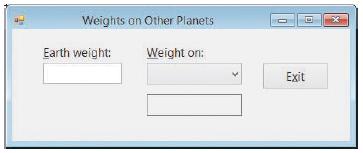
Create an application, using the following names for the solution and project, respectively: Planets Solution and Planets Project. Save the application in the VB2015\ Chap07 folder. Create the interface shown in Figure 7-38. The combo box should have the DropDownList style and contain the following
In this exercise, you modify the Cerruti Company application from this lesson. Use Windows to make a copy of the Cerruti Solution folder. Rename the copy Modified Cerruti Solution. Open the Cerruti Solution (Cerruti Solution.sln) file contained in the Modified Cerruti Solution folder. Modify the
Which of the following statements invokes the GetArea Sub procedure, passing it two variables by value?a. Call GetArea(dblLength, dblWidth)b. Call GetArea(ByVal dblLength, ByVal dblWidth)c. Invoke GetArea(dblLength, dblWidth)d. GetArea(dblLength, dblWidth) As Double
Write the code for a function that receives a copy of the value stored in an Integer variable. The function should divide the value by 2 and then return the result, which may contain a decimal place. Name the function GetQuotient. Then write an appropriate statement to invoke the function, passing
In this exercise, you modify the application from Exercise 4. Use Windows to make a copy of the Planets Solution folder. Rename the copy Planets Solution-Sub. Open the Planets Solution (Planets Solution.sln) file contained in the Planets Solution-Sub folder. Modify the code to use an independent
Open the Translator Solution (Translator Solution.sln) file contained in the VB2015\Chap07\Translator Solution-Sub folder. The application should use three independent Sub procedures to translate the English words into French, German, or Spanish. Code the application. Test the application
In this exercise, you experiment with passing variables by value and by reference. Open the VB2015\Chap07\Passing Solution\Passing Solution (Passing Solution.sln) file.a. Open the Code Editor window and review the existing code. Notice that the strMyName variable is passed by value to the GetName
In this exercise, you modify the application from Exercise 4. Use Windows to make a copy of the Planets Solution folder. Rename the copy Planets Solution-Function. Open the Planets Solution (Planets Solution.sln) file contained in the Planets Solution-Function folder. Modify the code to use a
Open the Translator Solution (Translator Solution.sln) file contained in the VB2015\Chap07\Translator Solution-Function folder. The application should use three functions to translate the English words into French, German, or Spanish. Code the application. Test the application appropriately.
In this exercise, you modify the Favorites application from this lesson. Use Windows to make a copy of the Favorites Solution folder. Rename the copy Modified Favorites Solution. Open the Favorites Solution (Favorites Solution.sln) file contained in the Modified Favorites Solution folder. Modify
In this exercise, you modify one of the Concert Tickets applications from Lesson A. Use Windows to make a copy of the Concert Solution-Function folder. Rename the copy Concert Solution-Intermediate. Open the Concert Solution (Concert Solution.sln) file contained in the Concert Solution-Intermediate
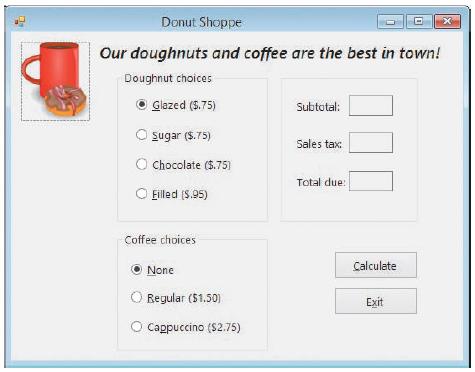
The Donut Shoppe sells four varieties of doughnuts: Glazed ($.75), Sugar ($.75), Chocolate ($.75), and Filled ($.95). It also sells regular coffee ($1.50) and cappuccino ($2.75). The store manager wants you to create an application that displays a customer’s subtotal, 4.5% sales tax, and total
In this exercise, you modify one of the Concert Tickets applications from this lesson. Use Windows to make a copy of the Concert Solution-Sub folder. Rename the copy Modified Concert Solution-Sub. Open the Concert Solution (Concert Solution.sln) file contained in the Modified Concert Solution-Sub
In this exercise, you modify the Donut Shoppe application from Exercise 7. Use Windows to make a copy of the Donut Solution folder. Rename the copy Modified Donut Solution. Open the Donut Solution (Donut Solution.sln) file contained in the Modified Donut Solution folder. Change the three functions
In this exercise, you modify one of the Concert Tickets applications from this lesson. Use Windows to make a copy of the Concert Solution-Function folder. Rename the copy Modified Concert Solution-Function. Open the Concert Solution (Concert Solution.sln) file contained in the Modified Concert
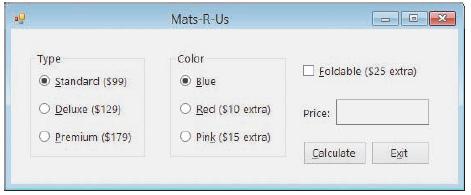
Create an application, using the following names for the solution and project, respectively: Mats Solution and Mats Project. Save the application in the VB2015\ Chap07 folder. Mats-R-Us sells three different type of mats: Standard ($99), Deluxe ($129), and Premium ($179). All of the mats are
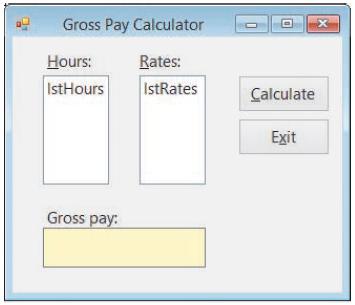
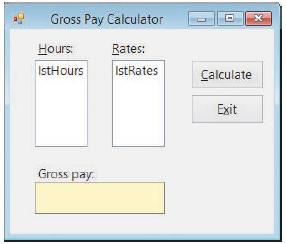
Create an application, using the following names for the solution and project, respectively: Gross Solution-Sub and Gross Project. The application’s interface is shown in Figure 7-30. The lstHours control should display the number of hours worked from 1 to 60 in increments of 1. The lstRates
In this exercise, you modify the Mats-R-Us application from Exercise 9. Use Windows to make a copy of the Mats Solution folder. Rename the copy Modified Mats Solution. Open the Mats Solution (Mats Solution.sln) file contained in the Modified Mats Solution folder. Change the function to an
Create an application, using the following names for the solution and project, respectively: Gross Solution-Function and Gross Project. The application’s interface is shown in Figure 7-30. The lstHours control should display the number of hours worked from 1 to 60 in increments of 1. The lstRates
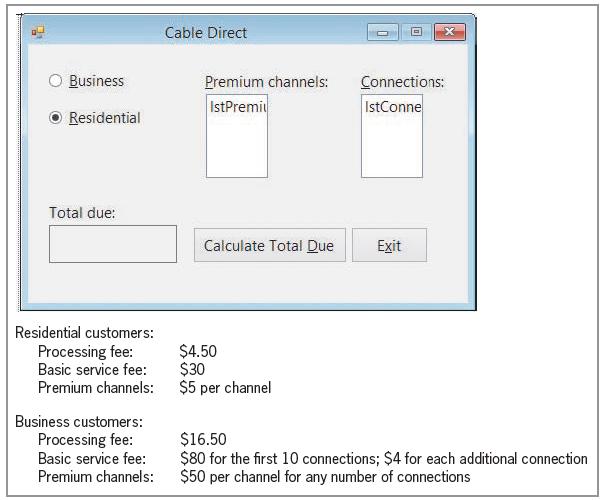
Create an application, using the following names for the solution and project, respectively: Cable Direct Solution and Cable Direct Project. Save the application in the VB2015\Chap07 folder. Create the interface shown in Figure 7-56. The list boxes are named lstPremium and lstConnections. Display
If the statement Call CalcNet(decNetPay) passes the variable’s address, the variable is said to be passed _____________________.a. By addressb. By contentc. By referenced. By value
Open the VB2015\Chap07\Average Solution\Average Solution (Average Solution.sln) file. Open the Code Editor window and review the existing code. The btnAvg_Click procedure should use a function to calculate and return the average score. Complete the application’s code, and then test it
The purpose of this exercise is to demonstrate a common error made when using functions. Open the Debug Solution (Debug Solution.sln) file contained in the VB2015\ Chap07\Debug Solution-Lesson C folder. Start the application. Click 20 in the Length list box, and then click 30 in the Width list box.
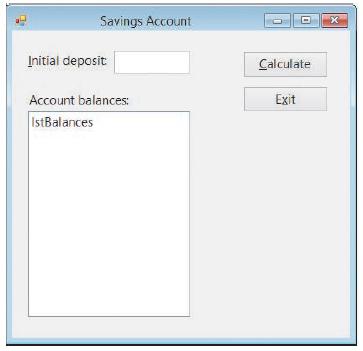
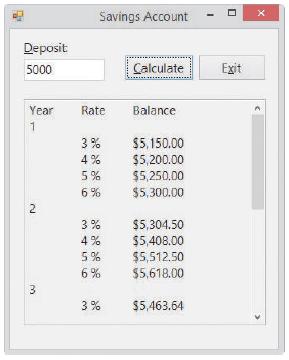
Create an application, using the following names for the solution and project, respectively: Savings Solution-Function and Savings Project. The application’s interface is shown in Figure 7-31. The interface provides a text box for the user to enter a one-time deposit into a savings account. If no
A Sub procedure named GetEndingInventory is passed four Integer variables named intBegin, intSales, intPurchases, and intEnding. The procedure should calculate the ending inventory using the beginning inventory, sales, and purchase amounts passed to the procedure. The result should be stored in the
In this exercise, you modify the Savings Account application from Exercise 13. Use Windows to make a copy of the Savings Solution-Function folder. Rename the copy Savings Solution-Sub. Also change the solution file’s name to Savings Solution.sln. Open the Savings Solution (Savings Solution.sln)
Which of the following statements should you use to call the GetEndingInventory procedure described in Review Question 14?a. Call GetEndingInventory(intBegin, intSales, intPurchases, intEnding)b. Call GetEndingInventory(ByVal intBegin, ByVal intSales, ByVal intPurchases, ByRef intEnding)c. Call
Open the Conversion Solution (Conversion Solution.sln) file contained in the VB2015\Chap07\Conversion Solution-Sub folder. Code the application so that it uses two independent Sub procedures: one to convert a measurement from inches to centimeters, and one to convert a measurement from centimeters
The memory locations listed in the parameterList in a procedure header have procedure scope and are removed from the computer’s internal memory when the procedure ends.a. Trueb. False
Open the Conversion Solution (Conversion Solution.sln) file contained in the VB2015\ Chap07\Conversion Solution-Function folder. Code the application so that it uses two functions: one to convert a measurement from inches to centimeters, and one to convert a measurement from centimeters to inches.
Which of the following statements invokes the GetDiscount function, passing it the contents of two Decimal variables named decSales and decRate? The statement should assign the function’s return value to the decDiscount variable.a. decDiscount = Call GetDiscount(decSales, decRate)b. Call
In this exercise, you learn how to specify that one or more arguments are optional in a Call statement. Open the VB2015\Chap07\Optional Solution\Optional Solution (Optional Solution.sln) file.a. Open the Code Editor window and review the existing code. The btnCalc_Click procedure contains two Call
Open the Debug Solution (Debug Solution.sln) file contained in the VB2015\Chap07\ Debug Solution-Lesson A folder. Open the Code Editor window and review the existing code. Start the application. Enter 100, 200.55, and .04 in the Store 1 sales, Store 2 sales, and Commission rate boxes, respectively.
Write the code for a function named GetState. The function should prompt the user to enter the name of a U.S. state and then return the user’s response. Then write a statement to invoke the GetState function. Display the function’s return value in a message box.
Each memory location listed in the parameterList in the procedure header is referred to as _____________________.a. An addressb. A constraintc. A parameterd. A value
In this exercise, you modify the Monthly Payment application from Lesson B. Use Windows to make a copy of the Payment Solution folder. Rename the copy Payment Solution-FormClosing. Open the Payment Solution (Payment Solution.sln) file contained in the Payment Solution-FormClosing folder. The
Which of the following rounds the contents of the dblNum variable to two decimal places?a. Math.Round(dblNum, 2)b. Math.Round(2, dblNum)c. Round.Math(dblNum, 2)d. Round.Math(2, dblNum)
In this exercise, you create an application that displays the capital of the state whose name is selected in a combo box. Create an application, using the following names for the solution and project, respectively: Capital Solution and Capital Project. Save the application in the VB2015\Chap07
Write the code for a Sub procedure named GetState. The procedure should prompt the user to enter the name of a U.S. state, storing the user’s response in its strState parameter. Then write a statement to invoke the procedure, passing it the strName variable.
The items listed in the Call statement are referred to as _____________________.a. Argumentsb. Parametersc. Passersd. None of the above
In this exercise, you will remove the Math.Round function from the payroll application created in the lesson; doing this will allow you to observe the “penny off” error. Use Windows to make a copy of the Cerruti Solution folder. Rename the copy No Rounding Cerruti Solution. Open the Cerruti
Which of a form’s events is triggered when you click the Close button on its title bar?a. Closeb. CloseFormc. FormClosed. FormClosing
In this exercise, you create an application that displays the name of the artist corresponding to the song title selected in a combo box. Create the application, using the following names for the solution and project, respectively: Song Solution and Song Project. Save the application in the
Write the code for a Sub procedure that receives a Double number passed to it. The procedure should multiply the number by 1.5 and then display the result in the lblAnswer control. Name the procedure IncreaseNum. Then write a statement to invoke the procedure, passing it the number 75.5.
Which of the following is false?a. A function can return only one value to the statement that invoked it.b. A Sub procedure can accept only one item of data passed to it.c. The parameterList in a procedure header is optional.d. At times, a variable inside the computer’s internal memory may have
Open the Debug Solution (Debug Solution.sln) file contained in the VB2015\Chap06\ Debug Solution-A29 folder. The code should display a 5% commission for each sales amount that is entered, but it is not working correctly. Correct the code.
Open the Debug Solution (Debug Solution.sln) file contained in the VB2015\Chap06\ Debug Solution-A28 folder. The code should display the numbers 10 through 1, but it is not working correctly. Correct the code.
Open the Debug Solution (Debug Solution.sln) file contained in the VB2015\Chap06\ Debug Solution-A27 folder. The code should display the numbers 1 through 4, but it is not working correctly. Correct the code.
Open the Debug Solution (Debug Solution.sln) file contained in the VB2015\Chap06\ Debug Solution-A26 folder. The code should display a 10% bonus for each sales amount that is entered, but it is not working correctly. Correct the code.
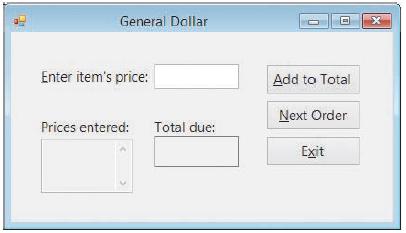
Create an application, using the following names for the solution and project, respectively: General Solution and General Project. Save the application in the VB2015\ Chap06 folder. The application’s interface is shown in Figure 6-32. The interface allows the user to enter an item’s price,
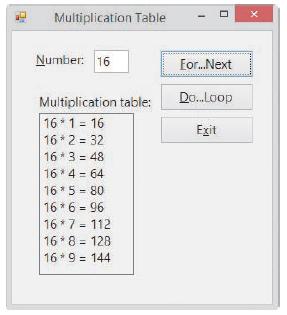
Open the VB2015\Chap06\Multiplication Solution (Multiplication Solution.sln) file. Code the application to display a multiplication table similar to the one shown in Figure 6-31. Use the For...Next statement in the btnForNext_Click procedure, and use the Do...Loop statement in the btnDoLoop_Click
In this exercise, you modify one of the Projected Sales applications from this lesson. Use Windows to make a copy of the Sales Solution-For Next folder. Rename the copy Sales Solution-Do While. Open the Sales Solution (Sales Solution.sln) file contained in the Sales Solution-Do While folder. Change
In this exercise, you modify the Addition application from this lesson. Use Windows to make a copy of the Addition Solution folder. Rename the copy Addition Solution Intermediate. Open the Addition Solution (Addition Solution.sln) file contained in the Addition Solution-Intermediate folder. The
In this exercise, you modify one of the Projected Sales applications from this lesson. Use Windows to make a copy of the Sales Solution folder. Rename the copy Sales Solution-Intermediate. Open the Sales Solution (Sales Solution.sln) file contained in the Sales Solution-Intermediate folder. Rather
What will the following code display?Dim intTotal As IntegerDo MessageBox.Show(intTotal.ToString) intTotal = intTotal + 2Loop Until intTotal >= 2
What will the following code display?Dim intTotal As IntegerDo While intTotal <= 7 MessageBox.Show(intTotal.ToString) intTotal += 3Loop
Write a For...Next statement that calculates and displays the squares of odd numbers from 3 through 15 (e.g., 9, 25, and so on). Display each number on a separate line in the lblNums control.
Write a For...Next statement that displays the numbers from 6 through 60 in increments of 6 in the lblNums control. Display each number on a separate line in the control.
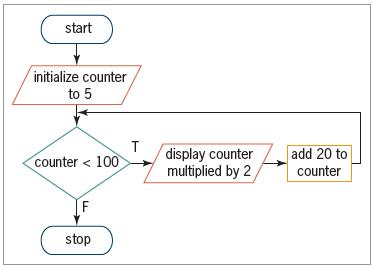
Write the Visual Basic code that corresponds to the flowchart shown in Figure 6-30. Display the calculated results on separate lines in the lblCount control. start initialize counter to 5 T display counter multiplied by 2 add 20 to counter < 100 counter [F stop
Open the Debug Solution (Debug Solution.sln) file contained in the VB2015\Chap06\ Debug Solution-B15 folder. Open the Code Editor window and review the existing code. Start and then test the application. Be sure to include non-integers in your test data. Correct any errors in the code. Save the
Rewrite the pretest loop from Exercise 14 as a posttest loop. Add another button to the interface used in Exercise 14. Enter your code from this exercise in the button’s Click event procedure. Test the application appropriately.Data From Exercise 14:Write the Visual Basic code for a pretest loop
In this exercise, you learn how to use the String Collection Editor window to fill a list box with values. Open the VB2015\Chap06\ListBox Solution\ListBox Solution (ListBox Solution.sln) file. Open the Code Editor window. Remove the Add methods and the For...Next statement from the form’s Load
Rewrite the pretest loop from Exercise 13 using the Do...Loop statement. Add another button to the interface created in Exercise 13. Enter your code from this exercise in the button’s Click event procedure, and then test the application appropriately.Data From Exercise 13:Write the Visual Basic
Write the Visual Basic code for a pretest loop that uses an Integer variable named intEven to display the even integers from 2 through 20 in the lblEven control. Use the For...Next statement. Display each number on a separate line in the control. Then create an application to test your code using
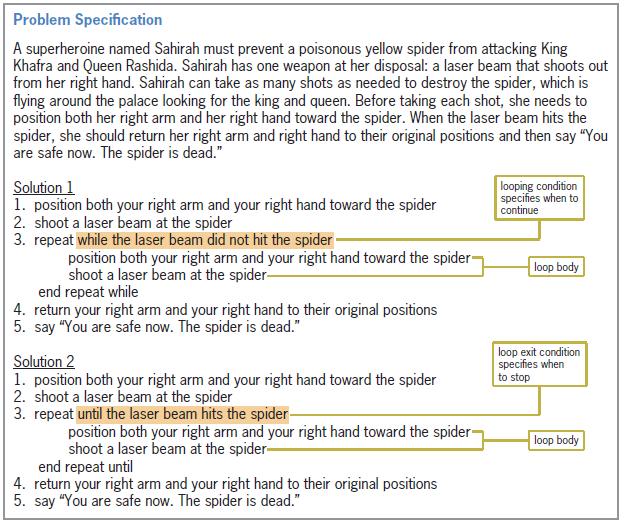
Modify Solution 2 shown earlier in Figure 6-4. The solution should now keep track of the number of times Sahirah’s laser beam missed the spider. After saying “You are safe now. The spider is dead.”, Sahirah should say one of the following: “I got him immediately.”; “I missed him one
Which of the following statements is equivalent to the statement dblTotal = dblTotal + dblScore?a. dblTotal += dblScoreb. dblScore += dblTotalc. dblTotal =+ dblScored. dblScore =+ dblTotal
Open the VB2015\Chap06\Car Solution\Car Solution (Car Solution.sln) file. (The image is provided courtesy of OpenClipArt.org/Keistutis.) The btnClickMe_Click procedure should make the “I WANT THIS CAR!” message blink 10 times. In other words, the message should disappear and then reappear,
Write a Visual Basic assignment statement that subtracts the contents of the decReturns variable from the contents of the decSales accumulator variable.
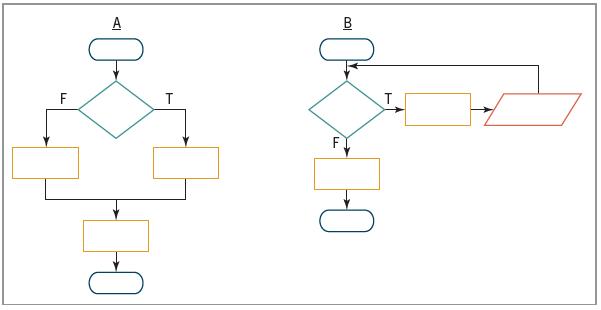
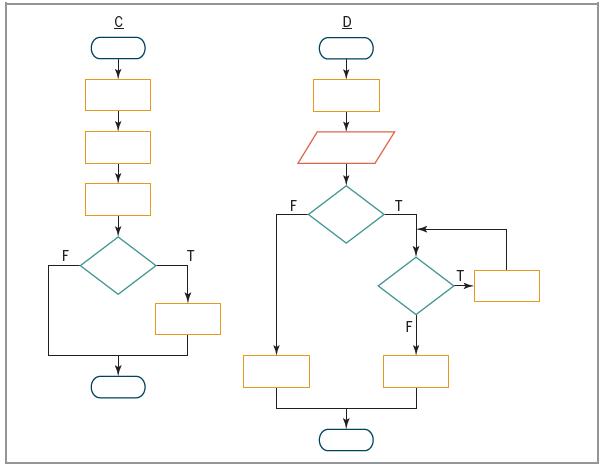
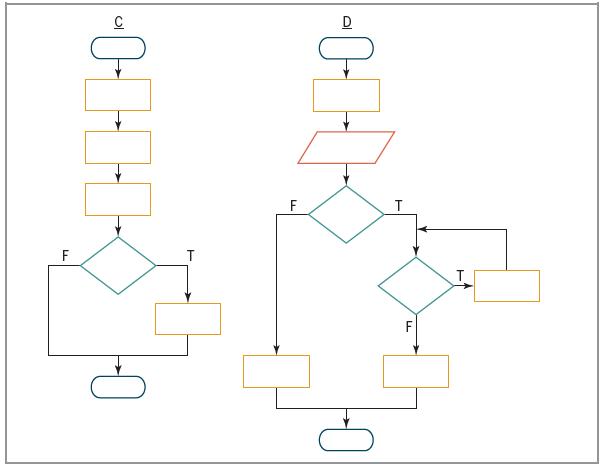
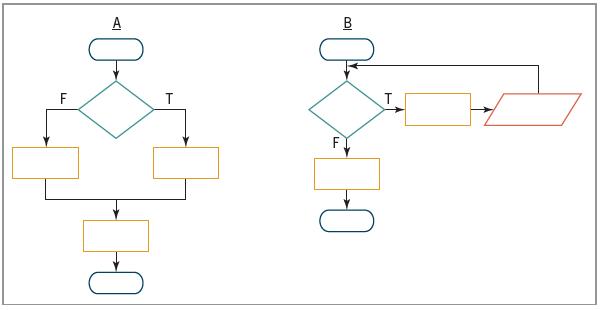
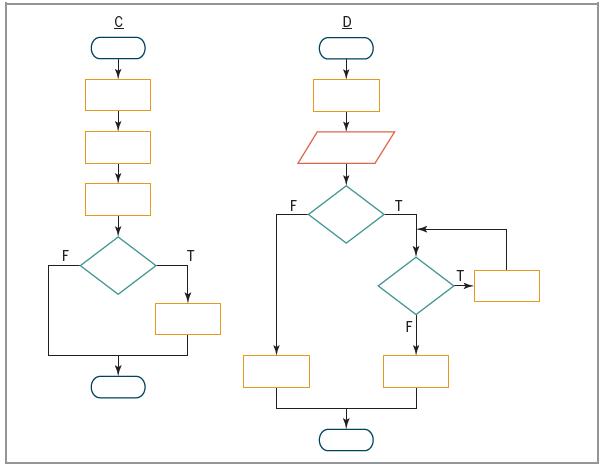
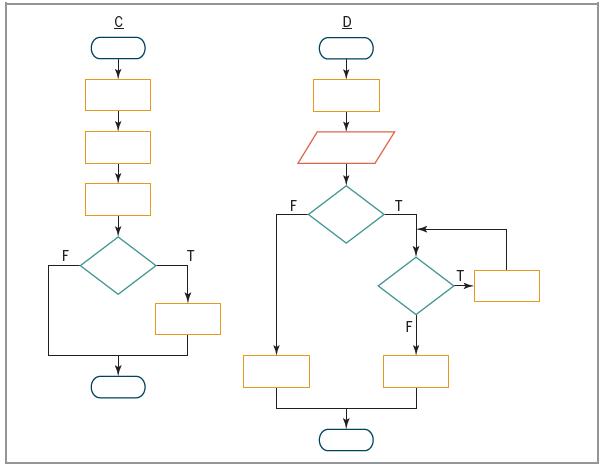
Which of the following control structures are used in flowchart D in Figure 6-28?a. Sequenceb. Selectionc. Repetition T.
Create an application, using the following names for the solution and project, respectively: Bar Chart Solution and Bar Chart Project. Save the application in the VB2015\Chap06 folder. The application should allow the user to enter the ratings for five different movies. Each rating should be a
Open the VB2015\Chap06\Fibonacci Solution\Fibonacci Solution (Fibonacci Solution.sln) file. The application should display the first 10 Fibonacci numbers: 1, 1, 2, 3, 5, 8, 13, 21, 34, and 55. Notice that beginning with the third number in the series, each Fibonacci number is the sum of the prior
Write a Visual Basic assignment statement that updates the intTotal counter variable by –3.
Which of the following control structures are used in flowchart C in Figure 6-28?a. Sequenceb. Selectionc. Repetition T.
Create an application, using the following names for the solution and project, respectively: New Salary Solution and New Salary Project. Save the application in the VB2015\Chap06 folder. Assume that at the beginning of every year, you receive a raise on your previous year’s salary. Create a
Open the VB2015\Chap06\Random Solution\Random Solution (Random Solution.sln) file. The application should give the user 10 chances to guess a random number generated by the computer. The random number should be an integer from 1 through 50, inclusive. Each time the user makes an incorrect guess,
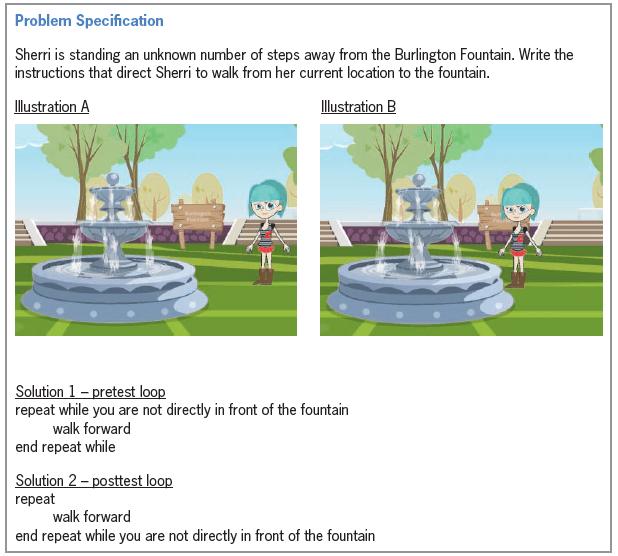
Figure 6-29 shows a problem specification, two illustrations, and two solutions containing loops.a. Will both loops work when Sherri is one or more steps away from the fountain, as shown in Illustration A? If not, why not?b. Will both loops work when Sherri is directly in front of the fountain, as
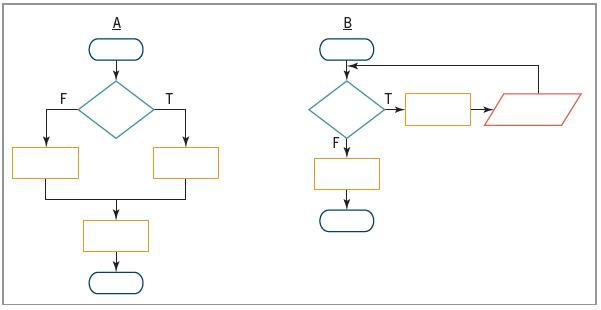
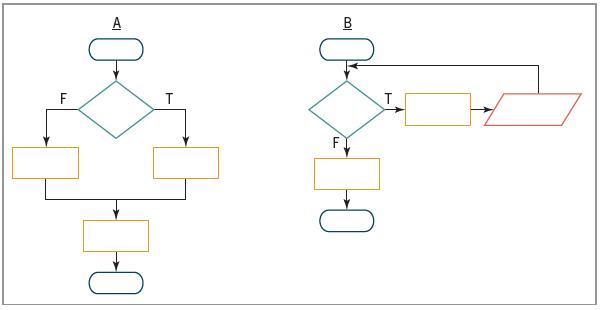
Which of the following control structures are used in flowchart B in Figure 6-28?a. Sequenceb. Selectionc. Repetition T.
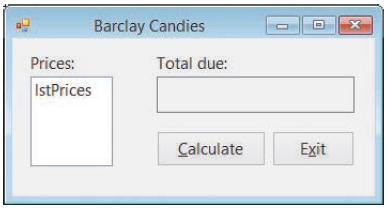
Create an application, using the following names for the solution and project, respectively: Barclay Solution and Barclay Project. Save the application in the VB2015\ Chap06 folder. The application’s interface is shown in Figure 6-72. The Calculate button’s Click event procedure should use a
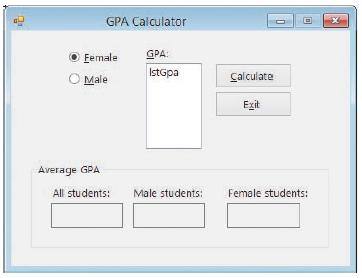
In this exercise, you create an application that allows the user to enter the gender (either F or M) and GPA for any number of students. The application’s interface is shown in Figure 6-53. The application should calculate the average GPA for all students, the average GPA for male students, and
Write a Visual Basic assignment statement that updates the decTotal accumulator variable by the value stored in the decSales variable.
Which of the following control structures are used in flowchart A in Figure 6-28?a. Sequenceb. Selectionc. Repetition T.
Create an application, using the following names for the solution and project, respectively: Parking Solution and Parking Project. Save the application in the VB2015\ Chap11 folder. The application should display the total cost of paving the parking lot shown in Figure 11-31. Create a suitable
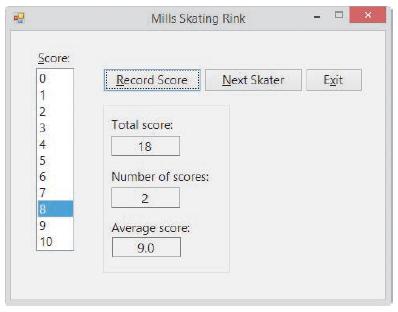
Mills Skating Rink holds a weekly ice-skating competition. Competing skaters must perform a two-minute program in front of a panel of judges. The number of judges varies from week to week. At the end of a skater’s program, each judge assigns a score of 0 through 10 to the skater. The manager of
Write a Visual Basic assignment statement that updates the intTotal counter variable by 3.
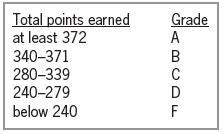
Open the VB2015\Chap06\Grade Solution\Grade Solution (Grade Solution.sln) file. Professor Mason wants you to create an application that allows her to assign a grade to any number of students. Each student’s grade is based on four test scores, with each test worth 100 points. The application
In this exercise, you modify the Monthly Payment application from this lesson. Use Windows to make a copy of the Payment Solution folder. Rename the copy Modified Payment Solution. Open the Payment Solution (Payment Solution.sln) file contained in the Modified Payment Solution folder. Modify the
What will the following code display in message boxes?Dim intX As Integer = 1Do MessageBox.Show(intX.ToString) intX = intX + 1Loop Until intX > 5
How many times will the MessageBox.Show method in the following code be processed? For intCount As Integer = 6 To 13 Step 2 MessageBox.Show("Hello") Next intCounta. Threeb. Fourc. Fived. Eight
In this exercise, you modify the Modified Savings Account application from this lesson. Use Windows to make a copy of the Modified Savings Solution folder. Rename the copy Modified Savings Solution-Intermediate. Open the Savings Solution (Savings Solution.sln) file contained in the Modified Savings
How many times will the MessageBox.Show method in the following code be processed? Dim intCount As Integer Do MessageBox.Show("Hello") intCount += 1 Loop While intCount > 4a. Zerob. Onec. Fourd. Five
Showing 1500 - 1600
of 1847
First
5
6
7
8
9
10
11
12
13
14
15
16
17
18
19
Step by Step Answers

 Get 50% OFF
Claim Now
Get 50% OFF
Claim Now