New Semester
Started
Get
50% OFF
Study Help!
--h --m --s
Claim Now
Question Answers
Textbooks
Find textbooks, questions and answers
Oops, something went wrong!
Change your search query and then try again
S
Books
FREE
Study Help
Expert Questions
Accounting
General Management
Mathematics
Finance
Organizational Behaviour
Law
Physics
Operating System
Management Leadership
Sociology
Programming
Marketing
Database
Computer Network
Economics
Textbooks Solutions
Accounting
Managerial Accounting
Management Leadership
Cost Accounting
Statistics
Business Law
Corporate Finance
Finance
Economics
Auditing
Tutors
Online Tutors
Find a Tutor
Hire a Tutor
Become a Tutor
AI Tutor
AI Study Planner
NEW
Sell Books
Search
Search
Sign In
Register
study help
computer science
programming with microsoft visual basic 2015
Bundle Programming With Microsoft Visual Basic 2015 7th + Mindtap Programming 1 Term Printed Access Card 7th Edition Diane Zak - Solutions
1. Which of the following clauses stops the loop when the value in the intPopulation variable is less than the number 5000?a. Do While intPopulation >= 5000b. Do Until intPopulation < 5000c. Loop While intPopulation >= 5000d. all of the above
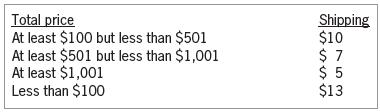
12. The purpose of this exercise is to demonstrate the importance of testing an application thoroughly. Open the VB2015\Chap05\Debug Solution\Debug Solution(Debug Solution.sln) file. The application displays a shipping charge that is based on the total price entered by the user, as shown in Figure
11. This exercise will show you how to generate and display random numbers containing decimal places. Open the Random Double Solution (Random Double Solution.sln) file contained in the VB2015\Chap05\Random Double Solution folder.a. Open the Code Editor window. You can use the Random.NextDouble
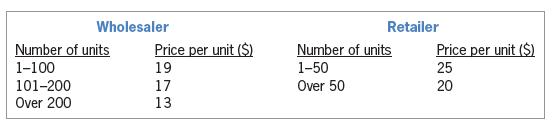
10. In this exercise, you create an application for Sunnyside Products. The application displays the price of an order based on the number of units ordered and the customer’s status (either wholesaler or retailer). The price per unit is shown in Figure 5-76. Create an application, using the
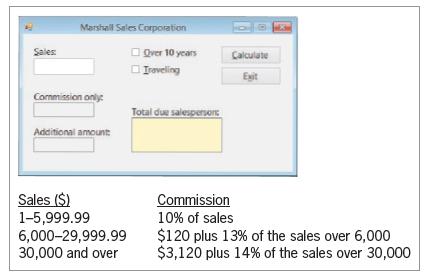
9. Create an application, using the following names for the solution and project, respectively:Marshall Solution and Marshall Project. Save the application in the VB2015\Chap05 folder. Create the interface shown in Figure 5-75. Each salesperson at Marshall Sales Corporation receives a commission
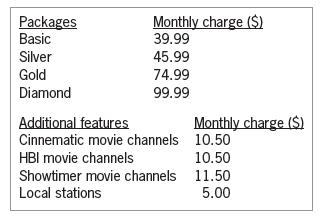
8. Create an application, using the following names for the solution and project, respectively:Kerry Cable Solution and Kerry Cable Project. Save the application in the VB2015\Chap05 folder. Kerry Cable Company wants you to create an application that displays a customer’s monthly cable bill,
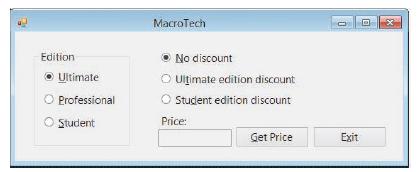
7. Create an application, using the following names for the solution and project, respectively:MacroTech Solution and MacroTech Project. Save the application in the VB2015\Chap05 folder. Create the interface shown in Figure 5-73. MacroTech sells a software package that is available in three
6. In this exercise, you modify the application from Exercise 5. Use Windows to make a copy of the Guessing Game Solution folder. Rename the copy Modified Guessing Game Solution. Open the Guessing Game Solution (Guessing Game Solution.sln) file contained in the Modified Guessing Game Solution
5. Create an application, using the following names for the solution and project, respectively:Guessing Game Solution and Guessing Game Project. Save the application in the VB2015\Chap05 folder. The application should generate a random integer from 1 through 30, inclusive. It then should give the
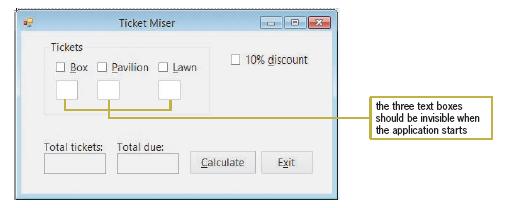
4. Create a Visual Basic Windows application. Use the following names for the solution and project, respectively: Concert Solution and Concert Project. Save the application in the VB2015\Chap05 folder. Create the interface shown in Figure 5-72. The three text boxes should be invisible when the
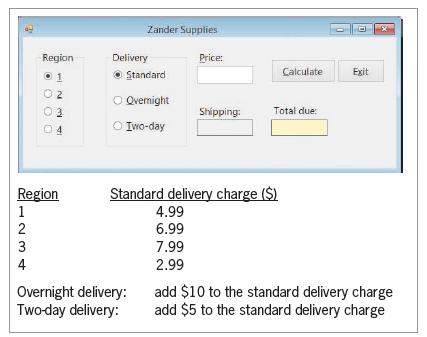
3. Create an application, using the following names for the solution and project, respectively:Zander Solution and Zander Project. Save the application in the VB2015\Chap05 folder. Create the interface shown in Figure 5-71. The text box should accept only numbers, the period, and the Backspace key.
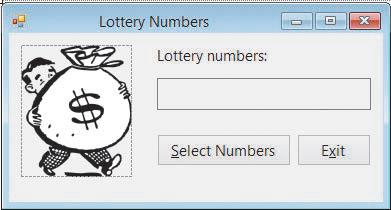
2. Create an application, using the following names for the solution and project, respectively:Lottery Solution and Lottery Project. Save the application in the VB2015\Chap05 folder. Create the interface shown in Figure 5-70. The image for the picture box is stored in the
1. Open the VB2015\Chap05\Riley Solution\Riley Solution (Riley Solution.sln) file.The btnCalc_Click procedure should display the message “Please enter the price.” in a message box when the contents of the txtPrice control cannot be converted to a Double number. Otherwise, it should display the
5. If the txtAge control is empty, the blnIsOk = Integer.TryParse(txtAge.Text, intAge) statement will store ____________________ in the intAge variable and also assign ____________________ to the blnIsOk variable.a. 0, Trueb. 0, Falsec. False, the empty stringd. the empty string, False
4. Which of the following statements generates a random integer from 1 to 25, inclusive?a. intNum = randGen.Next(1, 25)b. intNum = randGen.Next(1, 26)c. intNum = randGen(1, 25)d. intNum = randGen.NextNumber(1, 26)
3. Which of the following statements declares an object to represent the pseudo-random number generator in a procedure?a. Dim randGen As New RandomNumberb. Dim randGen As New Generatorc. Dim randGen As New Randomd. Dim randGen As New RandomObject
2. Which of the following statements will hide the picCar control?a. picCar.Hideb. picCar.Hide = Truec. picCar.Invisible = Trued. picCar.Visible = False
1. If the txtPrice control contains the value 75, what value will the Decimal.TryParse(txtPrice.Text, decPrice) method return?a. Falseb. Truec. 75d. 75.00
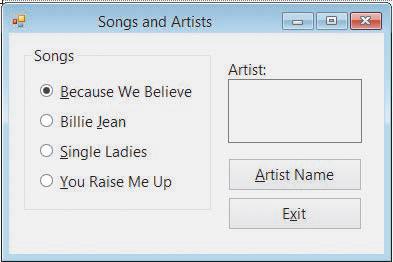
8. Create an application, using the following names for the solution and project, respectively:Songs Solution and Songs Project. Save the application in the VB2015\Chap05 folder.a. Create the interface shown in Figure 5-59. The four radio buttons contain song titles. The Artist Name button’s
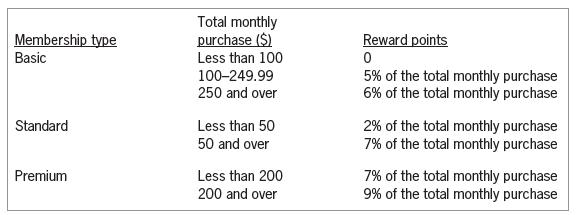
7. Shopper Stoppers wants you to create an application that displays the number of reward points a customer earns each month. The reward points are based on the customer’s membership type and total monthly purchase amount, as shown in Figure 5-58. Use the following names for the solution and
6. In this exercise, you modify the Treeline Resort application from this lesson. Use Windows to make a copy of the Treeline Solution folder. Rename the copy Modified Treeline Solution. Open the Treeline Solution (Treeline Solution.sln) file contained in the Modified Treeline Solution folder.a.
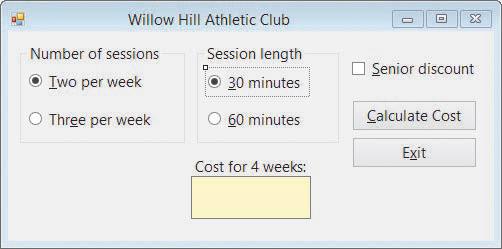
5. Willow Hill Athletic Club offers personal training sessions to its members. The sessions are either 30 or 60 minutes in length, and members can sign up to meet either two or three times per week. The application’s interface is shown in Figure 5-57. Each 30-minute session costs $17.50; each
4. In this exercise, you code an application that allows the user to select one radio button from each of two groups: an English group and a Spanish group. Open the VB2015\Chap05\Language Solution\Language Solution (Language Solution.sln) file. When a radio button is selected, its CheckedChanged
3. In this exercise, you modify the Brazilian Tea application from Exercise 2. Use Windows to make a copy of the Tea Solution folder. Rename the copy Modified Tea Solution.Open the Tea Solution (Tea Solution.sln) file contained in the Modified Tea Solution folder. Use the Select Case statement
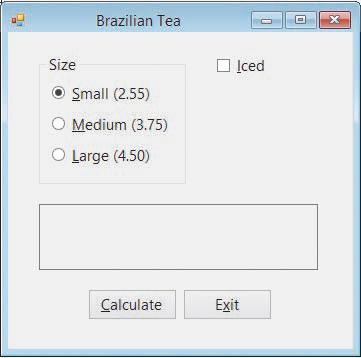
2. In this exercise, you create an application for Brazilian Tea, which sells both hot and iced tea in three different cup sizes. Use the following names for the solution and project, respectively: Tea Solution and Tea Project. Save the application in the VB2015\Chap05 folder. The application’s
1. In this exercise, you modify the Treeline Resort application from this lesson. Use Windows to make a copy of the Treeline Solution folder. Rename the copy Treeline Solution-Select Case. Open the Treeline Solution (Treeline Solution.sln) file contained in the Treeline Solution-Select Case folder.
10. If the blnSenior variable contains the Boolean value False, then the Not blnSenior condition will evaluate to______________________.a. Trueb. False
9. Which of the following events occurs when a check box is clicked?a. Checkb. Checkedc. CheckedChanged. CheckedChanged
8. Which of the following If clauses will evaluate to True when the Bonus check box is selected?a. If chkBonus.Check = True Thenb. If chkBonus.Checked Thenc. If chkBonus.Selected = True Thend. If chkBonus.Selected Then
7. If a radio button is selected, its _____________________ property contains the Boolean value True.a. Checkedb. Onc. Selectedd. Selection
6. A form contains six check boxes. Three of the check boxes are located in a group box.How many of the check boxes on the form can be selected at the same time?a. oneb. twoc. threed. six
5. A form contains six radio buttons. Three of the radio buttons are located in a group box. How many of the radio buttons on the form can be selected at the same time?a. oneb. twoc. threed. six
4. It is customary in Windows applications to designate a default check box.a. Trueb. False
3. Which capitalization should be used for the text appearing in check boxes and radio buttons?a. sentence capitalizationb. book title capitalizationc. either book title capitalization or sentence capitalization
2. If a check box is not selected, what value is contained in its Checked property?a. Trueb. Uncheckedc. Falsed. Unselected
1. What is the minimum number of radio buttons in a group?a. oneb. twoc. threed. There is no minimum number of radio buttons.
18. Open the Golf Solution (Golf Solution.sln) file contained in the VB2015\Chap04\Golf Solution-Ex18 folder. Test the application using the data shown in Exercise 17’s Figure 5-39. Modify the code to produce the correct results.
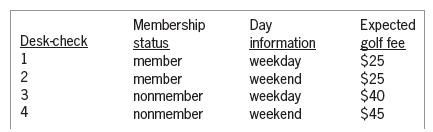
17. Open the Golf Solution (Golf Solution.sln) file contained in the VB2015\Chap04\Golf Solution-Ex17 folder. Test the application using the data shown in Figure 5-39. Modify the code to produce the correct results. Desk-check 1234 Membership Day Expected status member information golf fee weekday
16. Open the VB2015\Chap05\Canton Solution\Canton Solution (Canton Solution.sln)file. Canton Ltd. sells economic development software to cities around the country. The company is having its annual users’ forum next month. The price per person depends on the number of people a user registers. The
15. Open the VB2015\Chap05\Jetters Solution\Jetters Solution (Jetters Solution.sln) file.The txtPrice control should accept only numbers, the period, and the Backspace key;code the appropriate procedure. The txtQuantity control should accept only numbers and the Backspace key; code the appropriate
14. In this exercise, you modify the Carillo application from Exercise 13. Use Windows to make a copy of the Carillo Solution folder. Rename the copy Modified Carillo Solution.Open the Carillo Solution (Carillo Solution.sln) file contained in the Modified Carillo Solution folder. In the
13. Open the VB2015\Chap05\Carillo Solution\Carillo Solution (Carillo Solution.sln) file.The txtSales control should accept only numbers, the period, and the Backspace key;code the appropriate procedure. The btnCalc_Click procedure calculates a 3.5% commission when the annual sales are greater than
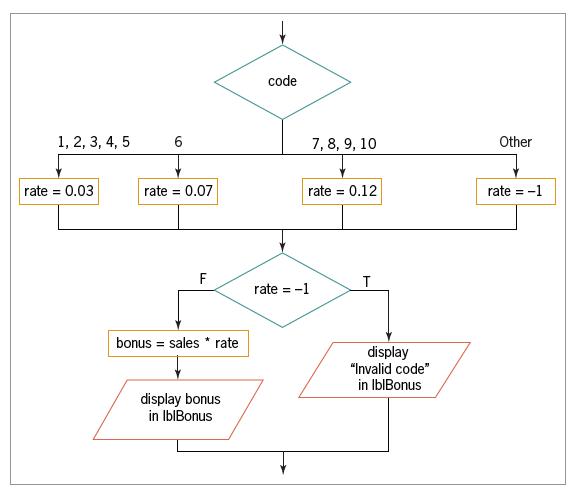
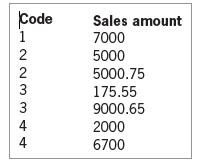
12. Open the VB2015\Chap05\Bonus Solution\Bonus Solution (Bonus Solution.sln) file.Use the Select Case statement to finish coding the Calculate button’s Click event procedure.Use the partial flowchart shown in Figure 5-38 as a guide. Test the application appropriately. code 1, 2, 3, 4, 5 6 7, 8,
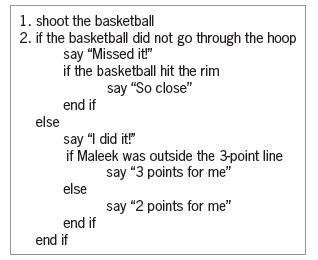
11. Does the algorithm in Figure 5-37 produce the same results as the solution shown in Figure 5-5 in this lesson? If not, why not? 1. shoot the basketball 2. if the basketball did not go through the hoop say "Missed it!" else if the basketball hit the rim end if say "So close" say "I did it!" if
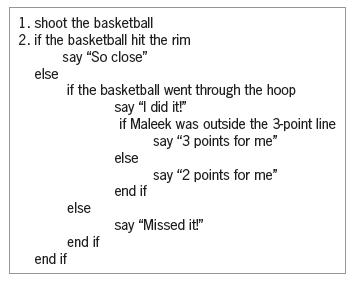
10. Does the algorithm in Figure 5-36 produce the same results as the solution shown in Figure 5-5 in this lesson? If not, why not? 1. shoot the basketball 2. if the basketball hit the rim say "So close" else if the basketball went through the hoop say "I did it!" if Maleek was outside the 3-point
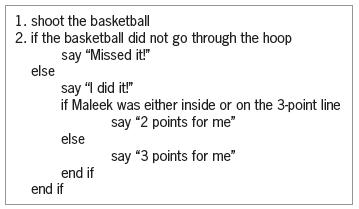
9. Does the algorithm in Figure 5-35 produce the same results as the solution shown in Figure 5-4 in this lesson? If not, why not? 1. shoot the basketball 2. if the basketball did not go through the hoop say "Missed it!" else say "I did it!" if Maleek was either inside or on the 3-point line say "2
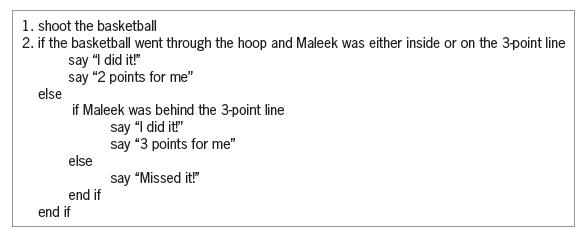
8. Does the algorithm in Figure 5-34 produce the same results as the solution shown in Figure 5-4 in this lesson? If not, why not? 1. shoot the basketball 2. if the basketball went through the hoop and Maleek was either inside or on the 3-point line else say "I did it!" say "2 points for me" if
7. Open the Movie Ticket Solution (Movie Ticket Solution.sln) file contained in the VB2015\Chap05\Movie Ticket Solution folder. If necessary, open the designer window.Use the If...Then...Else statement to code the If...Then...Else button’s Click event procedure.Use the Select Case statement to
6. Rewrite the code from Exercise 5 using the Select Case statement.
5. Write the Visual Basic code that displays the message “Use the Kanton room” when the number of seminar participants is at least 75. When the number is 40 through 74, display the message “Use the Harris room”. When the number is 10 through 39, display the message “Use the small
4. Write the Visual Basic code for the algorithm shown in Figure 5-10 in this lesson. The car classification (either S for standard or L for luxury) is stored, in uppercase, in a variable named strClass. The club membership information (either M for member or N for nonmember) is stored, in
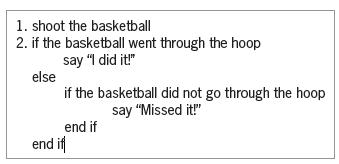
3. What is wrong with the algorithm shown in Figure 5-33? 1. shoot the basketball 2. if the basketball went through the hoop say "I did it!" else if the basketball did not go through the hoop say "Missed it!" end if end if
2. Caroline is at a store’s checkout counter. She’d like to pay for her purchase using either her credit card or her debit card, but preferably her credit card. However, she is not sure whether the store accepts either card. If the store doesn’t accept either card, she will need to pay cash
1. Travis is standing in front of two containers: one marked Trash and the other marked Recycle. In his right hand, he is holding a bag that contains either trash or recyclables.Travis needs to lift the lid from the appropriate container (if necessary), then drop the bag in the container, and then
16. Explain the meaning of the term desk-checking.
15. List the four errors commonly made when writing selection structures. Which errors produce the correct results but in a less efficient way?
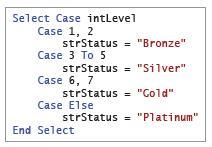
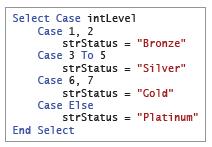
14. What will the code in Figure 5-30 assign to the strStatus variable when the intLevel variable contains the number 1?a. Bronzeb. Goldc. Platinumd. Silver Select Case intLevel Case 1, 2 strStatus = "Bronze" Case 3 To 5 strStatus = "Silver" Case 6, 7 strStatus = "Gold" Case Else strStatus =
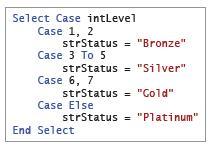
13. What will the code in Figure 5-30 assign to the strStatus variable when the intLevel variable contains the number 7?a. Bronzeb. Goldc. Platinumd. Silver Select Case intLevel Case 1, 2 strStatus = "Bronze" Case 3 To 5 strStatus = "Silver" Case 6, 7 strStatus = "Gold" Case Else strStatus =
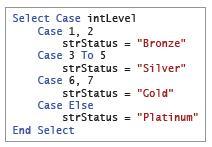
12. What will the code in Figure 5-30 assign to the strStatus variable when the intLevel variable contains the number 8?a. Bronzeb. Goldc. Platinumd. Silver Select Case intLevel Case 1, 2 strStatus = "Bronze" Case 3 To 5 strStatus = "Silver" Case 6, 7 strStatus = "Gold" Case Else strStatus =
11. What will the code in Figure 5-30 assign to the strStatus variable when the intLevel variable contains the number 4?a. Bronzeb. Goldc. Platinumd. Silver Select Case intLevel Case 1, 2 strStatus = "Bronze" Case 3 To 5 strStatus = "Silver" Case 6, 7 strStatus = "Gold" Case Else strStatus =
10. Which of the following Case clauses is valid in a Select Case statement whose selectorExpression is an Integer variable named intCode?a. Case Is > 7b. Case 3, 5c. Case 1 To 4d. all of the above
9. A nested selection structure can appear _____________________.a. only in an outer selection structure’s false pathb. only in an outer selection structure’s true pathc. in either an outer selection structure’s true path or its false path
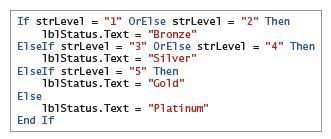
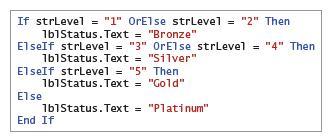
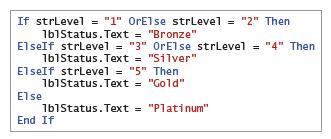
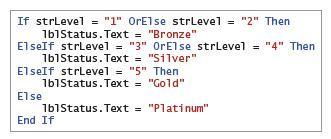
8. What will the code in Figure 5-29 assign to the lblStatus control when the strLevel variable contains the string “3”?a. Bronzeb. Goldc. Platinumd. Silver If strLevel = "1" OrElse strLevel = "2" Then 1b1Status.Text = "Bronze" ElseIf strLevel = "3" OrElse strLevel = "4" Then 1b1Status.Text =
7. What will the code in Figure 5-29 assign to the lblStatus control when the strLevel variable contains the string “10”?a. Bronzeb. Goldc. Platinumd. Silver If strLevel = "1" OrElse strLevel = "2" Then 1b1Status.Text = "Bronze" ElseIf strLevel = "3" OrElse strLevel = "4" Then 1b1Status.Text =
6. What will the code in Figure 5-29 assign to the lblStatus control when the strLevel variable contains the string “5”?a. Bronzeb. Goldc. Platinumd. Silver If strLevel = "1" OrElse strLevel = "2" Then 1b1Status.Text = "Bronze" ElseIf strLevel = "3" OrElse strLevel = "4" Then 1b1Status.Text =
5. What will the code in Figure 5-29 assign to the lblStatus control when the strLevel variable contains the string “2”?a. Bronzeb. Goldc. Platinumd. Silver If strLevel = "1" OrElse strLevel = "2" Then 1b1Status.Text = "Bronze" ElseIf strLevel = "3" OrElse strLevel = "4" Then 1b1Status.Text =
4. What will the code in Figure 5-28 assign to the dblRate variable when the dblSales variable contains the number 1000?a. 0b. 0.05c. 0.1d. 0.15
3. What will the code in Figure 5-28 assign to the dblRate variable when the dblSales variable contains the number 999.75?a. 0b. 0.05c. 0.1d. 0.15
2. What will the code in Figure 5-28 assign to the dblRate variable when the dblSales variable contains the number 0?a. 0b. 0.05c. 0.1d. 0.15
1. What will the code in Figure 5-28 assign to the dblRate variable when the dblSales variable contains the number 459.99?a. 0b. 0.05c. 0.1d. 0.15
13. Open the VB2015\Chap04\Debug Solution\Debug Solution (Debug Solution.sln)file. Open the Code Editor window and review the existing code. The btnCalc_Click procedure should calculate a 5% commission when the code entered by the user is 1, 2, or 3 and, at the same time, the sales amount is
12. In this exercise, you learn how to specify the maximum number of characters that can be entered in a text box. Open the VB2015\Chap04\Zip Solution\Zip Solution(Zip Solution.sln) file. Click the txtZip control, and then search the Properties list for a property that allows you to specify the
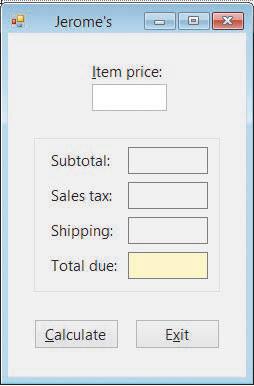
11. Create an application, using the following names for the solution and project, respectively: Jerome Solution and Jerome Project. Save the application in the VB2015\Chap04 folder. Create the interface shown in Figure 4-58. The Calculate button’s Click event procedure should add the item price
10. In this exercise, you modify the wedding reception application from Exercise 9. The modified application will display the number of rectangular tables needed to seat the bridal party as well as the number of round tables required for the guests. Each rectangular table can accommodate a maximum
9. Create an application that displays the number of round tables needed to seat only the guests at a wedding reception. (In other words, the bridal party does not need to be included in this calculation.) Each round table can accommodate a maximum of 8 guests. The interface should provide a text
8. Patti Garcia owns two cars, referred to as Car 1 and Car 2. She wants to drive one of the cars to her vacation destination, but she’s not sure which one (if any) would cost her the least amount in gas. Use the following names for the solution and project, respectively:Car Solution and Car
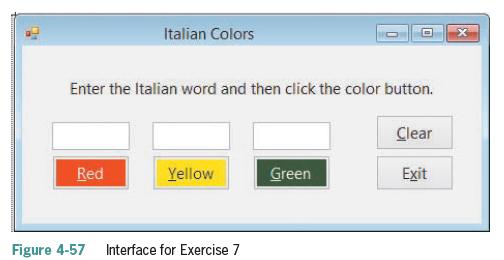
7. Create an application that can be used to teach the Italian words for the colors red, yellow, and green. Use the following names for the solution and project, respectively:Colors Solution and Colors Project. Save the application in the VB2015\Chap04 folder.Create the interface shown in Figure
6. In this exercise, you create an application for Beachwood Industries. Use the following names for the solution and project, respectively: Beachwood Solution and Beachwood Project. Save the application in the VB2015\Chap04 folder.The application’s interface should provide text boxes for the
5. Marcy’s Department store is having a BoGoHo (Buy One, Get One Half Off) sale. The store manager wants an application that allows the salesclerk to enter the prices of two items. The application should calculate and display the total amount the customer owes. The half-off should always be
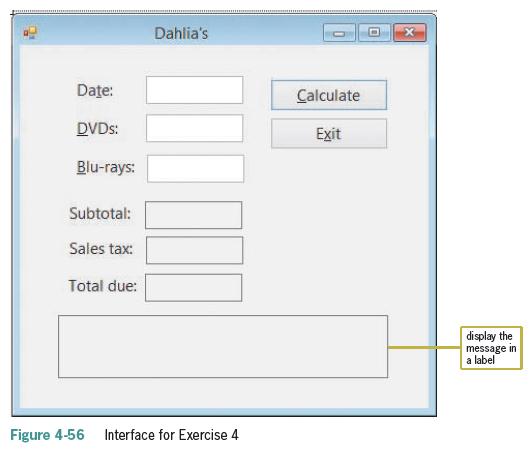
4. Create an application, using the following names for the solution and project, respectively: Dahlia Solution and Dahlia Project. Save the application in the VB2015\Chap04 folder. Create the interface shown in Figure 4-56. The interface provides text boxes for the salesclerk to enter the numbers
3. Open the MessageBox Value Solution (MessageBox Value Solution.sln) file contained in the VB2015\Chap04\MessageBox Value Solution folder. Open the Code Editor window. When the Hours worked text box receives the focus, its existing text should be selected. The text box should accept only numbers,
2. In this exercise, you modify the bakery application from Chapter 3. Use Windows to copy the Bakery Solution folder from the VB2015\Chap03 folder to the VB2015\Chap04 folder, and then open the Bakery Solution (Bakery Solution.sln) file. When a text box in the interface receives the focus, its
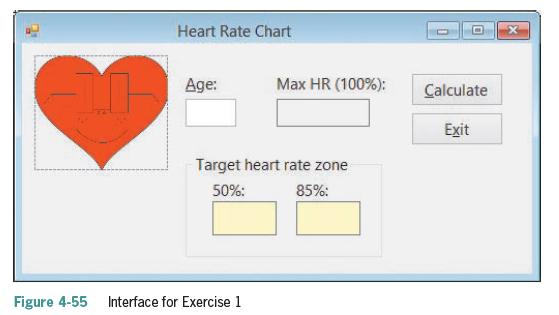
1. Create an application that displays a person’s maximum heart rate, given his or her age.The maximum heart rate is calculated by subtracting the person’s age from the number 220. The application should also display the person’s target heart rate zone, which is 50% to 85% of the maximum
7. The statement txtHours.Focus() invokes the txtHours _____________________ event.a. Clickb. Enterc. Focusd. SetFocus
6. Which of the following tells the computer to highlight all of the text contained in the txtName control?a. txtName.SelectAll()b. txtName.HighlightAll()c. Highlight(txtName)d. SelectAll(txtName.Text)
5. When a user tabs to a text box, the text box’s _____________________ event occurs.a. Accessb. Enterc. TabOrderd. TabbedTo
4. Which of the following If clauses determines whether the user pressed the % key?a. If ControlChars.PercentSign = True Thenb. If e.KeyChar.ControlChars = "%" Thenc. If e.KeyChar = Chars.PercentSign Thend. If e.KeyChar = "%" Then
3. Which of the following If clauses determines whether the user pressed the Backspace key?a. If e.KeyChar = ControlChars.Back Thenb. If e.KeyChar = Backspace Thenc. If e.KeyChar = ControlChars.Backspace Thend. If ControlChars.BackSpace = True Then
2. When entered in the appropriate event procedure, which of the following statements cancels the key pressed by the user?a. e.Cancel = Trueb. e.Cancel = Falsec. e.Handled = Trued. e.Handled = False
1. When entering data in a text box, each key the user presses invokes the text box’s _____________________ event.a. Focusb. Keyc. KeyFocusd. KeyPress
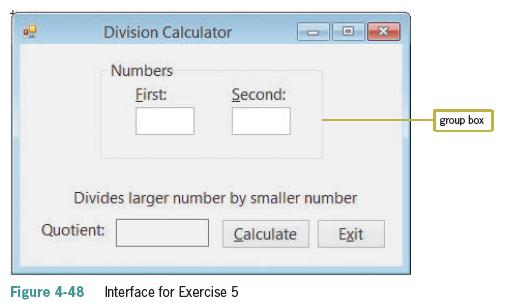
5. Create an application that displays the result of dividing the larger of two numbers entered by the user by the smaller one, as indicated in Figure 4-48. Use the following names for the solution and project, respectively: Division Solution and Division Project.Save the application in the
4. Triple County Electric wants you to create an application that calculates a customer’s monthly electric bill, given the customer’s name and his or her current and previous meter readings. If the current reading is less than the previous reading, use the MessageBox.Show method to display an
3. Tea Time Company wants you to create an application that allows a clerk to enter the number of pounds of tea ordered, the price per pound, and whether the customer should be charged a $15 shipping fee. The application should calculate and display the total amount the customer owes. Use the
2. In this exercise, you modify the Net Income or Loss application from Lesson A. Use Windows to make a copy of the Net Solution folder. Rename the copy Net Solution-Print. Open the Net Solution (Net Solution.sln) file contained in the Net Solution-Print folder. Locate the btnCalc_Click procedure
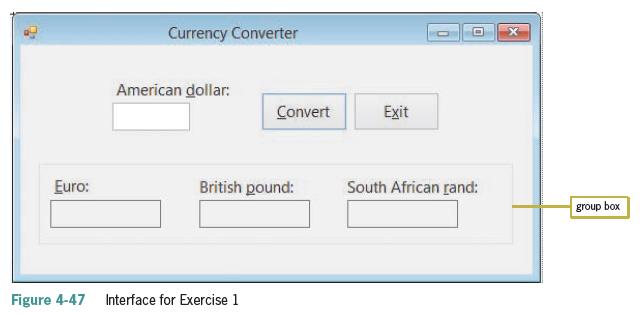
1. Create an application that converts American dollars to the three currencies indicated in Figure 4-47. Use the following names for the solution and project, respectively: Converter Solution and Converter Project. Save the application in the VB2015\Chap04 folder.Make the Convert button the
5. If the user clicks the Yes button in a message box, the message box returns the number 6, which is equivalent to which value?a. DialogResultButton.Yesb. DialogResult.Yesc. DialogResult.YesButtond. none of the above
4. If a message is for informational purposes only and does not require the user to make a decision, the message box should display which of the following?a. an OK button and the Information iconb. an OK button and the Exclamation iconc. a Yes button and the Information icond. any button and the
3. You use the _____________________ constant to include the Exclamation icon in a message box.a. MessageBox.Exclamationb. MessageBox.IconExclamationc. MessageBoxIcon.Exclamationd. MessageBox.WarningIcon
2. What is the TabIndex value of the first control added to a group box whose TabIndex value is 3?a. 3b. 3.0c. 3.1d. none of the above
1. Which of the following statements is false?a. When you delete a group box, the controls contained within the group box are also deleted.b. Moving a group box also moves all of the controls contained within the group box.c. A group box’s Label property specifies its identifying label.d. You can
Showing 500 - 600
of 1847
1
2
3
4
5
6
7
8
9
10
11
12
13
14
15
Last
Step by Step Answers

 Get 50% OFF
Claim Now
Get 50% OFF
Claim Now