New Semester
Started
Get
50% OFF
Study Help!
--h --m --s
Claim Now
Question Answers
Textbooks
Find textbooks, questions and answers
Oops, something went wrong!
Change your search query and then try again
S
Books
FREE
Study Help
Expert Questions
Accounting
General Management
Mathematics
Finance
Organizational Behaviour
Law
Physics
Operating System
Management Leadership
Sociology
Programming
Marketing
Database
Computer Network
Economics
Textbooks Solutions
Accounting
Managerial Accounting
Management Leadership
Cost Accounting
Statistics
Business Law
Corporate Finance
Finance
Economics
Auditing
Tutors
Online Tutors
Find a Tutor
Hire a Tutor
Become a Tutor
AI Tutor
AI Study Planner
NEW
Sell Books
Search
Search
Sign In
Register
study help
computer science
programming with microsoft visual basic 2015
Bundle Programming With Microsoft Visual Basic 2015 7th + Mindtap Programming 1 Term Printed Access Card 7th Edition Diane Zak - Solutions
5. Write a Do clause that determines whether the end of a sequential access file has been reached. The file is associated with a StreamReader variable named inFile.
4. Write an If clause that determines whether the inventory.txt sequential access file exists.
3. Write the code to close the sequential access file associated with a StreamWriter variable named outFile.
2. Write the code to declare a variable named inFile that can be used to read data from a sequential access file. Then write the statement to open a sequential access file named inventory.txt for input.
1. Write the code to declare a variable named outFile that can be used to write data to a sequential access file. Then write the statement to open a sequential access file named inventory.txt for output.
7. What type of object is created by the AppendText method?a. Fileb. SequenceReaderc. StreamWriterd. none of the above
6. What type of object is created by the OpenText method?a. Fileb. SequenceReaderc. StreamWriterd. none of the above
5. Which of the following can be used to determine whether the employ.txt file exists?a. If IO.File.Exists("employ.txt") Thenb. If IO.File("employ.txt").Exists Thenc. If IO.Exists("employ.txt") = True Thend. If IO.Exists.File("employ.txt") = True Then
4. What does the Peek method return when the end of the file is reached?a. –1b. 0c. the last character in the filed. the newline character
3. Which of the following reads a line of text from a sequential access file and assigns the line (excluding the newline character) to the strText variable?a. inFile.Read(strText)b. inFile.ReadLine(strText)c. strText = inFile.ReadLined. strText = inFile.Read(line)
2. If the file to be opened exists, the ___________________ method erases the file’s contents.a. AppendTextb. CreateTextc. InsertTextd. OpenText
1. Which of the following opens the employ.txt file and allows the computer to write new data to the end of the file’s existing data?a. outFile = IO.File.AddText("employ.txt")b. outFile = IO.File.AppendText("employ.txt")c. outFile = IO.File.InsertText("employ.txt")d. outFile =
13. In this exercise, you modify the application from Exercise 12. Use Windows to make a copy of the Average Solution folder. Rename the folder Modified Average Solution.Open the Average Solution (Average Solution.sln) file contained in the Modified Average Solution folder. Change the font used in
12. Open the VB2015\Chap10\Average Solution\Average Solution (Average Solution.sln)file. The application should display a student’s name and the average of five test scores entered by the user.a. Create a structure named StudentInfo. The structure should contain two members: a String variable for
11. In this exercise, you modify the Die Tracker application from Chapter 9. Copy the Die Solution folder from the VB2015\Chap09 folder to the VB2015\Chap10 folder, and then open the Die Solution (Die Solution.sln) file. Rather than using three parallel arrays, the application should use an array
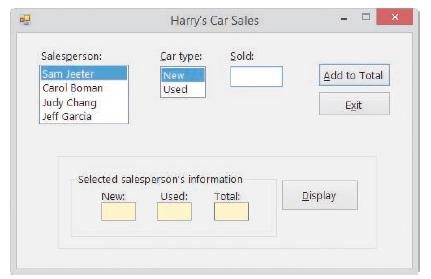
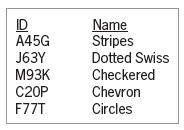
10. Create an application, using the following names for the solution and project, respectively: Car Solution and Car Project. Save the application in the VB2015\Chap10 folder. Create the interface shown in Figure 10-17. Fill the list boxes in the frmMain_Load procedure. Create a structure that
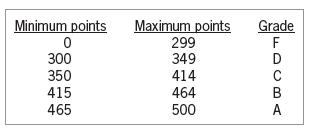
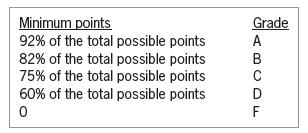
9. In this exercise, you code an application that displays a grade based on the number of points entered by the user. The grading scale is shown in Figure 10-16. Open the VB2015\Chap10\Chang Solution\Chang Solution (Chang Solution.sln) file. Create a structure that contains two members: an Integer
8. In this exercise, you modify the Paper Warehouse application completed in this lesson.Use Windows to make a copy of the Paper Solution-Structure folder. Rename the folder Modified Paper Solution-Structure. Open the Paper Solution (Paper Solution.sln) file contained in the Modified Paper
7. Open the VB2015\Chap10\City Solution\City Solution (City Solution.sln) file. Open the Code Editor window and review the existing code. Locate the btnDisplay_Click procedure. The procedure should display the contents of the array of structure variables in the list box, using the following format:
6. An application contains the Structure statement shown here. Write a Dim statement that declares a five-element one-dimensional array of MyFriend variables. Name the array home. Then write an assignment statement that assigns the value in the txtName control to the strName member contained in the
5. An application contains the Structure statement shown here. Write a Private statement that declares a 10-element one-dimensional array of Computer variables. Name the array business. Then write an assignment statement that assigns the string“AR456” to the strModel member contained in the
4. An application contains the Structure statement shown here. Write a Dim statement that declares a MyFriend variable named school. Then write assignment statements that assign the value in the txtFirst control to the strFirst member and assign the value in the txtLast control to the strLast
3. An application contains the Structure statement shown here. Write a Dim statement that declares a Computer variable named homeUse. Then write an assignment statement that assigns the string “KRZ45” to the strModel member. Finally, write an assignment statement that assigns the number 149.99
2. Write a Structure statement that defines a structure named SongInfo. The structure contains three member variables named strName, strArtist, and strSongLength. Then write a Private statement that declares a SongInfo variable named mySongs.
1. Write a Structure statement that defines a structure named Book. The structure contains three member variables named strTitle, strAuthor, and decPrice.Then write a Dim statement that declares a Book variable named fiction.
5. Where is the Structure statement typically entered?a. the form’s Declarations sectionb. the Definition section in the Code Editor windowc. the form’s Load event procedured. the User-defined section in the Code Editor window
4. An application uses a structure named Employee. Which of the following statements declares a five-element array of Employee structure variables?a. Dim workers(4) As Employeeb. Dim workers(5) As Employeec. Dim workers As Employee(4)d. Dim workers As Employee(5)
3. An array is declared using the statement Dim cities(10) As CityInfo. Which of the following statements assigns the number 4500 to the intPopulation member variable contained in the last array element?a. cities.intPopulation(10) = 4500b. CityInfo.cities.intPopulation = 4500c.
2. The course structure variable contains a member variable named strGrade. Which of the following statements assigns the string “B” to the member variable?a. course.strGrade(0) = "B"b. course.strGrade = "B"c. strGrade.course = "B"d. none of the above
1. Which statement is used to create a user-defined data type?a. Declareb. Definec. Structured. UserType
18. Open the VB2015\Chap09\Debug Solution\Debug Solution (Debug Solution.sln) file.Open the Code Editor window and review the existing code. The first column in the strNames array contains first names, and the second column contains last names.The btnDisplay_Click procedure should display the first
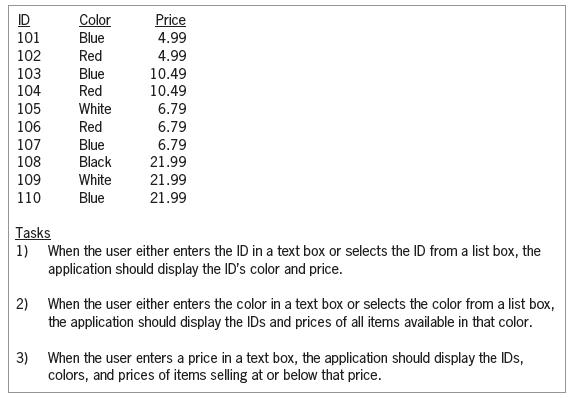
17. Create an application, using the following names for the solution and project, respectively: Bindy Solution and Bindy Project. Save the application in the VB2015\Chap09 folder. Bindy Enterprises sells the 10 items listed in Figure 9-61. Code the application in a way that allows the user to
16. Open the VB2015\Chap09\Count Solution\Count Solution (Count Solution.sln)file. The btnDisplay_Click procedure should display the number of times each of the numbers from 1 through 9 appears in the intNumbers array. (Hint: Store the counts in a one-dimensional array.) Test the application
15. Open the VB2015\Chap09\Harrison Solution\Harrison Solution (Harrison Solution.sln)file. The btnDisplay_Click procedure should display the largest number stored in the first column of the array. Code the procedure using the For...Next statement. Test the application appropriately.
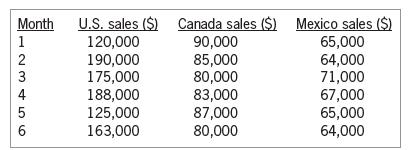
14. The sales manager at Lorenzo Markets wants you to create an application that displays the total sales made in each of three regions: the U.S., Canada, and Mexico. The application should also display the total company sales as well as the percentage that each region contributed to the total
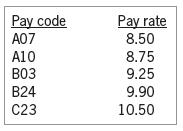
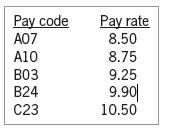
13. Open the VB2015\Chap09\Gross Solution\Gross Solution (Gross Solution.sln) file.The application should store the pay codes and rates listed in Figure 9-59 in a twodimensional array. It should also display the pay codes from the array in a list box. The btnCalc_Click procedure should display the
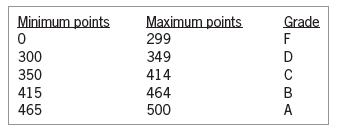
12. In this exercise, you code an application that displays a grade based on the number of points entered by the user. Open the VB2015\Chap09\Kranton Solution\Kranton Solution(Kranton Solution.sln) file. The grading scale is shown in Figure 9-58. Store the minimum points and grades in a
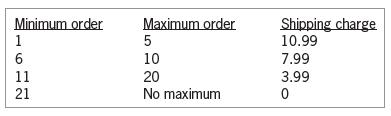
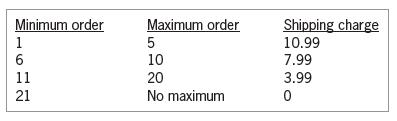
11. Open the Shipping Solution (Shipping Solution.sln) file contained in the VB2015\Chap09\Shipping Solution-Two-Dimensional folder. The btnDisplay_Click procedure should display a shipping charge that is based on the number of items a customer orders. The order amounts and shipping charges are
10. Open the VB2015\Chap09\Sales Solution\Sales Solution (Sales Solution.sln) file. The btnCalc_Click procedure should increase the value stored in each array element by 25% and then display the results in the list box. Use two For...Next statements. Test the application appropriately.
9. Open the VB2015\Chp09\Bonus Solution\Bonus Solution (Bonus Solution.sln) file. The btnCalc_Click procedure should display the sum of the numbers stored in the following three array elements: the second row, second column; the first row, fourth column; and the third row, first column. Test the
8. Open the VB2015\Chap09\Westin Solution\Westin Solution (Westin Solution.sln) file.The btnForEach_Click procedure should use the For Each...Next statement to display the contents of the strParts array in the lstForEachParts control. The btnFor_Click procedure should use the For...Next statement
7. Write the statement that determines the number of elements in a two-dimensional array named strTypes. The statement should assign the number to the intNumTypes variable.
6. Write the statements that determine the highest row and highest column subscripts in the strTypes array. The statements should assign the subscripts to the intHighRow and intHighCol variables, respectively.
5. Write the Private statement to declare an Integer array named intOrders that has three rows and two columns. Use the following values to initialize the array: 1, 2, 10, 20, 100, 200.
4. Write the statement to assign the Boolean value True to the variable located in the second row, third column of a two-dimensional Boolean array named blnAnswers.
3. Rewrite the code from Exercise 2 using a Do...Loop statement.
2. Write a loop to store the number 0 in each element in the intBalances array from Exercise 1. Use the For...Next statement.
1. Write the statement to declare a procedure-level array named intBalances. The array should have seven rows and three columns. Then write the statement to store the number 100 in the element located in the third row, second column.
6. Which of the following returns the highest column subscript in a two-dimensional array named decPays?a. decPays.GetUpperBound(1)b. decPays.GetUpperBound(0)c. decPays.GetUpperSubscript(0)d. decPays.GetHighestColumn(0)
5. Which of the following assigns the number 0 to each element in a two-row, fourcolumn Integer array named intSums?a. For intRow As Integer = 0 To 1 For intCol As Integer = 0 To 3 intSums(intRow, intCol) = 0 Next intCol Next intRowb. Dim intRow As Integer Dim intCol As Integer Do While intRow < 2
4. Which of the following statements assigns the string “California” to the element located in the fourth column, sixth row in the two-dimensional strStates array?a. strStates(3, 5) = "California"b. strStates(5, 3) = "California"c. strStates(6, 3) = "California"d. strStates(3, 6) = "California"
3. The intNum array is declared as follows: Dim intNum(,) As Integer ={{6, 12, 9, 5, 2}, {35, 60, 17, 8, 10}}. Which of the following If clauses determines whether the intRow and intCol variables contain valid row and column subscripts, respectively, for the array?a. If intNum(intRow, intCol) >= 0
2. The intNum array is declared as follows: Dim intNum(,) As Integer ={{6, 12, 9, 5, 2}, {35, 60, 17, 8, 10}}. The intNum(1, 4) =intNum(1, 2) - 5 statement will _____________________.a. replace the 10 amount with 12b. replace the 5 amount with 7c. replace the 2 amount with 4d. none of the above
1. Which of the following declares a two-dimensional array that has four rows and three columns?a. Dim decNums(2, 3) As Decimalb. Dim decNums(3, 4) As Decimalc. Dim decNums(3, 2) As Decimald. Dim decNums(4, 3) As Decimal
10. Create an application, using the following names for the solution and project, respectively:Stock Market Solution and Stock Market Project. Save the application in the VB2015\Chap09 folder. The application should declare a Double array that contains 30 elements. Each element will store the
9. In this exercise, you code a modified version of the Die Tracker application completed in this lesson. Open the Dice Solution (Dice Solution.sln) file contained in the VB2015\Chap09\Dice Solution-Advanced folder. The application should simulate the roll of two dice (rather than one die). It also
8. Open the Shipping Solution (Shipping Solution.sln) file contained in the VB2015\Chap09\Shipping Solution-Parallel folder. The btnDisplay_Click procedure should display a shipping charge that is based on the number of items a customer orders.The order amounts and shipping charges are listed in
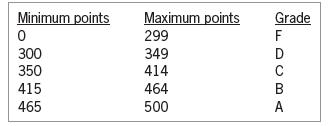
7. In this exercise, you code an application that displays a grade based on the number of points entered by the user. The grading scale is shown in Figure 9-44. Open the VB2015\Chap09\Perez Solution\Perez Solution (Perez Solution.sln) file. The user will enter the total possible points in the
6. In this exercise, you code an application that displays a grade based on the number of points entered by the user. The grading scale is shown in Figure 9-43. Open the VB2015\Chap09\Chang Solution\Chang Solution (Chang Solution.sln) file. Store the minimum points and grades in two parallel
5. Open the VB2015\Chap09\Computer Solution\Computer Solution (Computer Solution.sln) file. The interface allows the user to enter the number of either new or refurbished computers sold. The Add to Total button should use an array to accumulate the numbers sold by type. It also should display (in
4. In this exercise, you modify the Die Tracker application completed in this lesson.Use Windows to make a copy of the Die Solution folder. Rename the copy Modified Die Solution. Open the Die Solution (Die Solution.sln) file contained in the Modified Die Solution folder. Code the application
3. Open the VB2015\Chap09\City Solution\City Solution (City Solution.sln) file. Open the Code Editor window. The form’s Declarations section declares and initializes two parallel one-dimensional arrays named strCities and strStates. Locate the btnDisplay_Click procedure. The procedure should
2. Open the VB2015\Chap09\Pay Solution\Pay Solution (Pay Solution.sln) file. The application should allow the user to select a pay code from the list box. The btnCalc_ Click procedure should display the gross pay, using the number of hours worked and the pay rate corresponding to the selected code.
1. Open the VB2015\Chap09\Days Solution\Days Solution (Days Solution.sln) file. The frmMain_Load procedure should declare a one-dimensional String array, using the names of the seven days of the week to initialize the array. The procedure should use the For Each...Next statement to display the
4. The dblNums array is a six-element Double array. Which of the following If clauses determines whether the entire array has been searched?a. If intSub = dblNums.Length Thenb. If intSub dblNums.GetUpperBound(0) Thend. both a and c
3. The strStates and strCapitals arrays are parallel arrays. If Illinois is stored in the second element in the strStates array, where is its capital (Springfield) stored?a. strCapitals(1)b. strCapitals(2)
2. If the elements in two arrays are related by their subscripts, the arrays are called _____________________ arrays.a. associatedb. coupledc. matchingd. parallel
1. The intSales array is declared as follows: Dim intSales() As Integer ={10000, 12000, 900, 500, 20000}. Which of the following If clauses determines whether the intSub variable contains a valid subscript for the array?a. If intSub >= 0 AndAlso intSub = 0 AndAlso intSub < 4 Thenc. If intSub >= 0
18. Research the Visual Basic ReDim statement. What is the purpose of the statement?What is the purpose of the Preserve keyword?a. Open the VB2015\Chap09\ReDim Solution\ReDim Solution (ReDim Solution.sln)file. Open the Code Editor window and locate the btnDisplay_Click procedure. Study the existing
17. In this exercise, you code an application that generates and displays six unique random numbers for a lottery game. Each lottery number can range from 1 through 54 only.Open the VB2015\Chap09\Lottery Solution\Lottery Solution (Lottery Solution.sln)file. (The image in the picture box is provided
16. In this exercise, you modify the application from Exercise 15. The modified application allows the user to display the number of salespeople earning a commission within a specific range. Use Windows to make a copy of the Commission Solution folder.Rename the folder Modified Commission Solution.
15. Open the VB2015\Chap09\Commission Solution\Commission Solution (Commission Solution.sln) file. The btnDisplay_Click procedure should declare a 20-element, onedimensional Integer array named intCommission. Assign the following 20 numbers to the array: 300, 500, 200, 150, 600, 750, 900, 150, 100,
14. In this exercise, you modify the application from Exercise 13. The modified application allows the user to update a specific price. Use Windows to make a copy of the Retail Solution folder. Rename the folder Modified Retail Solution. Open the Retail Solution(Retail Solution.sln) file contained
13. Open the VB2015\Chap09\Retail Solution\Retail Solution (Retail Solution.sln) file.Open the Code Editor window. Notice that the code declares and initializes a class-level array named dblWholesale. The btnRetail_Click procedure should ask the user for a percentage amount and then use that amount
12. Open the VB2015\Chap09\Inventory Solution\Inventory Solution (Inventory Solution.sln)file. The interface provides a text box for entering an amount that represents the preferred quantity on hand. The application should display the number of array elements containing at least that amount. Finish
11. Open the VB2015\Chap09\Projected Solution\Projected Solution (Projected Solution.sln)file. The btnIncrease_Click procedure should increase each element in the intSales array by 10%, displaying the results in the lstProjected control. Test the application appropriately.
10. In this exercise, you modify one of the Waterson Company applications from this lesson. Use Windows to make a copy of the Stock Solution-Highest folder. Rename the copy Stock Solution-Highest-Lowest. Open the Stock Solution (Stock Solution.sln) file contained in the Stock
9. Open the VB2015\Chap09\Sold Solution\Sold Solution (Sold Solution.sln) file. The For...Next, For Each...Next, and Do...Loop buttons should display the average number sold. Open the Code Editor window. Enter the statement to declare and initialize a class-level one-dimensional array named
8. Open the VB2015\Chap09\Tea Solution\Tea Solution (Tea Solution.sln) file. Open the Code Editor window. Enter the statement to declare and initialize a class-level onedimensional array named dblPounds. Use the following numbers to initialize the array: 35.6, 15, 67.9, 78.8, 12.5, and 27.5. The
7. In this exercise, you modify one of the Waterson Company applications from this lesson. Use Windows to make a copy of the Stock Solution-Highest folder. Rename the copy Stock Solution-Highest-ForEachNext. Open the Stock Solution (Stock Solution.sln) file contained in the Stock
6. In this exercise, you modify one of the Waterson Company applications from this lesson. Use Windows to make a copy of the Stock Solution-Highest folder. Rename the copy Stock Solution-Highest-DoLoop. Open the Stock Solution (Stock Solution.sln)file contained in the Stock Solution-Highest-DoLoop
5. The intNumbers array is a one-dimensional array. Write the statement to add together the numbers stored in the first and second array elements, displaying the sum in the lblSum control.
4. The intNumbers array is a one-dimensional array. Write the statement to multiply the number stored in the first array element by 3, storing the result in the intResult variable.
3. Write the statement to declare and initialize a procedure-level one-dimensional array named dblTaxRates. Use the following numbers to initialize the array: 5.5, 7.25, and 3.4.
2. Write the statement to declare a class-level one-dimensional array named strStates.The array should be able to store 50 strings. Then write the statement to store the string“North Dakota” in the first element.
1. Write the statement to declare a procedure-level one-dimensional array named intOrders. The array should be able to store 20 integers. Then write the statement to store the number 25 in the third element.
15. The strNames array contains 100 elements. Which of the following statements assigns the number 99 to the intLastSub variable?a. intLastSub = strNames.Lengthb. intLastSub = strNames.GetUpperBound(0) + 1c. intLastSub = strNames.GetUpperBound(0)d. both a and b
14. The intNums array is declared as follows: Dim intNums() As Integer ={10, 5, 7, 2}. Which of the following blocks of code correctly calculates the average value stored in the array? The intTotal, intSub, and dblAvg variables contain the number 0 before the loop is processed.a. For Each intX As
13. The intCounters array contains five elements. Which of the following assigns the number 1 to each element?a. For intSub As Integer = 0 To 4 intCounters(intSub) = 1 Next intSubb. Dim intSub As Integer Do While intSub < 5 intCounters(intSub) = 1 intSub += 1 Loopc. For intSub As Integer = 1 To 5
12. Which of the following assigns the string “Rover” to the fifth element in a onedimensional array named strPetNames?a. strPetNames(4) = "Rover"b. strPetNames[4] = "Rover"c. strPetNames(5) = "Rover"d. strPetNames.Items.Add(5) = "Rover"
11. If the intNums array contains six elements, which of the following statements assigns the number 6 to the intElements variable?a. intElements = Len(intNums)b. intElements = Length(intNums)c. intElements = intNums.Lend. intElements = intNums.Length
10. Which of the following statements sorts the intQuantities array in ascending order?a. Array.Sort(intQuantities)b. intQuantities.Sortc. Sort(intQuantities)d. SortArray(intQuantities)
9. What will the code in Review Question 5’s answer d assign to the dblAvg variable?a. 0b. 5c. 6d. 8
8. What will the code in Review Question 5’s answer c assign to the dblAvg variable?a. 0b. 5c. 6d. 8
7. What will the code in Review Question 5’s answer b assign to the dblAvg variable?a. 0b. 5c. 6d. 8
6. What will the code in Review Question 5’s answer a assign to the dblAvg variable?a. 0b. 5c. 6d. 8
5. The intNums array is declared as follows: Dim intNums() As Integer ={10, 5, 7, 2}. Which of the following blocks of code correctly calculates the average value stored in the array? The intTotal, intSub, and dblAvg variables contain the number 0 before the loop is processed.a. Do While intSub < 4
4. The intSales array is declared as follows: Dim intSales() As Integer ={10000, 12000, 900, 500, 20000}. Which of the following loops will correctly multiply each element by 2? The intSub variable contains the number 0 before the loop is processed.a. Do While intSub
3. The intSales array is declared as follows: Dim intSales() As Integer ={10000, 12000, 900, 500, 20000}. The statement intSales(2) += 10 will _____________________.a. replace the 900 amount with 10b. replace the 900 amount with 910c. replace the 12000 amount with 10d. replace the 12000 amount with
2. The strItems array is declared as follows: Dim strItems(20) As String. The intSub variable keeps track of the array subscripts and is initialized to 0. Which of the following Do clauses will process the loop instructions for each element in the array?a. Do While intSub > 20b. Do While intSub <
Showing 200 - 300
of 1847
1
2
3
4
5
6
7
8
9
10
11
12
13
14
15
Last
Step by Step Answers

 Get 50% OFF
Claim Now
Get 50% OFF
Claim Now