







Question: NO PIVOT TABLES, ONLY FORMULAS. Create a new worksheet called R 0 1 _ DASHBOARD and create a dashboard based on the SALES table that
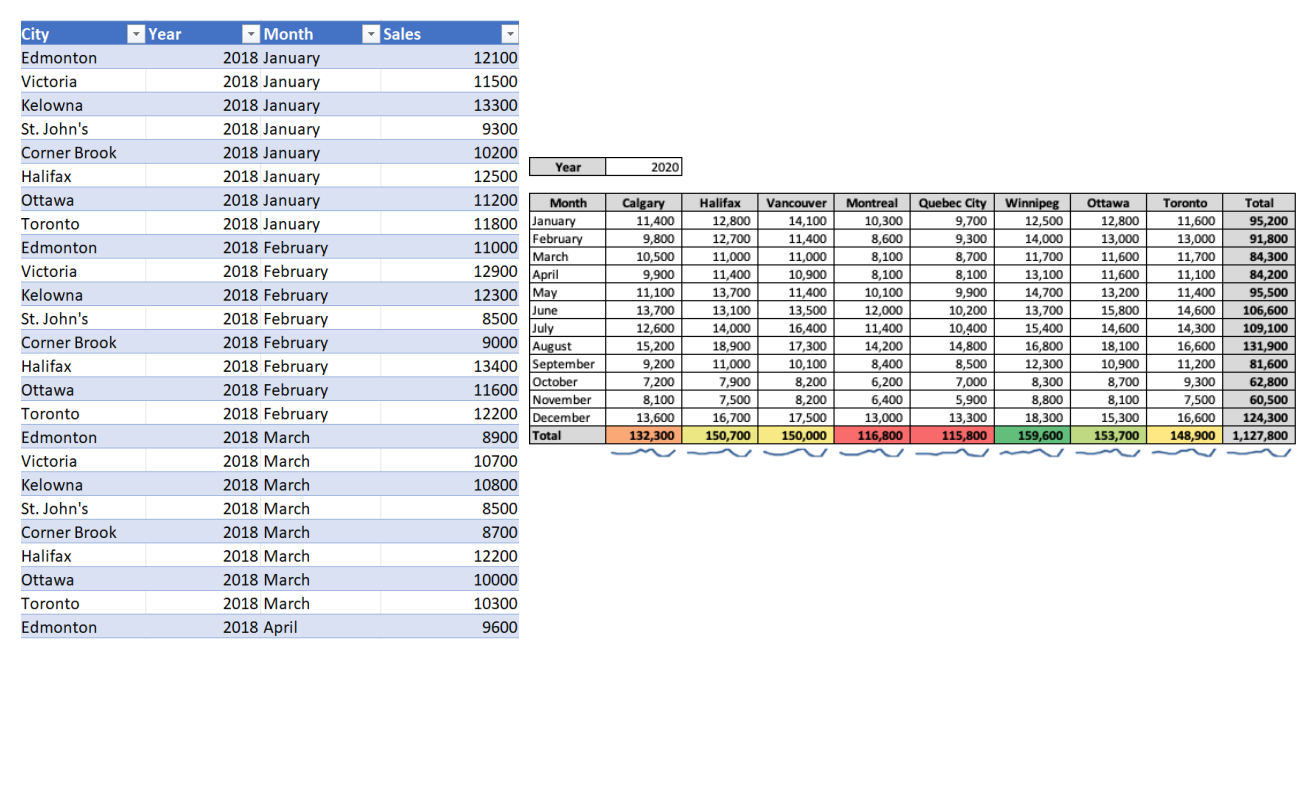
NO PIVOT TABLES, ONLY FORMULAS. Create a new worksheet called RDASHBOARD and create a dashboard based on the SALES table that resembles the template shown in Appendix A image on the right with each city in the dataset represented. As shown in Appendix A the dashboard will show the monthly sales for a given city and month based
on the year specified in the top left portion of the dashboard. The year must be a dropdown that
allows the user to select any year in the data set, and the sales amounts must dynamically recalculate when year is selected. All amounts must be formatted with commas and no decimal places.
Step by Step Solution
There are 3 Steps involved in it
1 Expert Approved Answer
Step: 1 Unlock

Question Has Been Solved by an Expert!
Get step-by-step solutions from verified subject matter experts
Step: 2 Unlock
Step: 3 Unlock
 Study Help