







Question: 1 . Create a 6 - Bit Ripple Carry Adder Module called Adder 6 : a . What inputs, outputs, and wires would you
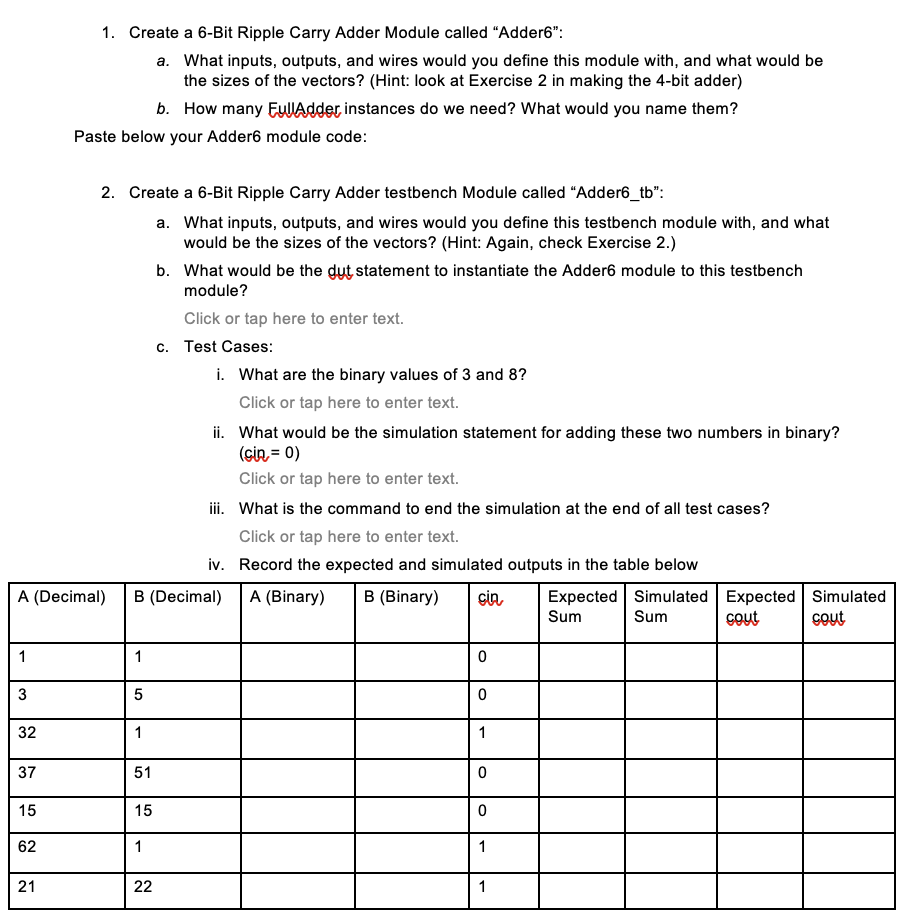
Create a Bit Ripple Carry Adder Module called "Adder:
a What inputs, outputs, and wires would you define this module with, and what would be the sizes of the vectors? Hint: look at Exercise in making the bit adder
b How many EullAdder instances do we need? What would you name them?
Paste below your Adder module code:
Create a Bit Ripple Carry Adder testbench Module called "Addertb:
a What inputs, outputs, and wires would you define this testbench module with, and what would be the sizes of the vectors? Hint: Again, check Exercise
b What would be the dut statement to instantiate the Adder module to this testbench module?
Click or tap here to enter text.
c Test Cases:
i What are the binary values of and
Click or tap here to enter text.
ii What would be the simulation statement for adding these two numbers in binary? mathrmsin
Click or tap here to enter text.
iii. What is the command to end the simulation at the end of all test cases?
Click or tap here to enter text.
iv Record the expected and simulated outputs in the table below
begintabularlllllllll
hline A Decimal & B Decimal & A Binary & B Binary & cin & begintabularl
Expected
Sum
endtabular & begintabularl
Simulated
Sum
endtabular & begintabularl
Expected
cout
endtabular & begintabularl
Simulated
cout
endtabular
hline & & & & & & & &
hline & & & & & & & &
hline & & & & & & & &
hline & & & & & & & &
hline & & & & & & & &
hline & & & & & & & &
hline & & & & & & & &
hline
endtabular v Paste below your testbench module code below using the test cases from the table above:
vi Paste a screenshot of your simulation waveforms for all input combinations:
Step by Step Solution
There are 3 Steps involved in it
1 Expert Approved Answer
Step: 1 Unlock

Question Has Been Solved by an Expert!
Get step-by-step solutions from verified subject matter experts
Step: 2 Unlock
Step: 3 Unlock
 Study Help